

Clock Widget for Apple Watch
Ibrahim Poyraz · Utilities
Independent analytics for this App Store listing. AppTracker is not affiliated with Ibrahim Poyraz.
Chart standing · US
What changed · US
Listing changes AppTracker has observed for this app in this storefront — new versions, price moves, rating shifts, and store copy.
• Cities sync to your Apple Watch more reliably, including when the watch app is installed after you've set up your list. • City search no longer offers a city that's already on your list, or the same city twice. • Version number now shown at the bottom of the iPhone app. • Minor fixes and improvements.
Price & rating history · US
Reconstructed from the listing changes AppTracker has observed in this storefront. A field is charted once it has changed more than once, and each line starts at the value it moved from.
Average rating · ★ 5.00 now · 3 changes on record
In-app purchases · US
No in-app purchases.
Screenshots



Keywords this app targets
Search terms AppTracker associates with this app — estimates, not search volume. ❝ = in the app's title; a highlighted number is its current position for that term.
Similar apps
Competitors and close alternatives, as estimated by AppTracker.





About
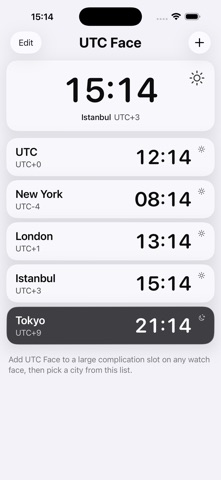
UTC Face: World Clock puts a city's time on your Apple Watch face in type large enough to read at a glance. The built-in world clock complication is small. This one uses the whole slot: the city's three-letter code, its UTC offset, and the time — in the same large, rounded, monospaced face as your watch's own clock. HOW IT WORKS • Edit your watch face and add UTC Face to a large rectangular complication slot — Modular Duo, Modular, Infograph Modular, or any face with one. • Tap the slot again to choose which city it shows. • Put a second one in the other slot for a different city. YOUR CITY LIST • Manage your cities in the iPhone app: add, remove, reorder. • Changes sync to your watch automatically. • 50 built-in cities covering every major time zone, available offline. • Unlimited online search for anywhere else. • UTC is always there. ACCURATE • Updates on the minute, aligned to the minute boundary — no drift. • Daylight saving changes are handled automatically for every city. PRIVATE • No accounts, no analytics, no ads. • Your city list stays on your devices. There is no server. Requires iOS 26 and watchOS 26.
What's new · 1.0.5
• Cities sync to your Apple Watch more reliably, including when the watch app is installed after you've set up your list. • City search no longer offers a city that's already on your list, or the same city twice. • Version number now shown at the bottom of the iPhone app. • Minor fixes and improvements.
Details