

Runline - Coding Anywhere
Rethinking.Studio · Developer Tools
Independent analytics for this App Store listing. AppTracker is not affiliated with Rethinking.Studio.
Chart standing · US
What changed · US
Listing changes AppTracker has observed for this app in this storefront — new versions, price moves, rating shifts, and store copy.
· Usage page: how much of your Claude and Codex plans is left, and what your API keys have cost, checked by your computer and shown at a glance. · See which files each turn changed, and open any of them as a diff with the changed words highlighted. · Control your computer's screen from the phone: tap, drag, scroll and type. With baguette installed on the computer, watch and drive iOS simulators directly. · Sessions you've opened before load instantly; search the session list by what was said, and find within a session. · Replies now stream in smoothly instead of in bursts. · Unsent messages are never lost: they're sent again automatically, even after closing the app. · Send shared content straight to an agent from the share sheet, and choose whether to keep it. · Settings shows which coding agents each computer has, and their versions. · Linux support: install Runline Host on a server and scan to pair. · Select part of a message to copy. · Some new features need Runline 3.5 on your computer.
Ratings breakdown · US
The star breakdown behind this app's rating in this storefront.
Screenshots



About
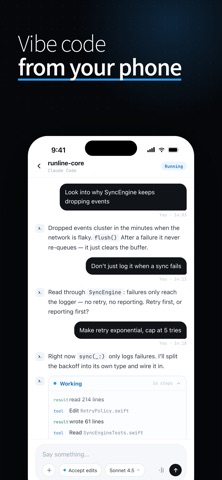
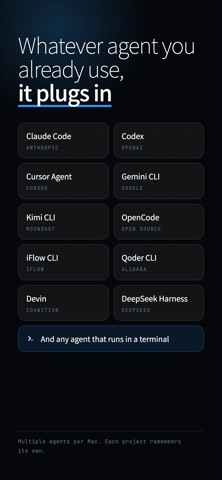
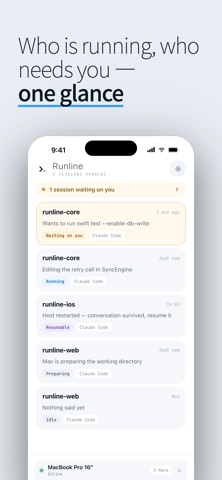
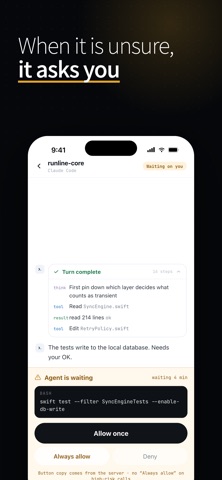
Runline connects the AI coding agents running on your Mac — Claude Code, Codex, Kimi Code and more — to your iPhone: assign work, answer questions and watch progress without being at the computer. It runs, you walk away Start a session on your Mac, close the lid, leave. The task keeps running on your own machine while your phone streams every step. One sentence is one task "Make the retry exponential, five attempts max" — send it and the agent takes it from there. Voice input works too, and you can switch models and permission modes from the phone. It asks, you answer on the phone When the agent needs approval or wants you to pick between proposals, the notification carries the options. One tap and the turn resumes. The Dynamic Island shows the live session state and the tool currently running. See exactly what changed Every turn ends with a summary, and each tool call can be inspected. Read first, then decide whether it continues. Your code never leaves your Mac Repositories and files stay on your own machine; Runline relays session messages only. Permissions are controlled on the Mac, and a lost phone can be revoked there at any time. Requires the free Runline Mac app (runline.rethinking.art). No accounts — pairing is one QR scan. Terms of Service: https://runline.rethinking.art/terms Privacy Policy: https://runline.rethinking.art/privacy
What's new · 2.3.1
· Usage page: how much of your Claude and Codex plans is left, and what your API keys have cost, checked by your computer and shown at a glance. · See which files each turn changed, and open any of them as a diff with the changed words highlighted. · Control your computer's screen from the phone: tap, drag, scroll and type. With baguette installed on the computer, watch and drive iOS simulators directly. · Sessions you've opened before load instantly; search the session list by what was said, and find within a session. · Replies now stream in smoothly instead of in bursts. · Unsent messages are never lost: they're sent again automatically, even after closing the app. · Send shared content straight to an agent from the share sheet, and choose whether to keep it. · Settings shows which coding agents each computer has, and their versions. · Linux support: install Runline Host on a server and scan to pair. · Select part of a message to copy. · Some new features need Runline 3.5 on your computer.
Details