

Network Analyzer & WiFi Tools
EMRE KOTUN · Utilities
Independent analytics for this App Store listing. AppTracker is not affiliated with EMRE KOTUN.
Chart standing · US
What changed · US
Listing changes AppTracker has observed for this app in this storefront — new versions, price moves, rating shifts, and store copy.
• New: try every advanced tool each day for free • New: monthly, yearly (7-day free trial) and lifetime plans with fairer regional pricing • New: 4 more languages — Italian, Korean, Simplified Chinese, Turkish • Faster, smoother scanning and a refreshed paywall • Bug fixes and polish
Screenshots


About
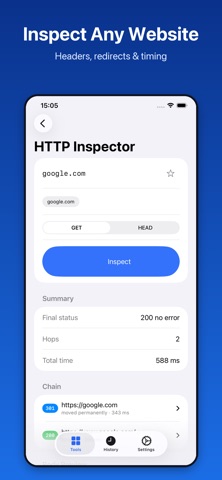
Network Analyzer is a complete network toolkit for iPhone and iPad. Diagnose Wi-Fi problems, map the devices on your LAN, and inspect hosts and services — all from one fast, native app. EVERY TOOL YOU NEED • LAN Scanner — discover every device on your local network with IP, hostname and Bonjour services • Port Scanner — check open ports with common presets or a custom range • Ping — continuous latency monitoring with live chart, jitter and packet loss • Traceroute — hop-by-hop path analysis to any host • Speed Test — download, upload and latency measurement • DNS Lookup — A, AAAA, CNAME, MX, NS and TXT records • Reverse DNS — resolve an IP back to its hostname • WHOIS — domain registration and ownership data • TLS Certificate Inspector — issuer, validity dates, SANs and the full chain • HTTP Inspector — status codes, headers, redirect chain and timing • Public IP — your external address with reverse DNS and NAT detection • Network Info — SSID, local IP, gateway, netmask and interface details • Subnet Calculator — CIDR ranges, usable hosts and broadcast address • Wake-on-LAN — power on your machines with a magic packet • Home Screen Widget — your current network at a glance BUILT FOR PRIVACY Everything runs on your device. No account. No ads. No analytics. No third-party tracking. History and favourites stay in local storage and never leave your iPhone. MADE FOR iOS Native SwiftUI throughout. Dark Mode, Dynamic Type, VoiceOver and iPad multitasking are supported from day one. History and recents make repeat diagnostics one tap away. NOTE Only scan networks you own or are authorized to test. LAN and Bonjour features require the Local Network permission. Location permission is used solely to read the Wi-Fi network name and is never stored or transmitted. PREMIUM Core tools are free, and you can try every advanced tool each day. Upgrade for unlimited LAN Scanner, Port Scanner, Traceroute, Speed Test, WHOIS, TLS and HTTP inspectors. Choose monthly, yearly (7-day free trial) or lifetime. Payment is charged to your Apple Account at confirmation. Subscriptions renew automatically unless cancelled at least 24 hours before the end of the period. Manage or cancel any time in Settings > Apple Account > Subscriptions. Terms of Use: https://www.apple.com/legal/internet-services/itunes/dev/stdeula/ Privacy Policy: https://emrekotun.github.io/network-analyzer/privacy https://emrekotun.github.io/network-analyzer/support
What's new · 1.2
• New: try every advanced tool each day for free • New: monthly, yearly (7-day free trial) and lifetime plans with fairer regional pricing • New: 4 more languages — Italian, Korean, Simplified Chinese, Turkish • Faster, smoother scanning and a refreshed paywall • Bug fixes and polish
Details