

Measure Ruler: AR Tape & Level
EMRE KOTUN · Utilities
Independent analytics for this App Store listing. AppTracker is not affiliated with EMRE KOTUN.
Chart standing · US
What changed · US
Listing changes AppTracker has observed for this app in this storefront — new versions, price moves, rating shifts, and store copy.
Try Premium free for 3 days — new Weekly, Yearly and Lifetime plans with a redesigned paywall. Now available in 11 languages (added Italian, Korean, Turkish and Chinese). Polish and stability improvements.
Ratings breakdown · US
The star breakdown behind this app's rating in this storefront.
In-app purchases · US
What this app sells inside itself, grouped by kind and priced for this storefront.
Screenshots


About
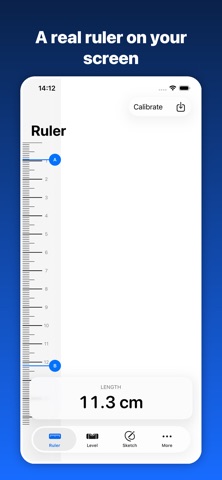
Measure Ruler turns your iPhone into a full toolbox. Nine measuring tools in one app — no ads, no account, no internet required. AR TAPE MEASURE Point the camera and tap two points to get an instant distance. Chain points to measure a whole wall, or close the loop to get area and perimeter of a floor, window or table. A crosshair, live readout and haptic feedback keep every tap precise. ON-SCREEN RULER A real ruler on your display, millimeter-accurate after a one-time card calibration. Calibrate once with any standard bank or ID card and the app remembers your exact screen scale. Perfect for small parts, screws, photos and cables. BUBBLE LEVEL Check any surface for level or plumb. Large readout, calibration for your device, optional sound cue and haptics when you hit zero. PROTRACTOR Measure real angles by tilting your phone against a surface. Great for miter cuts, furniture assembly and DIY layouts. MAGNETIC FIELD METER Detect ferrous metal and magnetic fields behind a surface using the magnetic field sensor. RANGEFINDER Estimate the distance to an object using the camera to find a surface under the crosshair — useful when the object is out of arm's reach. UNIT CONVERTER Convert instantly between millimeters, centimeters, meters, inches and feet-and-inches. Every tool respects the unit you choose. SKETCH PAD Draw a quick room or part diagram and drop your measured values onto it. Save, edit and export the sketch as a PDF. HISTORY & SHARING Every measurement can be saved with a label and reopened later. Export a clean share card or send values straight to Messages, Mail and Notes. BUILT FOR iOS - Native SwiftUI, fast and light - Dark Mode, Dynamic Type and full VoiceOver support - Metric and imperial, with a manual unit override - Works fully offline - Available in 11 languages: English, German, Spanish, French, Italian, Japanese, Korean, Portuguese, Russian, Turkish and Chinese FREE & PREMIUM Ruler, level, protractor, magnetic field meter and converter are free. Premium unlocks AR Measure, Rangefinder, unlimited sketches and CSV/PDF export. Start with a 3-day free trial, then choose weekly, yearly or lifetime access. Subscriptions renew automatically unless cancelled at least 24 hours before the end of the current period. Payment is charged to your Apple ID. Manage or cancel anytime in Settings > Apple ID > Subscriptions. PRIVACY FIRST We collect nothing. No analytics, no trackers, no accounts. Camera frames are processed live on device and never saved or uploaded. Your measurements stay on your iPhone. A NOTE ON ACCURACY AR and sensor measurements are estimates and depend on lighting, surface texture and device calibration. Use them for planning and everyday tasks, not for work that requires certified precision. Questions or ideas? Reach us at https://ktnapps.com/measure-ruler/support Terms of Use: https://www.apple.com/legal/internet-services/itunes/dev/stdeula/ Privacy Policy: https://ktnapps.com/measure-ruler/privacy
What's new · 1.2
Try Premium free for 3 days — new Weekly, Yearly and Lifetime plans with a redesigned paywall. Now available in 11 languages (added Italian, Korean, Turkish and Chinese). Polish and stability improvements.
Details