

ZeroSpin
Gary Leonel Guaman Toasa · Utilities
Independent analytics for this App Store listing. AppTracker is not affiliated with Gary Leonel Guaman Toasa.
Chart standing · US
What changed · US
Listing changes AppTracker has observed for this app in this storefront — new versions, price moves, rating shifts, and store copy.
HANDWRITTEN NOTES Notebooks to write and draw in: pen, highlighter, eraser and lasso, ten kinds of paper, images and pages. Hold still at the end of a stroke and it becomes the shape it looked like. You can also type with the keyboard, in text boxes you can move and resize. Notes export to PDF. EDIT AND SIGN PDFS Open a PDF and write on it, sign it by hand, add text or cover what should not be there. Scan paper with the camera, bring in pages from another PDF, and duplicate, move or delete them. The result is still a regular PDF that any reader opens. TERMINAL WIDGETS A button for each of your computers on the Home Screen: tap it and its terminal opens. GITHUB, NOW FOR WRITING TOO Edit a file in a repository and send it as a commit, to the same branch or to a new one with its pull request. If the repository is not yours, the app forks it for you. Create, rename and delete files, start branches, and review pull requests without leaving the app: the changes, the conversation, approving and merging.
Screenshots



About
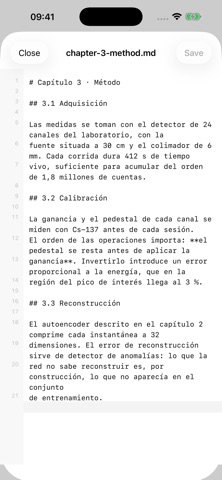
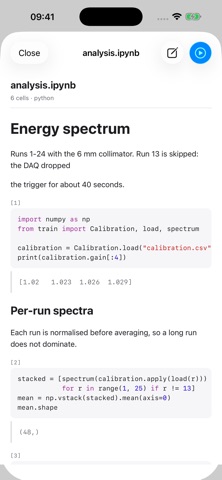
ZeroSpin is a file manager for iPad with the layout you already know from the desktop: columns, list or icons, a sidebar with your locations, and independent windows. BROWSING · Column, list and icon views, with adjustable width. · A sidebar holding your folders, your clouds and your external drives. · Sort by name, size, date or kind. · Search within the folder you have open. OPENING AND EDITING · A code editor with line numbers, syntax highlighting and a monospaced typeface, for scripts and configuration files. Saves in place. · Jupyter notebooks with their cells, their Markdown and their output — and now editable cell by cell, keeping the plots and the results. · Draw on an image and save the result. · Preview for documents, spreadsheets and presentations. · Every file opens in its own window, not in a tab trapped inside the main one. ORGANISING · Copy, move, duplicate, rename, compress and unzip. · A trash you can restore from: deleted items go back where they came from. · Drag and drop both ways, with any other app on the iPad. RUN IT ON YOUR COMPUTER The iPad cannot run a notebook or a script: there is no interpreter and no just-in-time compilation. Your computer can. With BosonCode installed — the app by the same developer that connects the iPad to your machines — ZeroSpin adds "Run in BosonCode" to any .ipynb, .py, .sh or .jl. You pick which machine, the file goes up and opens there, with its GPU and its interpreters. ZeroSpin sees the machines you have already added, so nothing is configured twice. Without BosonCode, ZeroSpin works the same for everything else. YOUR COMPUTERS, INSIDE ZEROSPIN Install the project's free and open-source script on your own Linux or Mac, add that computer in the app, and its folders sit next to yours. · Browse its files in columns, the same as the ones on your tablet. · Open and edit them; saving sends them back to the machine. · A terminal on any folder, in its own window. · Drag files between the tablet and the computer, both ways. It all travels over your private Tailscale network: your computer is never exposed to the internet, and there are no servers in between. The script is free. There is nothing to buy to use any of this. WHAT BOSONCODE ADDS Your tablet cannot run a notebook or a script — no interpreter, no just-in-time compilation. Your computer can. BosonCode, by the same developer, opens any file in the full code editor on your machine: syntax highlighting, extensions, and Jupyter notebooks that actually run, with its GPU and its interpreters. It uses the same computers you already added here, so nothing is configured twice. Without it, everything above still works. NO ACCOUNTS, NO TRACKING No sign-up, no analytics, no th your folders is requested one at a time through the system picker, and ZeroSpin never enumerates files you have not granted.
What's new · 1.5.0
HANDWRITTEN NOTES Notebooks to write and draw in: pen, highlighter, eraser and lasso, ten kinds of paper, images and pages. Hold still at the end of a stroke and it becomes the shape it looked like. You can also type with the keyboard, in text boxes you can move and resize. Notes export to PDF. EDIT AND SIGN PDFS Open a PDF and write on it, sign it by hand, add text or cover what should not be there. Scan paper with the camera, bring in pages from another PDF, and duplicate, move or delete them. The result is still a regular PDF that any reader opens. TERMINAL WIDGETS A button for each of your computers on the Home Screen: tap it and its terminal opens. GITHUB, NOW FOR WRITING TOO Edit a file in a repository and send it as a commit, to the same branch or to a new one with its pull request. If the repository is not yours, the app forks it for you. Create, rename and delete files, start branches, and review pull requests without leaving the app: the changes, the conversation, approving and merging.
Details