

SizeCap: Compress Video to MB
正平 孙 · Photo & Video
Independent analytics for this App Store listing. AppTracker is not affiliated with 正平 孙.
Chart standing · US
What changed · US
Listing changes AppTracker has observed for this app in this storefront — new versions, price moves, rating shifts, and store copy.
HEVC two-pass encoding is now the default. The first pass analyzes the whole clip and the second spends the bytes where they matter, so the same file size looks better. H.264 stays available as Compatibility First. One tap now sets the cap for email, Discord, WhatsApp or Teams, using limits checked against each platform's official help pages. The result screen shows where the file can go. SizeCap Pro is a one-time purchase that compresses up to 50 videos in one run. Single videos stay free with every quality feature. The audio bitrate now follows the source, HEVC keeps the original resolution longer, and a cap that came out underused gets a second pass.
In-app purchases · US
No in-app purchases.
Screenshots



About
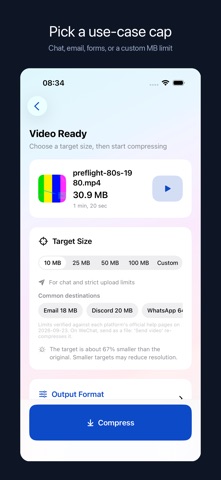
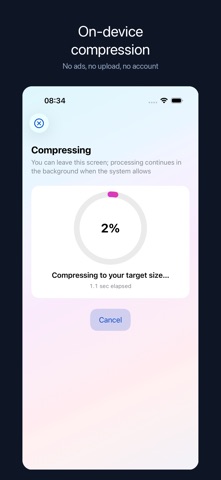
SizeCap compresses a video to a file size you choose, and checks the real bytes before calling it done. Pick a video, set a cap (10, 25, 50, or 100 MB, or type your own), and SizeCap works out the bitrate from your number. After compressing, it reads the finished file's actual size. If the file is under your cap, you get it. If your cap is too small for the clip's length, it tells you the smallest size that would work, instead of handing you a file that still fails to upload. NEW IN 1.7 • HEVC two-pass encoding by default. The first pass analyzes the whole clip and the second spends the bytes where they matter, which makes the same file size look better than single-pass H.264. H.264 stays available as Compatibility First for older players. • Common destinations. One tap sets the cap for email (18 MB, because mail counts the encoded size), Discord (20 MB), WhatsApp (64 MB) or Teams (100 MB). The limits were checked against each platform's official help pages on 2026-09-23, and the result screen tells you where the file can go. • SizeCap Pro. Compress up to 50 videos in one run, each verified under the same cap. One-time purchase, no subscription. Single videos stay free, with every quality feature included. • Tip for WeChat: send the result as a file. "Send video" re-compresses it. WHAT IT DOES • Compresses one video for free, or up to 50 in one run with Pro, each one under the size you set • Shows the original size, the result size, and the time it took • Imports from Photos, Files, or the iOS share sheet • Automatic output uses HEVC with two-pass encoding; Compatibility First uses H.264 • Keeps HDR clips in HEVC Main 10 with HDR color information • Preserves separate audio tracks, or removes every audio track when you want silence • Queues share-sheet videos safely, then imports them when you open SizeCap to review settings • Restores the current task after relaunch, keeping finished results and restarting interrupted items • Pauses the batch when storage is low so you can free space and continue without redoing finished items • Shows source names when available and lets you remove individual videos before a batch starts • Lowers resolution before quality collapses when a small cap calls for it • Saves to your photo library or hands the file to the share sheet • Lets you keep or remove the capture date on compressed copies; location is not copied • On iOS 26, a user-started compression can continue in the background with system progress • Cancel any time; completed batch results stay available • Leaves your original video untouched WHY A NUMBER, NOT A SLIDER Email attachments, course platforms, and upload forms reject files by size. A quality slider makes you guess and re-export until something fits. SizeCap starts from the limit and does the math for you. YOUR VIDEO STAYS ON YOUR DEVICE Compression runs on your device. The app has no account and no network code of its own, and the privacy label on this page says no data collected. The only connection is the App Store's own purchase system. WHAT IT COSTS Single videos are free. There are no ads or watermarks, and you do not need an account. SizeCap Pro is a one-time purchase that adds batch runs of up to 50 videos, with no subscription. REQUIREMENTS iOS 17 or later. Runs on iPhone and iPad.
What's new · 1.7
HEVC two-pass encoding is now the default. The first pass analyzes the whole clip and the second spends the bytes where they matter, so the same file size looks better. H.264 stays available as Compatibility First. One tap now sets the cap for email, Discord, WhatsApp or Teams, using limits checked against each platform's official help pages. The result screen shows where the file can go. SizeCap Pro is a one-time purchase that compresses up to 50 videos in one run. Single videos stay free with every quality feature. The audio bitrate now follows the source, HEVC keeps the original resolution longer, and a cap that came out underused gets a second pass.
Details