

Pixel Workout: Gym Tracker
TCGSWAP LLC · Health & Fitness
Independent analytics for this App Store listing. AppTracker is not affiliated with TCGSWAP LLC.
Chart standing · US
What changed · US
Listing changes AppTracker has observed for this app in this storefront — new versions, price moves, rating shifts, and store copy.
A new reading typeface, real doors to your progress charts. • Clearer text: labels, numbers and body copy now use Atkinson Hyperlegible. Pixel titles stay. • Every screen fits at large accessibility text sizes and on narrow phones. • VIEW PROGRESS on every card and in the log sheet. Tap a chart point to see that day's sets. • The log sheet's LAST line shows every set from your previous session. • Close the sheet with the X or a pull down. The exercise page keeps its back button in reach. • Dates, weeks and reminders stay right across midnight, a new week, daylight saving and travel. • Restoring a damaged backup can't wipe your data, and the app recovers from a bad launch. • Deleting an exercise removes its history everywhere. Milestones celebrate once. • Closing the app during onboarding no longer skips it.
Screenshots



About
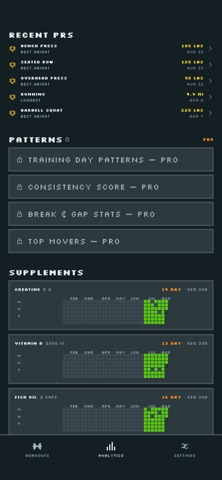
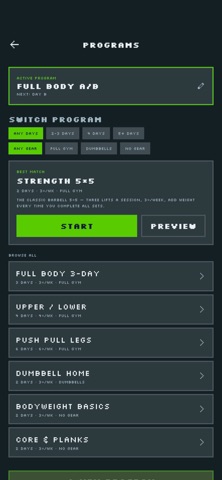
Pixel Workout is a free, offline workout tracker for iPhone that turns every training session into a pixel on a GitHub-style contribution grid. Log your sets, watch your year fill with color, and build a streak you can actually keep. THE YEAR GRID Every active day earns a pixel — colored by what you trained (push, pull, legs, cardio, core) and brighter the harder you worked. Your whole year of training on one screen. When it looks good, share it: one tap renders your grid as an image for the group chat. WEEKLY STREAKS THAT SURVIVE REST DAYS Pick a weekly goal you can keep — 3, 4, or 5 days. Rest days never break your streak; only a missed week does. Milestones at 2, 4, 8, 12, 26, and 52 weeks keep the long game interesting. FAST, FLEXIBLE LOGGING Sets and weight, timed holds, distance cardio, or a hundred bodyweight squats a day — log it how you train it. Steppers prefill from your last session, an in-app numpad keeps you off the keyboard, and a rest timer starts itself after weighted sets. TRAINING PROGRAMS WITH AUTO-PROGRESSION Eight ready-made plans — Full Body A/B, Push Pull Legs, Upper/Lower, classic 5x5 strength, bodyweight-only, dumbbell-only — or build your own in the editor. Targets progress automatically from what you actually lifted last time: hit the top of the range and the plan adds weight; fall short and it holds. PERSONAL RECORDS, DETECTED Heaviest set, estimated 1RM, best-day totals, longest hold, fastest pace - records fire the moment you log them, for every training style, with a gold flash to match. PROGRESS YOU CAN SEE Every exercise gets its own chart — topduration, or distance — drawn in chunkypixel lines that make the trend obvious at a glance, plus a per-exercise activity grid so consistency shows up lift by lift. SUPPLEMENT CHECKS One-tap daily checks for creatine and friends, tracked separately so rest days never touch your training grid. MADE FOR HOW YOU TRAIN Lifters chasing a 5x5, runners logging miles, calisthenics athletes counting daily push-ups, plank holders and stretchers — every training style erecords on equal terms. YOUR DATA IS YOURS No account. No cloud copy of your training. Workouts live on your iPhone with one-tap JSON backup, and the whole app works fully offline — log in ng. The app collects only anonymoususage statistics to help improve it; your training data is never uploaded. Free, with no ads and no subscriptions. Every workout is a pixel. Start filling
What's new · 1.1.2
A new reading typeface, real doors to your progress charts. • Clearer text: labels, numbers and body copy now use Atkinson Hyperlegible. Pixel titles stay. • Every screen fits at large accessibility text sizes and on narrow phones. • VIEW PROGRESS on every card and in the log sheet. Tap a chart point to see that day's sets. • The log sheet's LAST line shows every set from your previous session. • Close the sheet with the X or a pull down. The exercise page keeps its back button in reach. • Dates, weeks and reminders stay right across midnight, a new week, daylight saving and travel. • Restoring a damaged backup can't wipe your data, and the app recovers from a bad launch. • Deleting an exercise removes its history everywhere. Milestones celebrate once. • Closing the app during onboarding no longer skips it.
Details