

サブスク管理 月額いくら払ってる?
Kusama Yoshiki · Finance
Independent analytics for this App Store listing. AppTracker is not affiliated with Kusama Yoshiki.
Chart standing · US
What changed · US
Listing changes AppTracker has observed for this app in this storefront — new versions, price moves, rating shifts, and store copy.
A big update. - Review: rate how often you use each subscription and see what to cancel and how much you'd save. Record cancellations and watch the money saved add up - Widgets for the Home Screen and Lock Screen - A monthly calendar of billing dates - Colors and initials to tell subscriptions apart - Split plans (only your share is counted) and totals by payment method - Price change history - Tap a reminder to open that subscription - Now in English, with a choice of currency
Screenshots


About
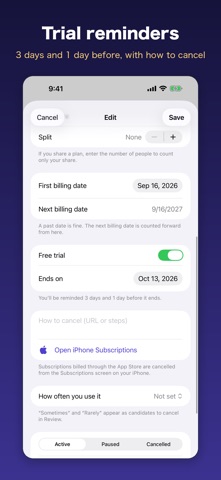
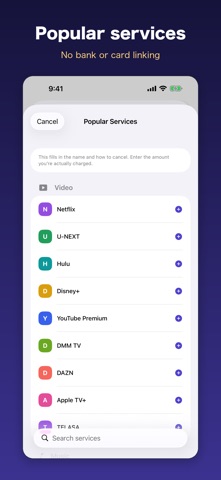
How much do you pay for subscriptions each month? Most people can't answer right away. Add what you're subscribed to and Subsuku shows your monthly total, your yearly total and what will actually leave your account in the next 30 days. Then it helps you find what you can drop. ■ Review and save Mark each subscription as used Often, Sometimes or Rarely. Subsuku lists what you could cancel and how much you'd save a year. When you cancel one, record it, and the charges you no longer pay add up as money saved. Only billing dates that actually pass are counted, so cancelling a yearly plan doesn't count as a month saved the next day. Change an amount after a price rise and the change is kept, so you can look back at what went up this year. ■ Know before a trial ends Enter when a trial ends and you'll be reminded 3 days and 1 day before, at 9 AM, while you can still decide. Keep a note of where to cancel (a URL or the steps). It's shown in the reminder, and tapping the reminder opens it. For subscriptions billed through the App Store, jump straight to the Subscriptions screen. ■ Monthly total and the next 30 days are different Weekly, monthly, every 3 months, every 6 months or yearly: everything is converted to a monthly figure. The next 30 days are shown separately, because a yearly renewal can make one month far more expensive than another. ■ Calendar and upcoming charges Billing dates move forward automatically from the first billing date. Month-end dates come back to the 31st. Home lists your upcoming charges in order, and the calendar shows which days of the month are busy. ■ Widgets Put your next charge and your 30-day total on the Home Screen or Lock Screen. When a trial is about to end, it shows that first. ■ Pause, split and tell them apart Not sure if you cancelled something? Pause it to keep it out of your totals without deleting it. Sharing a family plan? Enter the number of people and only your share is counted. Add a payment method to see totals by card. Each subscription gets a color and an initial or emoji. ■ No bank or card linking Nothing is read from your bank or card. Everything you enter stays on your device and is never sent anywhere. Choose your currency in Settings. Amounts are not converted. ■ Premium (one-time purchase) The free version holds up to 5 subscriptions (cancelled ones don't count). Premium removes the limit and the ads. It's a one-time purchase with no monthly fee, because a subscription tracker shouldn't be another subscription.
What's new · 2.0
A big update. - Review: rate how often you use each subscription and see what to cancel and how much you'd save. Record cancellations and watch the money saved add up - Widgets for the Home Screen and Lock Screen - A monthly calendar of billing dates - Colors and initials to tell subscriptions apart - Split plans (only your share is counted) and totals by payment method - Price change history - Tap a reminder to open that subscription - Now in English, with a choice of currency
Details