

Accent - Selective Color
AKIRA SANO · Photo & Video
Independent analytics for this App Store listing. AppTracker is not affiliated with AKIRA SANO.
Chart standing · US
What changed · US
Listing changes AppTracker has observed for this app in this storefront — new versions, price moves, rating shifts, and store copy.
• Added native iPad support • Added a two-pane editing layout in iPad landscape mode • Optimized the Editor and Export screens for larger iPad displays • Layouts now adapt automatically to the available window width, including Split View • The existing iPhone experience remains unchanged
In-app purchases · US
What this app sells inside itself, grouped by kind and priced for this storefront.
Screenshots

Keywords this app targets
Search terms AppTracker associates with this app — estimates, not search volume. ❝ = in the app's title; a highlighted number is its current position for that term.
Similar apps
Competitors and close alternatives, as estimated by AppTracker.
 Color Control
handyCloset Inc.
1 shared topic · 1 shared title word
Color Control
handyCloset Inc.
1 shared topic · 1 shared title word
 Color Splash
Pocket Pixels Inc.
1 shared topic · 1 shared title word
Color Splash
Pocket Pixels Inc.
1 shared topic · 1 shared title word
 Depello - color splash photos
Northmind AB
1 shared topic · 1 shared title word
Depello - color splash photos
Northmind AB
1 shared topic · 1 shared title word
 Auto Colorize Pro
Leszek Szary
1 shared topic
Auto Colorize Pro
Leszek Szary
1 shared topic
 Color Picker Pro +
EyeOS Store Inc.
1 shared title word
Color Picker Pro +
EyeOS Store Inc.
1 shared title word
 ACDSee Pro
ACD Systems International Inc.
1 shared topic
ACDSee Pro
ACD Systems International Inc.
1 shared topic
 Color Picker App
Multicore Technologies
1 shared title word
Color Picker App
Multicore Technologies
1 shared title word
 Colordrop: Color Picker
George Jones
1 shared title word
Colordrop: Color Picker
George Jones
1 shared title word
About
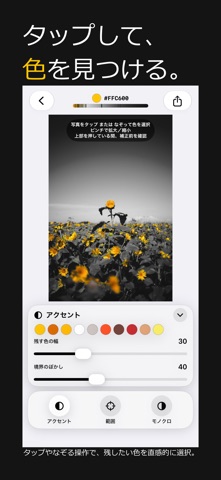
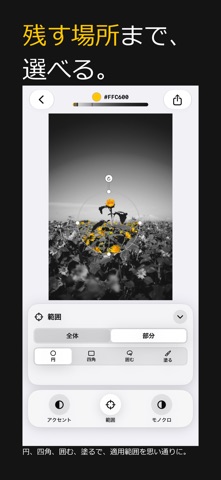
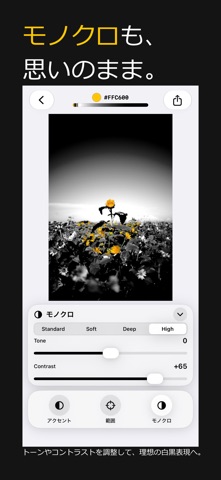
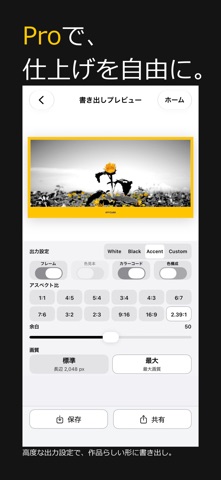
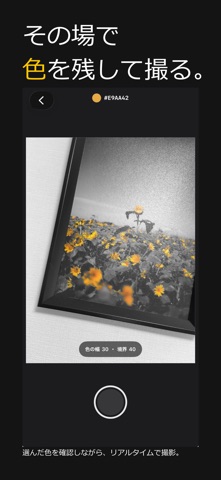
Is there a color in your photo you want to keep? Accent is a photo app that keeps the color you choose while turning everything else monochrome. Choose a photo and edit it. Or choose a color and capture it on the spot. Simply tap or drag across a photo to select a color. Adjust the color range and edge softness, and limit the effect to the entire image or just a specific area when needed. With Accent Live, you can select the color you want to keep while viewing the camera preview in real time. See the selective-color effect before you shoot, then continue refining the photo directly in Accent. Remove color to discover the color that matters. Key Features ・Select an accent color by tapping or dragging ・Adjust color range and edge softness ・Apply the effect globally or to selected areas ・Define areas with circles, rectangles, freehand selections, or brushes ・Reuse recently used colors ・Fine-tune monochrome tone and contrast ・Choose white, black, and other frame styles ・Display color swatches, HEX codes, and color composition ・Export in a variety of aspect ratios ・Save and share your photos Accent Live Apply selective color to the camera preview in real time and capture the look as you see it. The real-time preview is free to use. Photo capture is unlocked with a one-time Accent Live purchase. Accent Pro A one-time Accent Pro purchase unlocks additional aspect ratios, frame margin controls, and Max resolution export. Accent Live and Accent Pro are separate one-time purchases. The free version includes the core photo editing and export features. No watermark.
What's new · 2.3.0
• Added native iPad support • Added a two-pane editing layout in iPad landscape mode • Optimized the Editor and Export screens for larger iPad displays • Layouts now adapt automatically to the available window width, including Split View • The existing iPhone experience remains unchanged
Details