

ForgeShape: 3D Print Repair
Shanghai Fuwei Information Technology Co., Ltd. · Graphics & Design
Independent analytics for this App Store listing. AppTracker is not affiliated with Shanghai Fuwei Information Technology Co., Ltd.
Chart standing · US
What changed · US
Listing changes AppTracker has observed for this app in this storefront — new versions, price moves, rating shifts, and store copy.
- Reverse to CAD is now separate from format conversion. After import, choose 3D print check and repair, convert format, or rebuild a mesh as CAD. - Better reverse reconstruction: cones and spheres are now recognized; cylinders are more accurate; partial surfaces such as half-cylinders follow the real outline; neighboring holes on a plane are kept. - 3D print repair is more complete: merge part seams, remove extra inner walls, and fill holes more reliably. - Format conversion names each limit and what it means for the exported file, so you can tell whether the result will work. - Keyboard shortcuts on Mac and on iPad with a hardware keyboard: Open ⌘O, Export ⌘E, Export PDF report ⌘⇧E, Repair ⌘R. - Easier touch: buttons and format options are easier to tap, the splitter is easier to drag, tap a repair for details; a numeric keyboard appears when you edit check thresholds.
In-app purchases · US
What this app sells inside itself, grouped by kind and priced for this storefront.
Screenshots



About
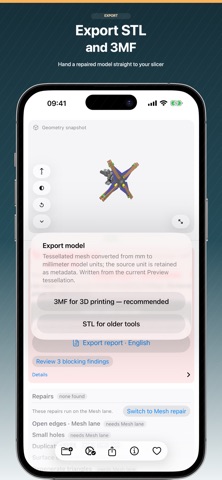
A print fails and the model still looks fine on screen. ForgeShape opens STL, STEP, IGES, OBJ, GLB and 3MF models on your device, finds what blocks printing — open edges, wrong normals, thin walls, overhangs — repairs it, and exports STL or 3MF for your slicer. It also converts between CAD and mesh formats. Nothing is ever uploaded. Key features: - Import STEP (.step/.stp), IGES (.iges/.igs), STL, OBJ, binary GLB and 3MF models, all parsed on device - Automatic detection: open edges, non-manifold edges, self-intersection (up to 500k triangles), surface orientation, duplicate faces, degenerate triangles, wall thickness, overhang, units and size - Each body is classified as a solid candidate or an open shell; closed manifold models report a measured volume - Guided repairs: weld and stitch boundaries, fix surface orientation, remove duplicate faces, fill small holes, remove degenerate triangles, or run them all in sequence - Repairs apply in one step, then show before/after; deep repair previews, escalates tolerance until the model closes and reports how far geometry moved - Pick a finding to highlight the affected edges and faces, or let the camera turn to frame it on the far side of the model - Inspect it your way: shaded, wireframe or both, Y-up and Z-up conventions, focus on any surface point, and level of detail that keeps large meshes responsive - Select a face to measure planar width, height and area, or cylinder radius, in source units - Fit the model to a print-size profile with one uniform scale, then recheck automatically - Three jobs: print to STL or 3MF; convert to OBJ, GLB, STL, 3MF or faceted STEP; Reverse to CAD to STEP - Source colors are read and shown: OBJ materials, 3MF color groups and baked textures, GLB base colors; on export only GLB carries color - Reverse to CAD for meshes: planar, cylindrical, conical and spherical faces become analytic STEP geometry; precise CAD sources are not reversed - Honest reports: every check names its mesh-snapshot evidence and lists what remains unresolved - Export the check as a PDF, HTML or JSON report in four languages, with marked-up model figures and close-ups of located findings For 3D-printing users, engineers converting between STEP/IGES and mesh formats, makers fixing scanned or downloaded models, and teams delivering in multiple formats. Common questions: - Is ForgeShape a slicer? No. It handles the step before slicing — checking and repairing the model — and does not generate G-code. - Can it repair every broken model? No. Issues beyond the supported scope — non-manifold edges, large openings — are labelled as not automatically repairable. Deep repair closes more models, but states how much the shape changed. - Does Reverse to CAD recover the full design? Unrecognized regions stay mesh; the STEP has no feature history and is not guaranteed machinable. - Are models uploaded to a server? Never. Import, checking, repair, measurement and export all happen on device. No account, no cloud, and you choose where files are saved. Pricing & Access - Free: import and view every format, run every check, apply every repair, read every finding, and export the report. - Pro subscription: export and save your model — repaired, converted or reversed to CAD. Weekly, monthly or annual, active on Mac, iPhone, iPad and Vision Pro with the same Apple Account. - Payment is charged to your App Store account. Subscriptions renew automatically unless auto-renew is turned off at least 24 hours before the current period ends. - Manage or cancel subscriptions in your App Store account settings. Privacy & Terms - Subscriptions, refunds and restores are handled by Apple through your App Store account. - Privacy Policy: https://apps.h53d.xyz/apps/forgeshape/policy.html - Terms of Use (EULA): https://www.apple.com/legal/internet-services/itunes/dev/stdeula/ Help or feedback? Email iuway@foowei.com or visit https://apps.h53d.xyz/apps/forgeshape/support.html.
What's new · 26.09.22
- Reverse to CAD is now separate from format conversion. After import, choose 3D print check and repair, convert format, or rebuild a mesh as CAD. - Better reverse reconstruction: cones and spheres are now recognized; cylinders are more accurate; partial surfaces such as half-cylinders follow the real outline; neighboring holes on a plane are kept. - 3D print repair is more complete: merge part seams, remove extra inner walls, and fill holes more reliably. - Format conversion names each limit and what it means for the exported file, so you can tell whether the result will work. - Keyboard shortcuts on Mac and on iPad with a hardware keyboard: Open ⌘O, Export ⌘E, Export PDF report ⌘⇧E, Repair ⌘R. - Easier touch: buttons and format options are easier to tap, the splitter is easier to drag, tap a repair for details; a numeric keyboard appears when you edit check thresholds.
Details