

FrankenOCR
Jeffrey Emanuel · Productivity
Independent analytics for this App Store listing. AppTracker is not affiliated with Jeffrey Emanuel.
Chart standing · US
Screenshots

About
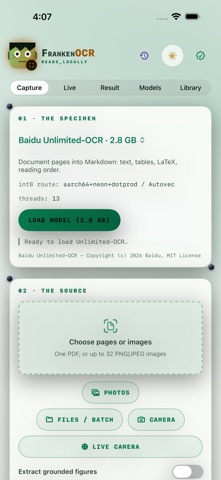
Extract text from an image or scanned PDF without uploading the document. FrankenOCR uses the same pure-Rust Unlimited-OCR engine as the FrankenOCR command-line project. Choose a photo, file, camera capture, tall scrolling screenshot, or scanned PDF. The app reads the input in memory and produces structured Markdown on the device. The flagship recognition path uses a downloaded, verified Baidu Unlimited-OCR model for careful document extraction. Tall screenshots are divided with overlap-aware smart cuts, while PDF pages are processed as a document and low-yield pages are called out instead of silently disappearing. Live Camera mode uses Apple's on-device Vision text recognition for speed. It is less accurate than the flagship FrankenOCR model, and the app labels that tradeoff clearly. Recognized words flow from their camera positions into the capture tray as the view updates. The current app ships one flagship model: Unlimited-OCR. It does not claim to include GOT-OCR2, SmolVLM2, OneChart, or a music-recognition model. Images, PDFs, camera frames, and recognized text stay on the device. Network access is used only to download the static flagship model files.
What's new · 1.2
Process full multi-image and PDF batches with shared document context across pages. Import through Photos, Files, camera, or the share extension; preserve results in a private on-device history; inspect and edit structured Markdown; and export grounded figures as PNG or HTML. This update also improves text scaling, light appearance, batch status, and iPhone/iPad layout polish.
Details