

Mass Scan
Codext GmbH · Productivity
Independent analytics for this App Store listing. AppTracker is not affiliated with Codext GmbH.
Chart standing · US
What changed · US
Listing changes AppTracker has observed for this app in this storefront — new versions, price moves, rating shifts, and store copy.
New places to keep your letters, and a round of fixes. • Sync finished letters to iCloud Drive, a network folder (an SMB share or NAS, via the Files app) or an FTP server, as well as Google Drive. Pick one under Settings › Sync. • Choose the colour mode right next to the scan button, and change it for a single letter in the page editor. • Search finds words however umlauts and accents are typed: "uberweisung" finds "Überweisung". • Editing a letter updates its copy in Google Drive instead of adding another, and letters that share a name no longer overwrite each other on an FTP server. • Rotated pages show the right way round, and edits are applied however you leave the page editor. • Long scans use far less memory, the camera opens sooner, and the library no longer stops at 500 letters. • Plus many smaller fixes.
Screenshots



About
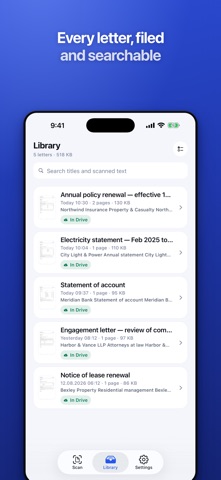
Mass Scan is built for one job: getting a pile of paper post onto your phone as fast as you can turn the pages. Point the camera at a letter. The edges are found for you and each page captures itself — no shutter button, no tapping between pages. Press Save and the letter is filed while the camera reopens instantly for the next one. A stack of twenty letters takes minutes, not an afternoon. Everything slow happens out of your way. Cropping, clean-up, text recognition, PDF building and uploading all run in the background, so the app is never busy when you are. SCANS THAT LOOK LIKE A SCANNER MADE THEM • Automatic edge detection and perspective correction, so the desk behind the page disappears • Adaptive clean-up leaves paper white and ink black, the way a flatbed scanner does • One A4 PDF per letter, sized for email and archiving at roughly 300 KB per page • Front and back, any number of pages, all in a single document SEARCHABLE, ON YOUR DEVICE • Text recognition runs on your iPhone using Apple's Vision engine — no page is ever sent to a server • An invisible text layer sits over the image, so the PDF still looks like a scan but selects and searches like a document • Search your whole library by any word inside any letter • Letters are named automatically after what they are actually about, not after the time of day GOOGLE DRIVE, IF YOU WANT IT • Finished letters upload to your own Drive folder in the background • Transfers keep going after you close the app, and retry on their own when the network drops out • The app asks only for access to the files it creates, so it never sees the rest of your Drive • Or skip Google entirely — keep everything on the phone and share a whole batch as one zip file BUILT FOR SPEED • Continuous mode reopens the camera the moment you save • Select several letters at once to share, upload or delete them together • Rotate a page or drag the crop corners, then rebuild the PDF with no loss of quality • Light and dark appearance, and a tab bar you can reach one-handed NO ACCOUNT, NO TRACKING Mass Scan has no sign-up, no analytics, no ads and no data collection of any kind. Your letters are yours: they stay on your device, and in your own Google Drive if you ask for it. Requires iOS 16.4 or later.
What's new · 1.1.0
New places to keep your letters, and a round of fixes. • Sync finished letters to iCloud Drive, a network folder (an SMB share or NAS, via the Files app) or an FTP server, as well as Google Drive. Pick one under Settings › Sync. • Choose the colour mode right next to the scan button, and change it for a single letter in the page editor. • Search finds words however umlauts and accents are typed: "uberweisung" finds "Überweisung". • Editing a letter updates its copy in Google Drive instead of adding another, and letters that share a name no longer overwrite each other on an FTP server. • Rotated pages show the right way round, and edits are applied however you leave the page editor. • Long scans use far less memory, the camera opens sooner, and the library no longer stops at 500 letters. • Plus many smaller fixes.
Details