

NotaVox
SOHEIL RAMEZANI · Productivity
Independent analytics for this App Store listing. AppTracker is not affiliated with SOHEIL RAMEZANI.
Chart standing · US
What changed · US
Listing changes AppTracker has observed for this app in this storefront — new versions, price moves, rating shifts, and store copy.
NotaVox is now a paid app, with no in-app purchase at all. You already have it: everything is unlocked for you, for good, at no cost. Minutes, rewriting, questions, merging, Apple Watch, iCloud Drive folder. New: import a recording made elsewhere — a voice message, a memo, a call — and NotaVox transcribes it like your own. A note recorded during a meeting in your calendar takes its name and participants. Short notes no longer get the treatment of an hour-long meeting: the screen stays simple and nothing keeps you waiting. Generated text now appears as it is written, instead of arriving in one block after a long wait. Long texts sit in their own scrolling area instead of stretching the page.
In-app purchases · US
What this app sells inside itself, grouped by kind and priced for this storefront.
Screenshots




About
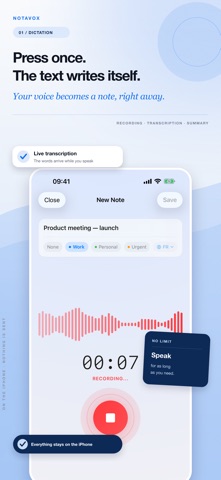
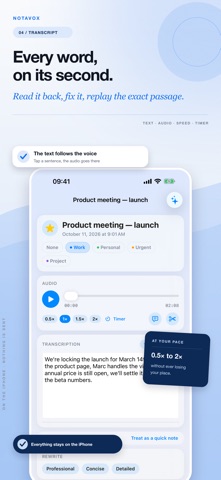
NotaVox turns your voice recordings into structured, usable notes. Record your meetings, ideas or lectures — from the iPhone or from your Apple Watch — and let the app transcribe what you said. With Apple Intelligence, the minutes draw out a summary, the decisions, the action items and the open questions. One purchase. No subscription, no in-app purchase, no ads, no account to create. RECORD - High-quality voice recording, in one tap - From Control Center, the Lock Screen or Siri - Background playback with Lock Screen controls - Adjustable playback speed and sleep timer - Trim the start and end of a recording APPLE WATCH - Record from your wrist, without reaching for the iPhone - The note arrives transcribed on the iPhone, even when the app is closed there - Pick the transcription language from the watch IMPORT - Bring in a voice message, a memo or a recorded call - Transcribed exactly like your own recordings TRANSCRIBE - Automatic transcription in English, French, German and Spanish - Live transcription while you speak - Tap a word in the text to jump to that moment in the audio - Automatic summary and detected action items STRUCTURE (with Apple Intelligence) - Minutes: summary, decisions, action items, open questions - Rewriting in the tone of your choice - Questions and answers about the contents of your note - Merge several notes into one, end to end or rewritten - Ask a question across all your notes, with the notes it drew on - PDF export of the minutes ORGANIZE - Custom categories: name, colour, filters and folders - Favourites, folders and instant search - Tickable action items, and a reminder for the ones still pending - A note recorded during a calendar meeting takes its name and participants - Short notes stay simple; long ones get the full treatment - Share and export your notes and transcripts - iCloud sync across your devices - A copy of your notes in iCloud Drive, readable from a Mac - Interface fully localized in 4 languages PRIVACY NotaVox has no server. No account, no ads, no tracking: your notes and audio files stay on your device. Transcription goes through Apple's speech recognition service, which may process audio on the device or on Apple's servers. The minutes, rewriting and question answering run on the device through Apple Intelligence. COMPATIBILITY NotaVox runs from iOS 18 on. The Apple Watch app needs watchOS 11. The minutes, rewriting and question answering need Apple Intelligence: iOS 26 on an iPhone 15 Pro or newer, or an iPad with an M1 chip or newer. On other devices, recording, importing, transcription, the summary, detected actions, the watch and organizing all remain fully usable.
What's new · 1.1.4
NotaVox is now a paid app, with no in-app purchase at all. You already have it: everything is unlocked for you, for good, at no cost. Minutes, rewriting, questions, merging, Apple Watch, iCloud Drive folder. New: import a recording made elsewhere — a voice message, a memo, a call — and NotaVox transcribes it like your own. A note recorded during a meeting in your calendar takes its name and participants. Short notes no longer get the treatment of an hour-long meeting: the screen stays simple and nothing keeps you waiting. Generated text now appears as it is written, instead of arriving in one block after a long wait. Long texts sit in their own scrolling area instead of stretching the page.
Details