

CapScribe: Auto Captions
正平 孙 · Photo & Video
Independent analytics for this App Store listing. AppTracker is not affiliated with 正平 孙.
Chart standing · US
What changed · US
Listing changes AppTracker has observed for this app in this storefront — new versions, price moves, rating shifts, and store copy.
This update adds App Store listings in Spanish, Portuguese, Japanese, German, and French. The app itself is unchanged from 2.8.
Ratings breakdown · US
The star breakdown behind this app's rating in this storefront.
In-app purchases · US
What this app sells inside itself, grouped by kind and priced for this storefront.
Screenshots



About
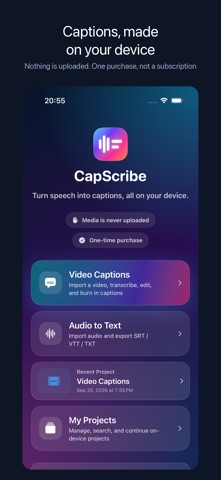
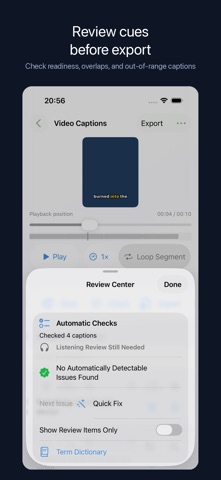
CapScribe turns speech into editable captions and burns them into your video, entirely on your iPhone or iPad. Nothing is uploaded to us. There is no subscription, no credit system, and no watermark: one purchase unlocks the full app. Import a video or audio file, transcribe it on device, fix words and timing, pick a style, and export. Already have captions? Pair a video with an SRT or VTT file and skip transcription. Batch up to 10 videos at once. Because everything runs locally, there is no upload queue and no waiting for a server. After the language pack is downloaded, transcription works in airplane mode. CREATE AND EDIT • Transcribe imported video and audio on your device • Keep multiple local video and audio projects, then search, rename, duplicate, reopen, or delete them • Burn styled captions into the exported video • Choose from eight presets or customize font design, alignment, colors, outline, background, corners, and shadow • Add a clean Pop or Rise entrance to captions, or keep motion off • Reframe output for the original ratio, 9:16, 4:5, 1:1, or 16:9 • Preview at 0.5×–2× speed and loop the current caption while editing • Enter exact timecodes, smart-split a caption, or safely fix empty and overlong captions in one step • Review low-confidence, fast, overlong, and empty captions in one place • Use on-device Automatic Checks to find detectable caption and timing issues, then listen and review names, numbers, original text, and translations before publishing • Reuse an on-device term dictionary for names and commonly misheard words • Undo and redo edits, or find and replace across original text and translations TRANSLATE AND EXPORT • Translate captions with Apple's system Translation framework • Switch between original, translated, and bilingual captions • Batch-caption up to 10 videos at a time • Export original, translated, or bilingual SRT, VTT, and TXT files separately or as one package • Preview the finished video, compare source-to-output resolution, and check expected duration, frame rate, audio, and file size before sharing FREE PREVIEW AND FULL VERSION Try the complete workflow at no charge. For longer media, the free preview processes the first 90 seconds of each video or the first 10 minutes of audio. A one-time, non-consumable in-app purchase removes those free preview limits. There is no subscription or watermark; actual processing capacity depends on your device and media. PRIVACY CapScribe processes your media and transcripts on your iPhone or iPad and does not upload them to the developer. Projects stay in the app's local storage. iOS may download Apple speech or translation language resources when first needed. Purchases are handled by Apple through the App Store. REQUIREMENTS iPhone with iOS 26 or later.
What's new · 2.8.1
This update adds App Store listings in Spanish, Portuguese, Japanese, German, and French. The app itself is unchanged from 2.8.
Details