

Prodigy Mindsight
Prodigy Life LLC · Education
Independent analytics for this App Store listing. AppTracker is not affiliated with Prodigy Life LLC.
Chart standing · US
What changed · US
Listing changes AppTracker has observed for this app in this storefront — new versions, price moves, rating shifts, and store copy.
• Settings has a Rate Prodigy Mindsight row for leaving a rating or review. • The app may ask for a rating after a recorded Solo run of 25 trials or more. • Send Link Again sends a new confirmation link. It is on the Check your email screen after you create an account, and under the sign-in message that says your email is not confirmed. The button waits one minute after Create Account and after each link it sends. • VoiceOver reads the error messages in the sign-in window aloud when they appear. • Cancel on Apple's window during Restore Purchases now closes it quietly, with no error. • The first Delete Account confirmation now names the kind of subscription that keeps renewing until you cancel it: App Store, bought outside the App Store, or both. • iPhone Duo: menus, set lists and results sit in the center of the unfolded screen. Partly folded, they move to one side of the crease. • iPhone Duo: End Run stays in the bar at the top of a trial screen. • A Welcome Tour opens the first time you use the app, with a picture of each screen it describes: practice with eyes covered, Clairvoyance and Precognition, teaching on one device or two, Help, and Settings. Replay it any time from the top of Help. • Help is rewritten. • Settings has Suggest a Feature. • The notes behind every (i) and the result lines are rewritten in plain words. • A terms page shows once, before the tour. • The Letters and Single Digit target sets say what they hold: the 26 letters, A to Z, and the 10 digits, 0 to 9. • Settings has a Release Notes link under the version number. • The result color setting is now called Show Color on Outcome. • In a Two Devices session, both devices stay awake until the session ends. A run with your eyes covered keeps the screen awake from Start, and every target in a Touch run shows at full brightness. • Sign Out, Delete Account, a purchase, and Restore Purchases each start only once, even if you tap twice.
Ratings breakdown · US
The star breakdown behind this app's rating in this storefront.
Screenshots



About
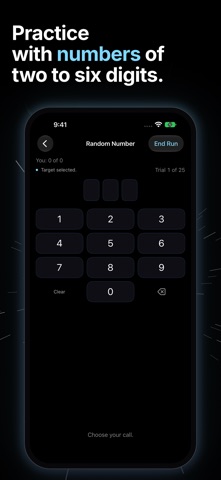
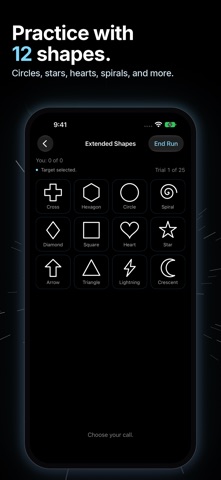
Prodigy Mindsight is a practice and training app for mindsight, blindfold perception, clairvoyance, and precognition. Practice perceiving targets with your eyes covered. In Clairvoyance, the app uses a quantum random number generator to select the target before you answer. In Precognition, you answer first, and the app selects the target afterward. Practice with the five Zener symbols, colors, letters, numbers, or words. The app can speak each step aloud and record your answer by voice, allowing you to complete an entire session on your own without removing your blindfold. Save your runs, review your results, and track your accuracy over time. For teachers and practitioners, Teacher Mode lets you control the targets while a student works blindfolded. Mindsight keeps a record for each student, making it easy to follow individual sessions and progress over time. You can also pair two devices, such as an iPhone and iPad, and separate the teacher from the student. Practice across the room, in another building, or anywhere in the world. Solo practice, saved runs, and statistics are completely free, with no account required and no ads. Mindsight Teaching unlocks Teacher Mode for guided sessions using one or two devices. Two-device sessions require a free Prodigy Account for the host and allow the paired devices to communicate and stay synchronized. Mindsight Teaching is an auto-renewable subscription. Payment is charged to your Apple Account at confirmation of purchase. The subscription renews automatically unless auto-renew is turned off at least 24 hours before the end of the current period. Manage or cancel in your App Store account settings. Terms of Use: https://www.apple.com/legal/internet-services/itunes/dev/stdeula/ Privacy Policy: https://prodigyhealing.com/privacy-policy/
What's new · 1.2.2
• Settings has a Rate Prodigy Mindsight row for leaving a rating or review. • The app may ask for a rating after a recorded Solo run of 25 trials or more. • Send Link Again sends a new confirmation link. It is on the Check your email screen after you create an account, and under the sign-in message that says your email is not confirmed. The button waits one minute after Create Account and after each link it sends. • VoiceOver reads the error messages in the sign-in window aloud when they appear. • Cancel on Apple's window during Restore Purchases now closes it quietly, with no error. • The first Delete Account confirmation now names the kind of subscription that keeps renewing until you cancel it: App Store, bought outside the App Store, or both. • iPhone Duo: menus, set lists and results sit in the center of the unfolded screen. Partly folded, they move to one side of the crease. • iPhone Duo: End Run stays in the bar at the top of a trial screen. • A Welcome Tour opens the first time you use the app, with a picture of each screen it describes: practice with eyes covered, Clairvoyance and Precognition, teaching on one device or two, Help, and Settings. Replay it any time from the top of Help. • Help is rewritten. • Settings has Suggest a Feature. • The notes behind every (i) and the result lines are rewritten in plain words. • A terms page shows once, before the tour. • The Letters and Single Digit target sets say what they hold: the 26 letters, A to Z, and the 10 digits, 0 to 9. • Settings has a Release Notes link under the version number. • The result color setting is now called Show Color on Outcome. • In a Two Devices session, both devices stay awake until the session ends. A run with your eyes covered keeps the screen awake from Start, and every target in a Touch run shows at full brightness. • Sign Out, Delete Account, a purchase, and Restore Purchases each start only once, even if you tap twice.
Details