
Chart standing · US
What changed · US
Listing changes AppTracker has observed for this app in this storefront — new versions, price moves, rating shifts, and store copy.
Price & rating history · US
Reconstructed from the listing changes AppTracker has observed in this storefront, so each line starts at the first change on record.
Price · USD
Screenshots


About
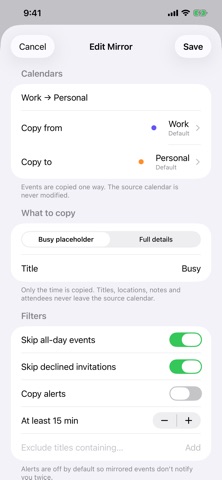
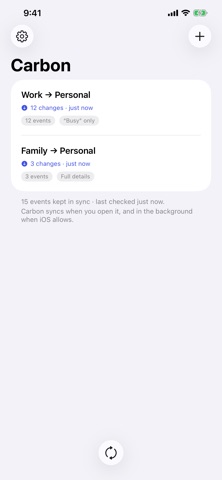
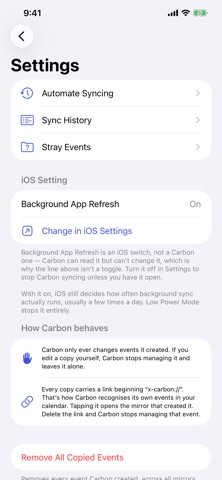
Carbon copies events from one calendar to another, so time blocked in one shows up in the other. Point it at a source calendar and a destination, choose what to copy, and Carbon keeps the destination in step. One way, always Carbon copies from a source calendar to a destination. It never writes back to the source. Your work calendar stays exactly as your employer's system left it. Choose what crosses over Copy full event details, or copy only a "Busy" placeholder that reserves the time without revealing the title, location, or notes. Set this per mirror, so a sensitive work calendar and a shared family calendar can be handled differently. See it before it happens Every new mirror shows you a preview of exactly what will be created before anything is written to your calendar. It won't touch what you've touched Carbon only ever changes events it created. Edit one of its copies yourself and Carbon steps back and leaves it alone - permanently. Undo any sync Sync history shows every run. Reverse any one of them and the events it created are removed. Filters that keep the noise out Skip all-day events, skip invitations you declined, skip anything shorter than a set length, or exclude events whose titles contain particular words. Two years ahead if you want it Choose how far each mirror reaches - up to two years ahead and a year back. Keep the window narrow for quicker syncs, or open it up so next year is already blocked out. Everything stays on your device No account. No server. No analytics. Carbon has no way to send your calendar anywhere, because it never talks to a network at all. Pay once One purchase and Carbon is yours. No subscription, no renewals, nothing to cancel. When Carbon syncs Carbon syncs when you open it, and periodically in the background when iOS allows. iOS decides how often background refresh happens, and it can be infrequent. For syncs on a schedule you control, add Carbon's "Sync Calendars" action to a Shortcuts automation - Carbon walks you through it. A note on invitations iOS does not allow apps to add attendees to an event, so copies are standalone events without invitees. This is an iOS limitation, not a Carbon one. A note on work calendars Some employers restrict copying work calendar data to personal accounts, and managed accounts may block access entirely. Check your organization's policy.
Details