

Goodtime: Energy Journal
Zhiqi Pan · Health & Fitness
Independent analytics for this App Store listing. AppTracker is not affiliated with Zhiqi Pan.
Chart standing · US
What changed · US
Listing changes AppTracker has observed for this app in this storefront — new versions, price moves, rating shifts, and store copy.
Journal - Edit an entry in place: change its activity, or move it to another day with its date wheels - Deleting an entry leaves a few seconds to undo, a ring counting them down - Moving or deleting a standout asks first — a reflection depends on it Reflect - Past weeks lists every week you logged, reflected or not — and any of them can still be reflected on - A row names how many entries its week holds; show all weeks or only the reflected ones - Edit or delete a saved reflection from its menu, or by holding its row - Write what you noticed even with no standouts picked; an empty week says so instead of opening a blank review Insights - Rename an activity, or merge it into another — every entry follows My Garden - New at the foot of Insights: every day you have journalled grows a flower - The card holds your newest 28 days; open it to walk back through every month you have logged - Arrange the beds by month, by flow or by energy - Tap a flower to open its day, the plant drawn large over that day's entries - Each flower is its own VoiceOver element, named by its day Also fixed - The month calendar folds and unfolds without ghost rows or a doubled week - The Today chip lights only when today is really off screen - VoiceOver speaks calendar dates in the app's language - The compose card moves in step with the keyboard - Opening the journal never lands on a blank stretch
In-app purchases · US
What this app sells inside itself, grouped by kind and priced for this storefront.
Screenshots




About
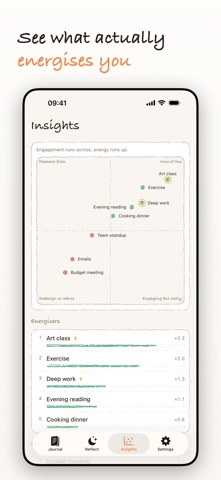
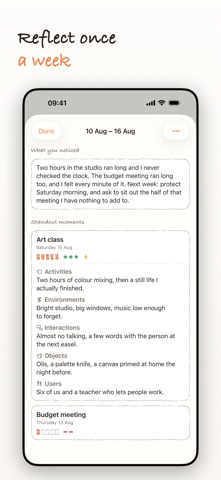
Some hours glow. Some drain. Most of us are poor judges of which is which — we remember the day we planned, not the day we had. Goodtime is a small journal for catching it as it happens. You write down what you did, then rate it on two things: how absorbed you were, and what the hour gave back or took. Energy has a real zero in the middle, so a flat hour reads as flat rather than as mildly good. If something took you somewhere else entirely, mark it as flow. Log the day An activity, and a short note if you want one. Typing suggests activities you have logged before, so the same thing keeps one name. Rate it Two quick ratings. Engagement runs from one to five. Energy runs from minus to plus around a real zero — green one side, red the other, and a flat hour is allowed to be a zero. Reflect once a week Which activities gave you a harvest, and what was it? Pick the moments that stood out, the highs and the lows, then take each one through five prompts: activities, environments, interactions, objects, users. Picking none is a fine answer. Read the map Every activity is plotted by engagement against energy on a quadrant map — more of this, engaging but costly, pleasant filler, redesign or reduce. Underneath: your energisers, your drainers, the things that put you in flow, and how the last three weeks have run. The month calendar grows a small sprout on each logged day, a leaf per entry, a gold blossom when something reached flow. Quick Find opens with a pull down, for when you want to look something up. What is not in here: No account, and nothing to sign up for. No subscription, no ads. No AI reading your notes. No streaks, no badges, no reminders. A missed day is just a missed day. Your journal stays on your device. The icons are drawn rather than picked off a shelf: nineteen small glyphs in the app's own hand. The rest is near-flat paper and ink, one warm amber accent, green and red kept for energy's sign, gold kept for flow. Light and dark are both first class. Goodtime follows the good time journal exercise popularised by Bill Burnett and Dave Evans. The exercise runs about three weeks, and that is when your weeks start to show their shape. It is not a mood tracker. It is a way of noticing where your good hours actually go.
What's new · 1.3
Journal - Edit an entry in place: change its activity, or move it to another day with its date wheels - Deleting an entry leaves a few seconds to undo, a ring counting them down - Moving or deleting a standout asks first — a reflection depends on it Reflect - Past weeks lists every week you logged, reflected or not — and any of them can still be reflected on - A row names how many entries its week holds; show all weeks or only the reflected ones - Edit or delete a saved reflection from its menu, or by holding its row - Write what you noticed even with no standouts picked; an empty week says so instead of opening a blank review Insights - Rename an activity, or merge it into another — every entry follows My Garden - New at the foot of Insights: every day you have journalled grows a flower - The card holds your newest 28 days; open it to walk back through every month you have logged - Arrange the beds by month, by flow or by energy - Tap a flower to open its day, the plant drawn large over that day's entries - Each flower is its own VoiceOver element, named by its day Also fixed - The month calendar folds and unfolds without ghost rows or a doubled week - The Today chip lights only when today is really off screen - VoiceOver speaks calendar dates in the app's language - The compose card moves in step with the keyboard - Opening the journal never lands on a blank stretch
Details