

MadoHub
Shanghai TacticSpace Technology Co., Ltd. · Developer Tools
Independent analytics for this App Store listing. AppTracker is not affiliated with Shanghai TacticSpace Technology Co., Ltd.
Chart standing · US
What changed · US
Listing changes AppTracker has observed for this app in this storefront — new versions, price moves, rating shifts, and store copy.
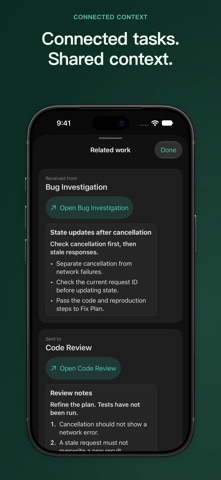
[New] iPhone Duo support: continue the same conversation and keep unsent drafts when switching between the inner and outer displays. [Improved] Conversation reading: keep your place in earlier messages and quickly return to the latest reply. [Improved] Related work: read connected Agent output, then return to your conversation and continue your draft. [Improved] Structured replies: clearer code blocks, tables, and checklists make long responses easier to read. [Improved] Canvas and settings: refined Agent lists, settings, and creation forms on iPhone and iPad. [Improved] First use: choose whether to connect to a Mac automatically. Existing connection preferences are preserved. [Improved] Reliability: fixes for fast text input, live replies after multiline sends, and restoring purchases.
Screenshots
About
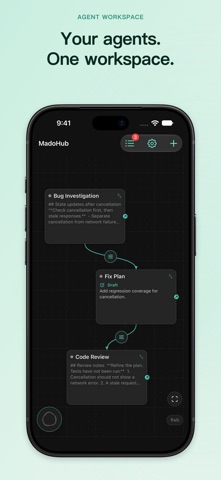
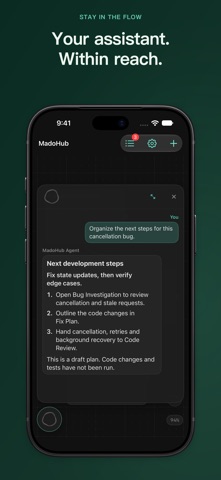
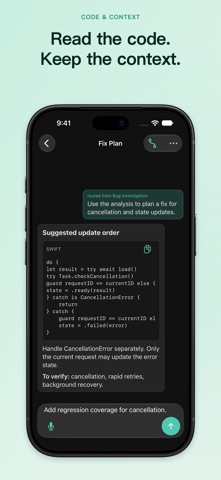
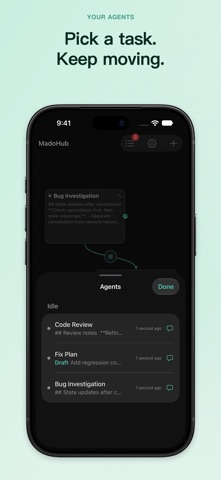
Your AI team, organized on one canvas. MadoHub is a visual AI workspace for iPhone and iPad. Brainstorm ideas, refine a draft, summarize study material, or discuss code and plans. Give each Agent its own role, instructions and conversation, then connect related tasks on your canvas. TURN IDEAS INTO NEXT STEPS Outline a plan, compare approaches, or ask another Agent to review a reply. Keep each task in its own conversation so you can return to it and build on earlier work. SEE YOUR WORK Pan and zoom the canvas. Use the Agents list to find working or idle tasks and return to their conversations. Read streaming replies with headings, lists, tables and code blocks. CONNECT TASKS Connect Agents so a completed reply can become the next task. Start with Peer Review, Pipeline or Watcher templates, then review the results and follow up where needed. ASK FROM YOUR CANVAS Open the floating MadoHub Agent for ideas and help with your workspace. Hold its button to speak, or open the full conversation to type. Speech is transcribed on your device; the resulting text is sent for AI processing after you accept the data disclosure. KEEP CONVERSATIONS Return to earlier messages and continue a task with follow-up instructions. Closing an Agent stops its work and removes it from the active canvas while preserving its history for restoration. OPTIONAL MAC COMPANION Connect a compatible Mac running MadoHub to view its desktop canvas, follow terminal output and send supported actions. A Mac is not required for the standalone iPhone and iPad workspace. ACCOUNT AND PURCHASES An internet connection, a MadoHub account and available Credits or plan allowances are required for AI tasks. Requests are processed through MadoHub Cloud. The iOS app does not require your own AI provider API key. MadoHub Pro is an auto-renewing monthly subscription. Eligible users can use the introductory offer shown in the app. You can also purchase 1,000 non-expiring Credits without a subscription. Prices, included usage and renewal terms are shown before purchase. Restore purchases in the app and manage App Store subscriptions in your device settings. Terms of Use: https://madohub.com/terms Privacy Policy: https://madohub.com/privacy
What's new · 1.1
[New] iPhone Duo support: continue the same conversation and keep unsent drafts when switching between the inner and outer displays. [Improved] Conversation reading: keep your place in earlier messages and quickly return to the latest reply. [Improved] Related work: read connected Agent output, then return to your conversation and continue your draft. [Improved] Structured replies: clearer code blocks, tables, and checklists make long responses easier to read. [Improved] Canvas and settings: refined Agent lists, settings, and creation forms on iPhone and iPad. [Improved] First use: choose whether to connect to a Mac automatically. Existing connection preferences are preserved. [Improved] Reliability: fixes for fast text input, live replies after multiline sends, and restoring purchases.
Details