

AI Video Translator: Captioner
Botisan AI Pte. Ltd. · Photo & Video
Independent analytics for this App Store listing. AppTracker is not affiliated with Botisan AI Pte. Ltd.
Chart standing · US
What changed · US
Listing changes AppTracker has observed for this app in this storefront — new versions, price moves, rating shifts, and store copy.
New in 1.2.0: • Export your translated video with subtitles burned in, right on your iPhone • Edit captions: drag to move, pinch to resize, fix the text and see it live • Save the transcript as text, or subtitle files (SRT) with Premium • Minute packs: extra minutes that never expire • Faster, more accurate caption scanning • Videos show up in Recents right after you import them • Swipe back from any video, plus a cleaner, refreshed design • Now available in 19 languages
Ratings breakdown · US
The star breakdown behind this app's rating in this storefront.
Screenshots




About
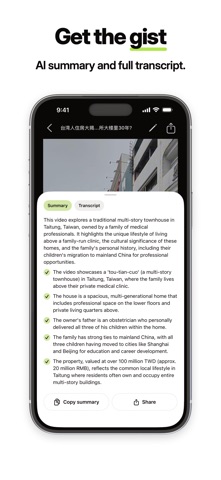
Captioner is an AI video translator: it turns a video in a language you don't speak into one you can watch in your own. Choose a video from your photo library — Captioner transcribes the speech, translates it, and plays the video back with captions in your language, plus an AI summary of what it says. Any language in, any language out: Thai speech to English captions, English to Burmese, Chinese to Vietnamese — every direction works. No account. No editing skills. Start with five free videos. HOW IT WORKS 1. Choose a video from your photo library 2. Choose your language — 100+ supported 3. Watch with translated captions, or skim the AI summary first WHAT YOU GET • AI subtitles — accurate speech-to-text, automatically timed • Translation across 100+ languages: Burmese, Thai, Vietnamese, Indonesian, Malay, Tagalog, Khmer, Lao, plus English, Chinese, Hindi, Japanese, Korean, Spanish and 90+ more • Hardcoded captions? Covered. Captioner reads burned-in captions on screen and shows the translation right under them — the text other video translator apps can't touch • AI summary — know what a video says before you watch it • Library — translated videos stay saved on your device for rewatching WORKS WITH • Videos saved in your photo library • Video files shared directly to Captioner from another app • Only use videos you own or have permission to process PERFECT FOR • Watching foreign-language videos with subtitles in your language • Understanding a video someone sent you, fast — read the summary first • Translating videos for friends and family who speak another language • Language learners who want real subtitles on real videos FIVE FREE VIDEOS Captioner includes five free video translations, no sign-up needed. A Captioner Premium subscription unlocks more translations. It runs on the same engine as captioner.io, our AI subtitle generator and video translator on the web. Your videos are processed securely and never shared. Terms of Service: https://captioner.io/en/terms Privacy Policy: https://captioner.io/en/privacy
What's new · 1.2.0
New in 1.2.0: • Export your translated video with subtitles burned in, right on your iPhone • Edit captions: drag to move, pinch to resize, fix the text and see it live • Save the transcript as text, or subtitle files (SRT) with Premium • Minute packs: extra minutes that never expire • Faster, more accurate caption scanning • Videos show up in Recents right after you import them • Swipe back from any video, plus a cleaner, refreshed design • Now available in 19 languages
Details