

Mango & Dill
Felix Barth · Food & Drink
Independent analytics for this App Store listing. AppTracker is not affiliated with Felix Barth.
Chart standing · US
What changed · US
Listing changes AppTracker has observed for this app in this storefront — new versions, price moves, rating shifts, and store copy.
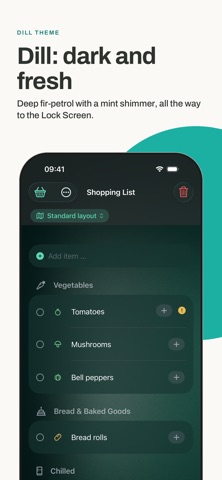
New: themes. In the list settings (gear icon), pick Classic, Dill or Mango under "Theme". Classic is the familiar look. Dill dips the app into deep fir-petrol with a mint shimmer, Mango into dark chocolate with an amber glow. Backgrounds, buttons, checkmarks, chips and shopping mode on the Lock Screen all follow. The choice applies only on your device. Also for big screens: on the unfolded iPhone Duo and on an iPhone Max in landscape, meals stay in the list on the left and open on the right. Shopping list, meal plan and ingredients keep to a readable column.
In-app purchases · US
No in-app purchases.
Screenshots




Similar apps
Competitors and close alternatives, as estimated by AppTracker.
 Watchlist+Shopping
James Hattin
Watchlist+Shopping
James Hattin
 Shopping List / Grocery List
sascha maihoefer
Shopping List / Grocery List
sascha maihoefer
 Shopping List + Pantry
PC-Future GmbH
Shopping List + Pantry
PC-Future GmbH
 Our Groceries Shopping List
OurGroceries, Inc.
Our Groceries Shopping List
OurGroceries, Inc.
 Aisly: Adaptive Shopping List
Oliver Gutermuth
Aisly: Adaptive Shopping List
Oliver Gutermuth
 Grocery List ◎
Diego de Paz Sierra
Grocery List ◎
Diego de Paz Sierra
 Plenty: Shopping List
Netkreatives
Plenty: Shopping List
Netkreatives
 Shopping List - Grocery & Todo
Komorebi Inc.
Shopping List - Grocery & Todo
Komorebi Inc.
About
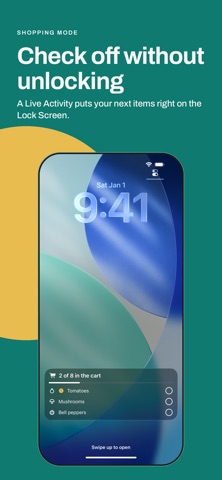
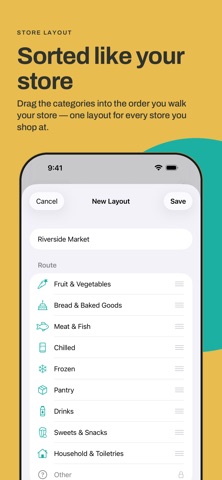
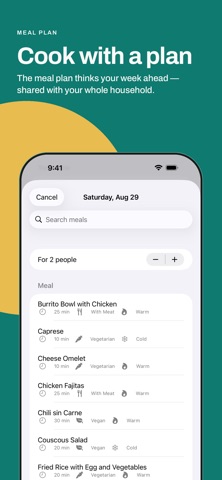
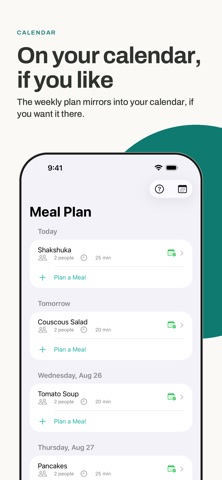
Mango & Dill sorts your shopping list to match your supermarket's aisle order. You walk the store once instead of zigzagging. You check items off right on the Lock Screen or on your Apple Watch, without unlocking your iPhone. Your whole household writes on the same list, with no account and no ads, and all your data stays in your iCloud. Your own recipes and a meal plan round it out. One tap puts a dish's ingredients on the list, and the suggestions show what you can already cook from what's on it. SORTED LIKE YOUR SUPERMARKET • Aisle-order templates for Kaufland, Lidl, Aldi, and Rewe in Germany, Austria, and Switzerland. Everywhere else you build your own layout by dragging categories into the order you walk them. • About 60 fine sections instead of rough groups: spices, canned goods, or the ice-cream freezer appear where they really are in your store. You can reorder the sections per store. • While you shop, the app can quietly learn your actual route. Learning happens only on your device and can be turned off. • Optional: a quick location check suggests the market nearby. Your position goes to Apple Maps only, never to the developer. No continuous tracking. • 247 ingredients with icons and categories are built in. Start typing, tap, and the list sorts itself. IN THE STORE: CHECK OFF WITHOUT UNLOCKING • One tap starts shopping mode. A Live Activity puts your next items on the Lock Screen. • You check them off right there, without unlocking and without hunting for the app. • Progress runs along (“3 of 12 in the cart”). Once everything is checked off, the display ends on its own. ON APPLE WATCH • Your shopping list as its own watch app: see what's open, tap, done. Your iPhone stays in your pocket. • No check-off gets lost. If your iPhone is briefly out of reach, the watch remembers it and delivers it later. ONE LIST FOR THE WHOLE HOUSEHOLD • Shared via iCloud: everyone sees the same list, and changes show up for everyone. • Swipe to mark an item urgent. It wiggles until it's in the cart. • Dishes and calendar events exist only once, even when your household mixes German and English. • Instead of many single notifications you get one summary: “Shopping list updated — 5 changes to your list.” COOK WITH A PLAN • Your recipes with servings, quantities, and reusable building blocks. One sauce, many dishes. • One tap puts all of a dish's ingredients on the list, scaled to your headcount. Duplicates are merged. • Suggestions show quick dishes (10 to 30 minutes) that match your list, including what's still missing. • If you like, the weekly plan mirrors into your calendar. • 22 starter dishes are included to try things out. BUILT PRIVATE • No account, no sign-up. Open the app and start. • No tracking, no analytics services. • Sync runs only through your private iCloud. The developer cannot see your data. PAY ONCE, DONE • The price of the app is the whole price. No subscription, no in-app purchases. • Family Sharing: one purchase covers everyone in your Apple family. REQUIREMENTS • iPhone with iOS 18 or later (no iPad version) • Apple Watch optional: the watch app requires watchOS 11, your iPhone provides the data • App interface in English and German • For sync and shared lists you need iCloud. Everyone on the list needs an iPhone with the app. Mango & Dill is built by one person in Germany. Questions or ideas? Write to support@mangodill.app. Your feedback goes straight to the developer. Mango & Dill is not affiliated with or endorsed by Kaufland, Lidl, Aldi, or Rewe.
What's new · 1.5
New: themes. In the list settings (gear icon), pick Classic, Dill or Mango under "Theme". Classic is the familiar look. Dill dips the app into deep fir-petrol with a mint shimmer, Mango into dark chocolate with an amber glow. Backgrounds, buttons, checkmarks, chips and shopping mode on the Lock Screen all follow. The choice applies only on your device. Also for big screens: on the unfolded iPhone Duo and on an iPhone Max in landscape, meals stay in the list on the left and open on the right. Shopping list, meal plan and ingredients keep to a readable column.
Details