
Chart standing · US
What changed · US
Listing changes AppTracker has observed for this app in this storefront — new versions, price moves, rating shifts, and store copy.
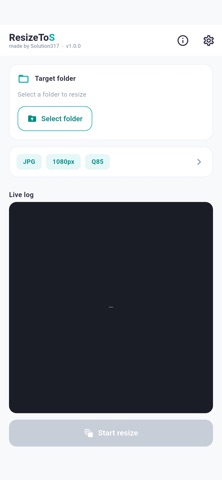
ResizeToS is the most efficient and intuitive productivity utility designed to batch resize massive amounts of photos on your smartphone by processing entire folders at once. You no longer need to rely on the tedious old method of painstakingly selecting photos one by one just to reduce their file sizes. All you have to do is select the folder you wish to process. The app will automatically scan all the images inside and uniformly scale them down to your desired horizontal resolution. The most significant advantage of this app is its absolute commitment to preserving your precious original photos. Every resized output is strictly saved into a newly and automatically created subfolder within your selected directory. This ensures you can use the app with complete peace of mind knowing your original files will never be overwritten or corrupted. Detailed Feature Overview First the batch processing capability. Without any complicated selection processes you just designate a single target folder and dozens or even hundreds of photos inside it are resized with just a single tap. Second the intelligent scaling system. The app provides convenient presets for the most commonly used resolutions such as 720 1080 1440 1920 and 2560 pixels while also allowing you to input any custom pixel value you need. If an original photo happens to have a horizontal width smaller than your target setting the app is smart enough to prevent pixelation caused by forced upscaling. Instead of passing it through the resizing engine it safely copies the original file exactly as it is. Third customizable file formats and quality control. If your goal is to drastically free up storage space on your device you can select the highly compressed JPG format and fine tune the quality slider anywhere from ten to one hundred. Alternatively if you wish to prevent any loss of visual quality you can choose the PNG format which provides lossless saving and fully preserves image transparency. Fourth perfect metadata preservation. Even when reducing the physical size of the photo the app ensures that your memories remain intact by seamlessly transplanting all crucial EXIF metadata including the original date and time of capture lens parameters and location data directly into the newly generated images preventing any loss of vital information. Fifth intuitive real time status monitoring. Once the conversion process begins a real time log console appears on your screen. The app distinctly displays various statuses such as successfully resized original kept skipped duplicates encountered errors and metadata written using soft easily distinguishable colors. This allows you to grasp exactly how your batch job is progressing at a single glance. Absolute Privacy and Fully Offline Operation Because this app handles your highly private media data security and privacy were our top priorities during development. The application does not contain any network communication modules whatsoever. One hundred percent of the processing and saving happens entirely offline directly within the local storage of your device. The risk of your precious photo data being transmitted to external clouds or servers is fundamentally blocked meaning you can use the app safely in any situation. Supported Languages The app provides comprehensive support for English Korean Japanese Simplified Chinese and Traditional Chinese automatically adapting to your smartphones system language settings. You can also manually switch languages at any time through the in app settings menu. Developer Solution317
Screenshots


About
ResizeToS is the most efficient and intuitive productivity utility designed to batch resize massive amounts of photos on your smartphone by processing entire folders at once. You no longer need to rely on the tedious old method of painstakingly selecting photos one by one just to reduce their file sizes. All you have to do is select the folder you wish to process. The app will automatically scan all the images inside and uniformly scale them down to your desired horizontal resolution. The most significant advantage of this app is its absolute commitment to preserving your precious original photos. Every resized output is strictly saved into a newly and automatically created subfolder within your selected directory. This ensures you can use the app with complete peace of mind knowing your original files will never be overwritten or corrupted. Detailed Feature Overview First the batch processing capability. Without any complicated selection processes you just designate a single target folder and dozens or even hundreds of photos inside it are resized with just a single tap. Second the intelligent scaling system. The app provides convenient presets for the most commonly used resolutions such as 720 1080 1440 1920 and 2560 pixels while also allowing you to input any custom pixel value you need. If an original photo happens to have a horizontal width smaller than your target setting the app is smart enough to prevent pixelation caused by forced upscaling. Instead of passing it through the resizing engine it safely copies the original file exactly as it is. Third customizable file formats and quality control. If your goal is to drastically free up storage space on your device you can select the highly compressed JPG format and fine tune the quality slider anywhere from ten to one hundred. Alternatively if you wish to prevent any loss of visual quality you can choose the PNG format which provides lossless saving and fully preserves image transparency. Fourth perfect metadata preservation. Even when reducing the physical size of the photo the app ensures that your memories remain intact by seamlessly transplanting all crucial EXIF metadata including the original date and time of capture lens parameters and location data directly into the newly generated images preventing any loss of vital information. Fifth intuitive real time status monitoring. Once the conversion process begins a real time log console appears on your screen. The app distinctly displays various statuses such as successfully resized original kept skipped duplicates encountered errors and metadata written using soft easily distinguishable colors. This allows you to grasp exactly how your batch job is progressing at a single glance. Absolute Privacy and Fully Offline Operation Because this app handles your highly private media data security and privacy were our top priorities during development. The application does not contain any network communication modules whatsoever. One hundred percent of the processing and saving happens entirely offline directly within the local storage of your device. The risk of your precious photo data being transmitted to external clouds or servers is fundamentally blocked meaning you can use the app safely in any situation. Supported Languages The app provides comprehensive support for English Korean Japanese Simplified Chinese and Traditional Chinese automatically adapting to your smartphones system language settings. You can also manually switch languages at any time through the in app settings menu. Developer Solution317
What's new · 1.0.1
ResizeToS is the most efficient and intuitive productivity utility designed to batch resize massive amounts of photos on your smartphone by processing entire folders at once. You no longer need to rely on the tedious old method of painstakingly selecting photos one by one just to reduce their file sizes. All you have to do is select the folder you wish to process. The app will automatically scan all the images inside and uniformly scale them down to your desired horizontal resolution. The most significant advantage of this app is its absolute commitment to preserving your precious original photos. Every resized output is strictly saved into a newly and automatically created subfolder within your selected directory. This ensures you can use the app with complete peace of mind knowing your original files will never be overwritten or corrupted. Detailed Feature Overview First the batch processing capability. Without any complicated selection processes you just designate a single target folder and dozens or even hundreds of photos inside it are resized with just a single tap. Second the intelligent scaling system. The app provides convenient presets for the most commonly used resolutions such as 720 1080 1440 1920 and 2560 pixels while also allowing you to input any custom pixel value you need. If an original photo happens to have a horizontal width smaller than your target setting the app is smart enough to prevent pixelation caused by forced upscaling. Instead of passing it through the resizing engine it safely copies the original file exactly as it is. Third customizable file formats and quality control. If your goal is to drastically free up storage space on your device you can select the highly compressed JPG format and fine tune the quality slider anywhere from ten to one hundred. Alternatively if you wish to prevent any loss of visual quality you can choose the PNG format which provides lossless saving and fully preserves image transparency. Fourth perfect metadata preservation. Even when reducing the physical size of the photo the app ensures that your memories remain intact by seamlessly transplanting all crucial EXIF metadata including the original date and time of capture lens parameters and location data directly into the newly generated images preventing any loss of vital information. Fifth intuitive real time status monitoring. Once the conversion process begins a real time log console appears on your screen. The app distinctly displays various statuses such as successfully resized original kept skipped duplicates encountered errors and metadata written using soft easily distinguishable colors. This allows you to grasp exactly how your batch job is progressing at a single glance. Absolute Privacy and Fully Offline Operation Because this app handles your highly private media data security and privacy were our top priorities during development. The application does not contain any network communication modules whatsoever. One hundred percent of the processing and saving happens entirely offline directly within the local storage of your device. The risk of your precious photo data being transmitted to external clouds or servers is fundamentally blocked meaning you can use the app safely in any situation. Supported Languages The app provides comprehensive support for English Korean Japanese Simplified Chinese and Traditional Chinese automatically adapting to your smartphones system language settings. You can also manually switch languages at any time through the in app settings menu. Developer Solution317
Details