

PAlarm: Adjust Before It Rings
akira kawakami · Utilities
Independent analytics for this App Store listing. AppTracker is not affiliated with akira kawakami.
Chart standing · US
What changed · US
Listing changes AppTracker has observed for this app in this storefront — new versions, price moves, rating shifts, and store copy.
Added alarm skipping based on rain and snow forecasts. • Set rain and snow conditions and a forecast location for each alarm. • Receive a notification at a chosen time on the previous day when a skip is planned. • See weather skip status beside each alarm on the app's Home screen. • Revised the Japanese explanations and operation instructions.
In-app purchases · US
No in-app purchases.
Screenshots



About
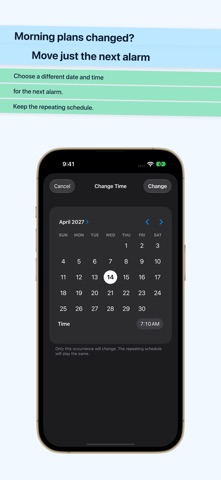
PAlarm lets you change the date and time of just the next alarm or skip it once without changing the repeating schedule. SET ALARMS Choose a one-time date and time or the weekdays on which an alarm repeats. You can also skip Japanese public holidays. SKIP FOR RAIN OR SNOW Use this for alarms you do not need on days with rain in the forecast, such as getting up early to walk your dog. For each alarm, choose whether to skip for rain, snow, or both, and select a forecast location. PAlarm uses the hourly forecast for the alarm time. If no forecast was obtained for that occurrence, the alarm rings as usual. You can set a time on the previous day to receive a notification when an alarm is expected to be skipped. The plan can still change as forecasts are updated. Forecast updates while the app is not open are not guaranteed to run at a specified time. CHANGE JUST ONE OCCURRENCE Skip the next alarm or move it to another date and time. You can undo a change made for just one occurrence. ADVANCE NOTIFICATIONS AND ALARM SOUNDS Receive a notification before an alarm and change or skip only its next occurrence. Use an audio file as the alarm sound, or trim a segment of 5–30 seconds. WIDGETS, LIVE ACTIVITY AND APPLE WATCH Check the next alarm in Home Screen and Lock Screen widgets, a Live Activity, or the Apple Watch app. Supported screens also offer actions such as skipping or changing the time. Available features depend on the device, OS, permissions, connection and system limits. PAlarm does not read or modify alarms in Apple's Clock app. No account, advertising or subscription is required. Alarm settings are stored on your device. To obtain weather forecasts, PAlarm sends the coordinates of your selected forecast location to WeatherKit.
What's new · 1.1.0
Added alarm skipping based on rain and snow forecasts. • Set rain and snow conditions and a forecast location for each alarm. • Receive a notification at a chosen time on the previous day when a skip is planned. • See weather skip status beside each alarm on the app's Home screen. • Revised the Japanese explanations and operation instructions.
Details