

Solframe: Photo Collage Print
Yefga Torra · Photo & Video
Independent analytics for this App Store listing. AppTracker is not affiliated with Yefga Torra.
Chart standing · US
What changed · US
Listing changes AppTracker has observed for this app in this storefront — new versions, price moves, rating shifts, and store copy.
We opened the app. Then we opened it wider. - iPhone Duo, unfolded: turn it sideways and Solframe opens like a good spread. Paper on one side, tools on the other. Nobody’s thumb is standing on the photo any more. - Left-handed? Right-handed? Still deciding? There is a new Canvas position setting, so the paper sits on the side you like. iPad gets it too. - Text controls on Duo have grown up. Size, typeface, style, alignment, colour and spacing each have a name and a place. The sideways-scrolling treasure hunt is over. Sheets (the pop-up kind) now keep to the tools’ side, so your sheet (the paper kind) stays in view. Yes, we know. Naming things is hard. - Touch and hold the app icon to start a new paper sheet or a new screen sheet straight from the Home Screen. - We swept the floor, straightened the margins and fixed a few small things we hope you never noticed. Fold it, turn it, print it. See you in 1.2
Screenshots


About
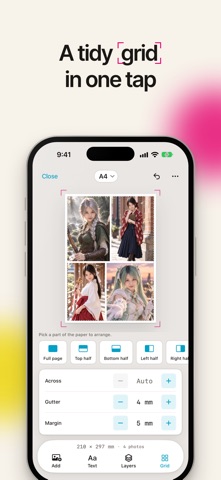
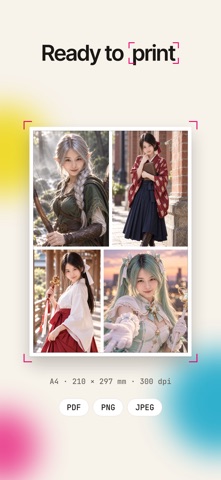
Your photos deserve better than a template that crops them. 12 photos. One beautiful layout. Less than a second. Meet Solframe. The little app that makes arranging photos feel effortless. Pick your pictures, choose a size, and watch everything fall into place. No fighting templates. No unwanted crops. No wondering why your A4 print came out looking… not quite A4. Just your photos, your way. LESS FIDDLING. MORE MAKING. - Drop in photos. Solframe arranges them automatically, keeping their original proportions. - Circles, hearts, stars, hexagons? Clip photos into shapes, even several on one photo. - Backgrounds you don't want? Gone in a tap. - Drag, pinch, rotate, rearrange. Make every little detail yours. - Add names, dates, captions, or whatever the moment deserves. A4 MEANS A4. REALLY. Millimetres matter. Especially when you're printing. Choose A4, US Letter, 4×6, 5×7, square, or your own exact dimensions. Portrait, landscape, printer-friendly margins. All sorted. Going digital? Make layouts at 1080×1350, 1080×1080, 1080×1920, or any custom pixel size. iPhone wallpapers and widgets? We've done the pixel maths for you. MAKE IT. SAVE IT. PRINT IT. - Export a PDF at its actual physical size. - Save crisp, print-ready images at 300 DPI. - Print directly with AirPrint, as often as you want. What you see is what you get. Imagine that. THINK OUTSIDE THE PAGE. One page not enough? Poster mode spreads your image across multiple sheets, with cutting guides, glue overlap, and assembly marks. Print, piece together, and go big. More of a screen person? Split a canvas into a social media feed grid instead. YOUR HOME SCREEN COULD USE SOME LOVE. Turn any layout into a small, medium, or large Home Screen widget. Change it whenever you feel like it. Making a Lock Screen wallpaper? Our guide shows where the clock and date will sit. No more faces hiding behind the time. MORE ROOM. MORE FUN. Made for iPhone Duo and iPad. Unfold Duo, turn sideways, and put your canvas on one side and tools on the other. Partially folded? The layout works around the hinge. Left-handed or right-handed, you decide where the canvas belongs. FOUND A PHOTO? SEND IT OVER. Share pictures straight into Solframe from Photos, Messages, or any app with a share sheet. They'll be ready when you are. YOUR PHOTOS. YOUR BUSINESS. No photo uploads. Ever. Browsing is read-only, selected photos are copied into the app's storage, and your layouts stay on your device unless you export them. Optional iCloud sync uses your own iCloud Drive. We never see your files. FREE TO MAKE SOMETHING GREAT. Every layout tool, paper size and screen size is free, and so is AirPrint. A few extras are available as optional in-app purchases. No design degree required. Just photos and a little imagination. Go on. Make something worth keeping. Subscriptions automatically renew unless cancelled at least 24 hours before the current period ends. Manage or cancel yours in Apple Account settings. Terms of Use: https://solframe.vercel.app/tnc Privacy Policy: https://solframe.vercel.app/privacy-policy
What's new · 1.2
We opened the app. Then we opened it wider. - iPhone Duo, unfolded: turn it sideways and Solframe opens like a good spread. Paper on one side, tools on the other. Nobody’s thumb is standing on the photo any more. - Left-handed? Right-handed? Still deciding? There is a new Canvas position setting, so the paper sits on the side you like. iPad gets it too. - Text controls on Duo have grown up. Size, typeface, style, alignment, colour and spacing each have a name and a place. The sideways-scrolling treasure hunt is over. Sheets (the pop-up kind) now keep to the tools’ side, so your sheet (the paper kind) stays in view. Yes, we know. Naming things is hard. - Touch and hold the app icon to start a new paper sheet or a new screen sheet straight from the Home Screen. - We swept the floor, straightened the margins and fixed a few small things we hope you never noticed. Fold it, turn it, print it. See you in 1.2
Details