

Side Table
Hunter Bradley · Productivity
Independent analytics for this App Store listing. AppTracker is not affiliated with Hunter Bradley.
Chart standing · US
What changed · US
Listing changes AppTracker has observed for this app in this storefront — new versions, price moves, rating shifts, and store copy.
Photos you share from your iPhone or iPad are on the table the moment you open Side Table, even when your Mac got there first. Photos land in the viewer without a hitch, and documents and web pages now rest square like photos. Every menu shares one look and size; on the Mac, right-click opens Side Table's own menus, the selection bar and group window are larger, and Esc reliably closes the viewer. Group windows fit what's in them.
Screenshots






About
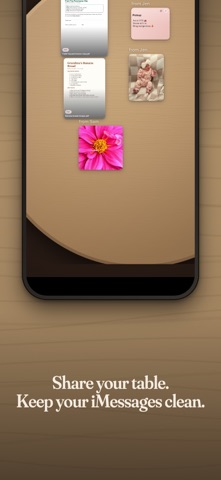
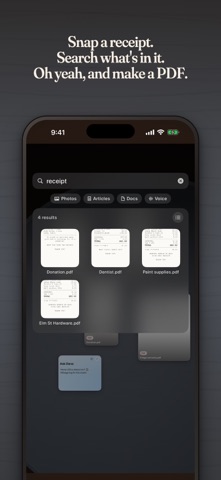
Side Table is where things go when they don't have a place yet. A photo you need to send later. A PDF someone sent you. A link you'll read tonight. The half-written caption you're not done with. Right now those things scatter across screenshots, drafts to yourself, and eleven open tabs. Put them on the table instead. SECONDS IN Drop anything onto a round wooden table: photos, videos, files, PDFs, links, voice notes, scanned documents, or a note you type yourself. Share from any app, tap a widget, or ask Siri. Nothing to name, nothing to file, nothing to decide. SECONDS OUT Everything leaves as fast as it arrived. Tap a card to open it full screen. Flick one toward the edge of the table to share it. Copy text out exactly as it went in — every emoji, every line break, every blank line preserved — so a draft you wrote somewhere else arrives somewhere else intact. FIND IT WITHOUT FILING IT Side Table reads what you drop. It pulls the text out of your PDFs and scans and recognizes what's in your photos, entirely on your device. Search "receipt" and the receipt surfaces, even though you never named it. Your things show up in iPhone and iPad search, too. TIDY ONLY WHEN YOU WANT TO Pull a few cards together and they become a labeled tray. Slide a pile off to the side when the table gets busy. Drop something in the basket when you're done with it. Or don't — a messy table still works fine. ONE TABLE FOR THE HOUSEHOLD Share a table with the people you live and work with. Everyone sets things down on it and everyone sees them — the same table, on every device, live. Cards say who set them down. PRIVATE BY DEFAULT No account, no sign-in, no analytics. Side Table collects nothing and never asks who you are. Turn on iCloud sync and your tables travel between your iPhone, iPad and Mac through your own iCloud — we never see them. SIDE TABLE PRO The first table is free forever. Side Table Pro, a single purchase, adds more tables, one-tap organization, PDFs from anything on the table, iCloud sync across your devices, and shared tables. Accepting a table someone shares with you is always free. The measure of this app is how little time you spend inside it. Drop it off, get on with your day, pick it up when you need it.
What's new · 1.2.2
Photos you share from your iPhone or iPad are on the table the moment you open Side Table, even when your Mac got there first. Photos land in the viewer without a hitch, and documents and web pages now rest square like photos. Every menu shares one look and size; on the Mac, right-click opens Side Table's own menus, the selection bar and group window are larger, and Esc reliably closes the viewer. Group windows fit what's in them.
Details