

Provaro: Job Photo Reports
Robert Jensen · Business
Independent analytics for this App Store listing. AppTracker is not affiliated with Robert Jensen.
Chart standing · US
What changed · US
Listing changes AppTracker has observed for this app in this storefront — new versions, price moves, rating shifts, and store copy.
See your own letterhead before you buy. The Pro screen now shows your letterhead up close: your logo, your company name and the report title, big enough to read. No business profile yet? It shows the empty slots instead, so you can see what goes where. In the PDF preview there is now a "With Pro" tile at the end of the layouts. Tap it to see your report with a letterhead. It never pops up by itself and never gets between you and Share. Just bought Pro? The app now takes you straight from the purchase to adding your logo and details, so your next report carries them. New to Provaro? After each batch of photos, the app goes straight to marking them up with arrows, circles and text. Turn it off (or on, if you've used Provaro before) under Settings → "Mark up photos after each batch". And the welcome screen now shows the real app icon.
Screenshots


About
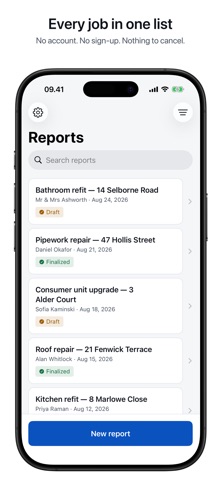
Pay once. No subscription. Ever. Provaro turns a job into a professional photo report your customer is impressed by — a branded PDF, made on site, in under a minute. Photograph the work. Mark up what matters with arrows and circles. Hand over the report before you have packed up your tools. BUILT FOR THE WAY YOU ACTUALLY WORK • Stay in the camera. Shoot a whole room without leaving the viewfinder. • Mark up straight from the photo you just took — one tap, no saving and reopening. • Arrows, circles, dots, freehand and text callouts, in six colours, at a size you set. Big enough to read on a phone and on paper. • Nothing is baked into the picture. Your original photo is never touched, and you can come back days later and add more. • Big buttons. You are wearing gloves, in bad light, using one hand. • Save the phrases you write over and over, and drop them into a caption with one tap. • Add the job address in a tap, and let the report carry a map of where you were. • Already have the photos? Bring in as many as you like from your camera roll. A DOCUMENT THAT LOOKS LIKE A REAL BUSINESS SENT IT • Your logo and company name at the head of the report; your registration number, address, phone, email, website and review link along the foot of every page. • Choose the layout that suits the trade: one photo per page, two-up for before and after, or a grid for dense documentation. • A cover page with the customer, the address and the date — or switch it off when a short call-out does not need one. • See the finished PDF, and how big the file is, before you send it. Small enough to email. • Send it with WhatsApp, iMessage, email, AirDrop — whatever your customer already uses. • Search, sort and archive every job you have documented. WORKS WITH NO SIGNAL Basements. Lofts. Half-built houses. Everything happens on the phone in your hand: capture, markup, the PDF, the lot. No connection is needed at any step, and nothing waits on an upload. ON EVERY DEVICE YOU OWN With Pro, your reports sync through your own iCloud. Start on the phone at the job, finish on the iPad in the van, and the report you made this morning is already there. It is your iCloud account, not a server of ours — one app, one purchase, iPhone and iPad. NO ACCOUNT. NO SIGN-UP. No login, no email to hand over, no trial counting down and no sales call. Your reports never leave your device unless you send them yourself. There is no advertising identifier, no ad network and nothing sold to anybody. Anonymous usage figures — which screens get opened, how long an export takes, never your photos, notes, customers or addresses — tell us what to build next, and Settings has a switch to turn them off. PAY ONCE The whole job is free, including exporting and sharing — that is not a trial, and it never expires. One optional purchase puts your own branding on the document and keeps your reports on every device you own. Bought once, yours for good: no monthly fee, nothing to cancel, no renewal to be surprised by. Because the last thing you need is another subscription.
What's new · 1.5
See your own letterhead before you buy. The Pro screen now shows your letterhead up close: your logo, your company name and the report title, big enough to read. No business profile yet? It shows the empty slots instead, so you can see what goes where. In the PDF preview there is now a "With Pro" tile at the end of the layouts. Tap it to see your report with a letterhead. It never pops up by itself and never gets between you and Share. Just bought Pro? The app now takes you straight from the purchase to adding your logo and details, so your next report carries them. New to Provaro? After each batch of photos, the app goes straight to marking them up with arrows, circles and text. Turn it off (or on, if you've used Provaro before) under Settings → "Mark up photos after each batch". And the welcome screen now shows the real app icon.
Details