

Interval Pro: Timelapse Camera
Teddy Verneuil · Photo & Video
Independent analytics for this App Store listing. AppTracker is not affiliated with Teddy Verneuil.
Chart standing · US
What changed · US
Listing changes AppTracker has observed for this app in this storefront — new versions, price moves, rating shifts, and store copy.
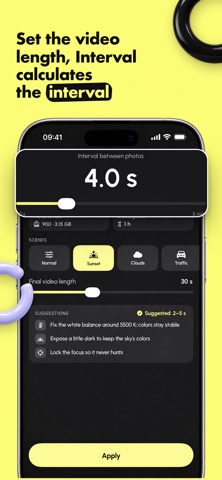
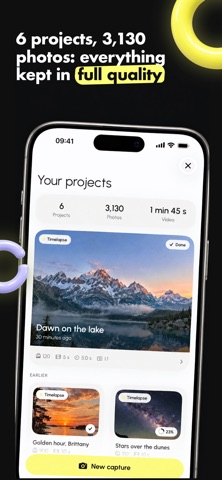
Interval now speaks Spanish and German, and almost every screen has been redesigned. • Simpler settings: pick the interval and the length of the final film, Interval works out how many photos to take and how long to shoot. • Scenes: sunset, clouds, traffic, night sky, construction, crowd. One tap gives you a starting point and shooting tips. • Frame rate is now chosen at export, with the resulting film length shown for each option. • Viewfinder: aspect ratio, grid and level right on the image. • Projects: animated preview of your photos, progress at a glance, exports kept in one place. • Export: see the final framing and exact dimensions before you start. • More reliable long sessions: the screen stays on until the end, even after an interruption. • New welcome tour and new Pro page.
Screenshots



About
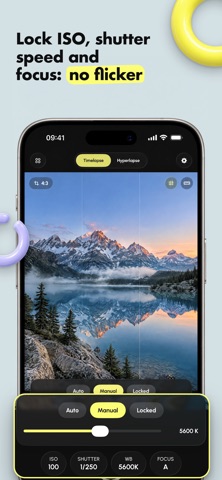
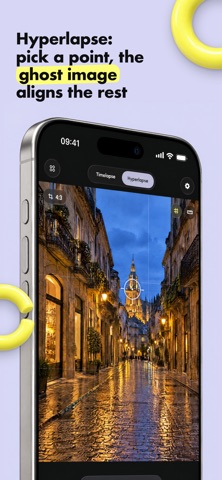
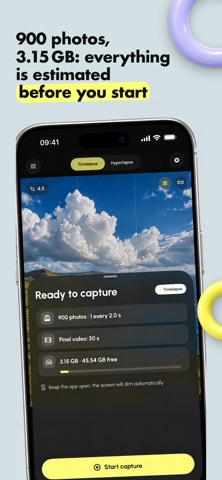
The iPhone's timelapse mode controls nothing. DSLR workflows control everything, but weigh a ton. Interval puts full control in a simple app. LOCKABLE MANUAL CONTROLS ISO, shutter speed, white balance and focus: leave each setting on auto, dial it in by hand, or lock it on the current reading. That lock is what removes flicker, the flaw that gives away amateur timelapses. THE INTERVAL CALCULATOR Give it the length of your event, the video length you want and the frame rate: Interval computes the interval and tells you the photo count, the storage and the battery you need before you even start. No more session ruined by poor planning. STABILIZED HYPERLAPSE Set a target point on your subject, walk, realign the ghost frame of the previous photo, shoot. At export, the analysis aligns every photo and smooths the path. Fluid results, no rig, no tripod. BUILT FOR LONG SESSIONS The screen genuinely lowers its brightness while capturing to save battery. The app pauses by itself if the iPhone gets too hot, then resumes. An incoming call no longer ruins anything: the session picks up exactly where it stopped, locked settings included. PRECISE FRAMING Native 4:3, 16:9, 3:2 or square, with a guide showing exactly what the video will contain. Rule of thirds mapped to your chosen frame, and a horizon line to set the phone up straight. YOUR PHOTOS STAY YOURS Every session keeps its full-quality HEIC photos. Re-export in 1080p or 4K, at 24, 25, 30 or 60 frames per second, as many times as you like. Nothing is thrown away. NO DATA COLLECTED No account, no server, no trackers. Your photos and videos never leave your iPhone. That is not a marketing promise: the app has nowhere to send anything. ONE PRICE, EVERYTHING, FOREVER The app is free with all manual controls, 1080p export and three full-quality exports to try everything. A one-time purchase unlocks 4K, removes the watermark and lifts the export limit. For good. Never a subscription. Built by a photographer who actually uses it in the field.
What's new · 1.1
Interval now speaks Spanish and German, and almost every screen has been redesigned. • Simpler settings: pick the interval and the length of the final film, Interval works out how many photos to take and how long to shoot. • Scenes: sunset, clouds, traffic, night sky, construction, crowd. One tap gives you a starting point and shooting tips. • Frame rate is now chosen at export, with the resulting film length shown for each option. • Viewfinder: aspect ratio, grid and level right on the image. • Projects: animated preview of your photos, progress at a glance, exports kept in one place. • Export: see the final framing and exact dimensions before you start. • More reliable long sessions: the screen stays on until the end, even after an interruption. • New welcome tour and new Pro page.
Details