

Chigiri Memo - Split Notes
Keiji Hirose · Productivity
Independent analytics for this App Store listing. AppTracker is not affiliated with Keiji Hirose.
Chart standing · US
Screenshots




About
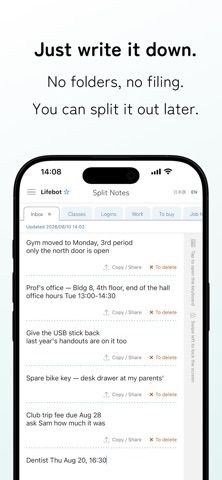
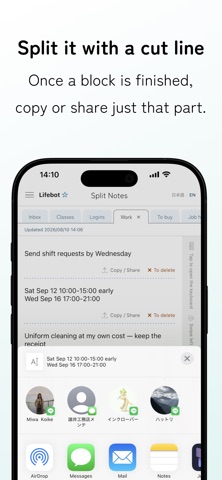
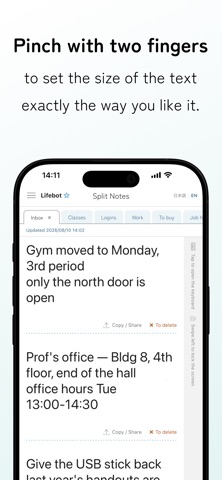
Write it all down first. Split it later. Simple to use, with everything you need in one notepad. Card-based note apps make you decide where something goes before you write it. Split Notes works the other way round: you write onto one page, and split out what you need afterwards. Filing becomes a decision you can postpone. ■ A cut line marks where a block ends Tap "Insert cut line" in the footer and a dotted line appears wherever the cursor is. The Copy / Share and To delete buttons sit just above each line, and they act on the block above that line only. Press and hold a line to remove it, and the blocks above and below become one again. ■ Tabs instead of folders Each tab holds one continuous page, so everything you wrote earlier stays in view while you type. Press and drag a tab to reorder it: gather the ones you use on the left, and the rest slide off the edge of the screen. Nothing is deleted, so scroll sideways and they come back. The order is the filing. ■ Move the cursor without opening the keyboard You can select text without the keyboard popping up every time you touch the page. Tap the strip along the right edge when you want to write. While the keyboard is up, the Insert cut line button floats just above it, so you can split what you wrote without stopping. ■ We tell you when you repeat yourself Press Search all and the app points out passages you wrote twice within the same tab. Tap a row to jump to the note, with both places lit up in yellow. If it turns out you need both, choose "Don't show" and that pair stops appearing. ■ Also included - Full-text search across every tab, with the match lit up in yellow - Earlier versions: the last 30 are kept for each tab - Pinch with two fingers to resize the text; the size you choose is remembered - Screen lock: swipe the right-edge strip to the left to cover the text. Unlock with Face ID / Touch ID, or your device passcode - Dark mode - A double tap selects a whole alphanumeric run, so 1234-5678, user_name and email addresses are not cut in half ■ Your notes never leave your device What you write is stored only in a database on your iPhone. There is no mechanism for sending it to our servers, and there is no account and no sign-in. The screen lock covers what is on the screen. It is not a vault that encrypts the text itself, so please use a dedicated password manager for anything that needs that level of protection. ■ Price Every feature is there from the start, free. Tabs, cut lines and full-text search are unlimited, and the screen lock and dark mode work as well. The only difference is whether ads appear. Removing them is a one-time purchase, not a subscription. Privacy Policy: https://lifebot.jp/chigirimemo/en/privacy/ Terms of Use: https://lifebot.jp/chigirimemo/en/terms/ Contact: https://lifebot.jp/chigirimemo/en/
Details