

Countdown Widget: Any Event
可 吴 · Productivity
Independent analytics for this App Store listing. AppTracker is not affiliated with 可 吴.
Chart standing · US
What changed · US
Listing changes AppTracker has observed for this app in this storefront — new versions, price moves, rating shifts, and store copy.
Stories get a new look. Choose a background for the back of a countdown: dots, grid, ruled lines, gingham, stars, clouds and more, or a photo of your own. The story editor shows your countdown's name as its title again, and you can rename it right there. A new Edit button sits at the top of the back, and “…” in the editor can delete a story; your countdown keeps its photo backdrop. An empty back now has a single + to write, add photos or record. Closing the editor is smoother, and Photo adjustments asks before discarding your changes.
Price & rating history · US
Reconstructed from the listing changes AppTracker has observed in this storefront. A field is charted once it has changed more than once, and each line starts at the value it moved from.
Average rating · ★ 4.70 now · 15 changes on record
Ratings breakdown · US
The star breakdown behind this app's rating in this storefront.
Screenshots


About
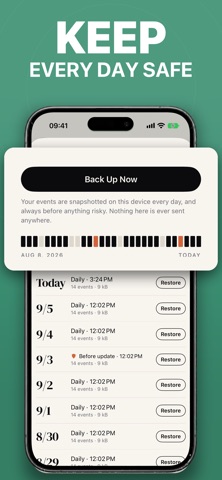
A countdown that never loses your days — and never holds a widget back. Add the day that matters, put it on your home screen, and watch it come closer. No limit on how many you keep, and nothing between you and the number. EVERY WIDGET, FREE • Four widgets: one countdown, the next few in a list, a spotlight, or a tile for each • Every widget size, on the Home Screen and the Lock Screen • Unlimited events — there is no cap, and there never will be • Count down to a date, or count up from one • Recurring events: yearly, monthly, weekly, or every few days • Reminders on the day, and as far ahead as you want • iCloud sync, with no account to make • Import from a calendar, a spreadsheet, or another countdown app — and export any time • No ads, ever COUNT DOWN TO ANYTHING A wedding countdown, a vacation or trip countdown, a birthday or an anniversary. Christmas, New Year, Halloween and Thanksgiving. Exam day, graduation, retirement, a baby due date, a concert, a deadline, payday. Or count the days since a day that has already happened. YOUR DAYS, KEPT Most countdown apps lose your events at the worst moment — an update, a reinstall, a phone that died. This one takes a snapshot of everything on this device every single day, and always before anything risky. Thirty days of history, one tap to restore, and nothing ever leaves your phone. Days that have already passed are never deleted either: they collect into a timeline you can look back through, with the longest wait of each year written next to it. THE MOMENT ITSELF When a countdown reaches a milestone — a hundred days, a week, the morning of — the app opens on the number, full screen, and gives you a card worth sharing. THE BACK OF EVERY EVENT Tap an event and it turns over to a page of its own. Write a few lines, add photos, record a voice — the story of the day, kept with the day. It syncs with iCloud, goes into every backup, and shares as one picture. MADE TO LOOK LIKE YOURS Thirty-six ready-made events, from a birthday to a first day at work, each already set up with the right repeat and the right reminders. Two hundred drawn icons and the whole emoji keyboard. A hundred and fifty-nine full-screen backdrops — twenty-two of them photographs — a hundred and seven in Pro. COUNTDOWN PRO Pro unlocks the Pro backdrops, with a new drop every month, your own photos behind a countdown, the Pro typefaces, the Lock Screen Live Activity, and inviting someone to count down with you. Whatever you unlock while subscribed stays yours for good — cancelling only stops the new ones arriving. Your countdowns, reminders and widgets work the same whether you subscribe or not. ——— Countdown Pro is an auto-renewing subscription. Prices for the annual plan, which includes a 7-day free trial, and the monthly plan are shown in the app before purchase. Payment is charged to your Apple Account at confirmation of purchase. It renews automatically unless cancelled at least 24 hours before the current period ends, and you can manage or cancel it in your Apple Account settings at any time. A one-time Lifetime purchase is also available; it does not renew. Privacy Policy: https://dyljqq.github.io/countdown/privacy-policy/ Terms of Use: https://dyljqq.github.io/countdown/terms-of-service/
What's new · 1.4.24
Stories get a new look. Choose a background for the back of a countdown: dots, grid, ruled lines, gingham, stars, clouds and more, or a photo of your own. The story editor shows your countdown's name as its title again, and you can rename it right there. A new Edit button sits at the top of the back, and “…” in the editor can delete a story; your countdown keeps its photo backdrop. An empty back now has a single + to write, add photos or record. Closing the editor is smoother, and Photo adjustments asks before discarding your changes.
Details