

DrawingSight: Drawing Practice
Code and DESIGN inc · Graphics & Design
Independent analytics for this App Store listing. AppTracker is not affiliated with Code and DESIGN inc.
Chart standing · US
What changed · US
Listing changes AppTracker has observed for this app in this storefront — new versions, price moves, rating shifts, and store copy.
Minor bug fixes
In-app purchases · US
No in-app purchases.
Screenshots




About
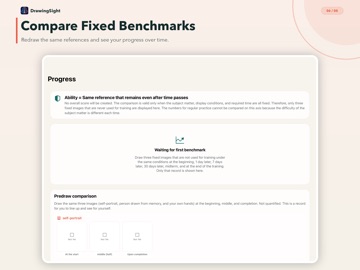
Practice drawing what you actually see, one observation at a time. DrawingSight is a structured observational drawing trainer built for iPad. It does not send finished pictures to generative AI for judgment. You repeatedly compare the reference and canvas while practicing edges, negative spaces, proportion, angle, drawing order, and value. Look. Draw. Look again. Instead of memorizing the whole subject, observe one small section, draw it, and return before the memory becomes vague. Practice with an always-visible reference, press-and-hold Peek, 1.5-second Peek, upside-down drawing, Pure Contour Drawing, and trace-then-copy comparisons. A curriculum with a clear next step - 8 learning modules - 240 unique references - 803 scheduled stages - 6 perception drills for angle, proportion, negative space, value, error detection, and structure recall - Lessons covering purpose, procedure, common mistakes, and self-checks Measure relationships on iPad Matching 4x4 grids connect positions on the reference and canvas. Use the angle guide and Basic Unit marker to compare visible angles and relative lengths as you draw. Compare with yourself under fixed conditions Draw three benchmark references that never appear in training, then repeat them under the same conditions. Track changes in shape, proportion, and angle without turning your work into a score for talent or artistic value. Train perception without drawing Short drills ask you to distinguish angles and proportions, identify negative spaces and value groups, detect planted errors, and recall structure after a brief view. Difficulty adapts to recent accuracy. Private by design Drawings, strokes, measurements, and progress are processed and stored on-device by the app. Nothing is sent to our servers, external AI, or third-party analytics SDKs. There are no accounts, ads, or leaderboards. JSON export happens only when you choose to share it. Key features - PencilKit canvas with Apple Pencil support - Peek with double tap on compatible Apple Pencil models - Optional finger drawing - On-device feedback for shape, proportion, and angle - Progress charts, gallery, and JSON export - Optional daily local reminder - Japanese and English interface - Works offline Use DrawingSight for a first structured drawing course or to revisit the fundamentals of observation. Before drawing more, practice deciding what to look at and what to compare. Requirements - Made exclusively for iPad with iPadOS 16 or later - Used in landscape orientation - Apple Pencil recommended; finger drawing is supported - An optional self-portrait exercise can show the front camera as a live mirror. The app never captures, analyzes, saves, or transmits camera images or video
What's new · 1.9
Minor bug fixes
Details