

Berrak: Hızlı Okuma
DIJITAL PILOT REKLAM SANAYI TICARET LIMITED SIRKETI · Education
Independent analytics for this App Store listing. AppTracker is not affiliated with DIJITAL PILOT REKLAM SANAYI TICARET LIMITED SIRKETI.
Chart standing · US
What changed · US
Listing changes AppTracker has observed for this app in this storefront — new versions, price moves, rating shifts, and store copy.
New look: floating tab bar, swipe to delete with undo, flowing numbers, a category filter rail and refreshed result screens. Training screens are now also in English, German and Spanish.
Screenshots


About
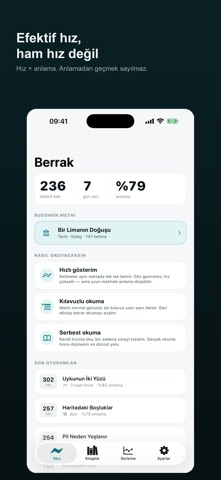
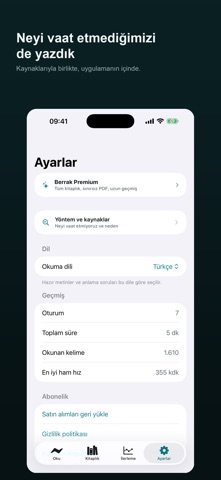
Berrak offers three modes for reading faster with your eyes — and tells you honestly what is actually happening. THREE READING MODES • Rapid display: Words appear one at a time in the same spot. Your eyes stop travelling along the line. Every word is aligned so the letter your eye naturally lands on stays fixed. • Guided reading: The text looks normal while a guide moves through it. Cuts down on going back to reread. • Free reading: Read at your own pace while we simply time you. BRING YOUR OWN BOOK Import a PDF, paste text, or share from Safari. Even scanned pages are turned into text. Long books are split into chapters and you pick up where you left off. NOT SPEED — EFFECTIVE SPEED After each read there is a short comprehension check. The number we show is not raw speed but raw speed multiplied by comprehension. Skip the check and no effective speed is calculated. WHAT WE DON'T PROMISE We don't promise to double or triple your reading speed in a few weeks. Reading research doesn't show that such a jump is possible while comprehension holds. The Method section inside the app explains this with sources. ALSO • Built-in library: science, history, business, fiction, technology — every text with comprehension questions • Compare your speed against a meta-analysis of 190 studies • Daily goal, streak and reminder • Paper, white and night reading surfaces; text size and line spacing • Home Screen widget • No account, no server, no ads Terms of Use (EULA): https://www.apple.com/legal/internet-services/itunes/dev/stdeula/
What's new · 1.5
New look: floating tab bar, swipe to delete with undo, flowing numbers, a category filter rail and refreshed result screens. Training screens are now also in English, German and Spanish.
Details