

Pomini: Focus & Pomodoro Timer
Fenger Digital GmbH · Productivity
Independent analytics for this App Store listing. AppTracker is not affiliated with Fenger Digital GmbH.
Chart standing · US
What changed · US
Listing changes AppTracker has observed for this app in this storefront — new versions, price moves, rating shifts, and store copy.
Small improvements and fixes.
Screenshots




About
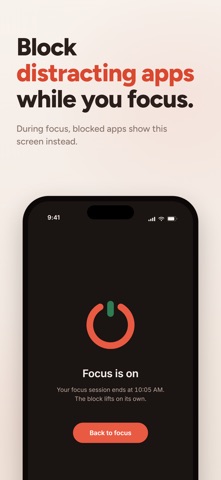
Pomini is a beautiful pomodoro timer that just works. Sessions end exactly on time, even with your iPhone locked and the app closed. Reliability comes first. Pomini anchors every session to the clock instead of counting ticks, so the end of a focus session or a break always arrives on time. Never early, never late, never missed. The running timer lives on your lock screen and in the Dynamic Island as a Live Activity. Play, pause and skip work right there, without unlocking your phone. Widgets for the home screen and lock screen show what is running, what comes next and what you finished today. New to the pomodoro technique? You work in focused sessions and take short breaks, with a long break after every fourth session. Pomini guides the cycle and you can shape every part of it. Whether you study for an exam, plan deep work blocks, or want structure that makes starting easier, the rhythm carries you. Stay off distracting apps while you focus. The app blocker runs on Screen Time: you choose the apps that stay available, and everything else waits until the break. iOS enforces it on your device. Tasks keep your day in view. Estimate each task in pomodoros and Pomini projects your finish time, updated live while the timer runs. Statistics show your focus time and sessions in clean charts, with a detailed session history. A daily goal and streaks are strictly opt-in. Pomini never guilts you: no sad mascots, no shame for a day off. Every session type comes with free preset durations, from a 5 minute break to 90 minute deep work blocks. Auto-start, four completion sounds, and an alarm that can repeat until you react are free as well. Pomini can save finished sessions to Apple Health as mindful minutes and, with Pro, add them to your calendar. Light and dark mode, eight accent colors, and twelve languages. The design keeps the timer first, and settings stay one quiet list. Private by design. No account, no tracking, no server. Your data stays on your phone. Free and Pro, stated plainly. The free timer is complete and stays that way: presets for every session type, auto-start, the Live Activity and Dynamic Island, widgets, tasks with the finish time projection, day and week statistics, all eight accent colors, and Apple Health. Free features never move behind the paywall, and the free presets are never narrowed. Pro adds the custom minute stepper, the app blocker, full statistics history with month and year views, creating and editing session tags, a custom accent color, and calendar sync. Pro is a subscription or a one-time purchase. Terms of use: https://www.apple.com/legal/internet-services/itunes/dev/stdeula/ Privacy policy: https://denisfenger.github.io/pomini/privacy/
What's new · 1.0.4
Small improvements and fixes.
Details