

Countpad: Inventory Tracker
Jatupon Hongweing · Productivity
Independent analytics for this App Store listing. AppTracker is not affiliated with Jatupon Hongweing.
Chart standing · US
What changed · US
Listing changes AppTracker has observed for this app in this storefront — new versions, price moves, rating shifts, and store copy.
Fixed a bug where photos were not copied when setting up a shared inventory from your existing items.
Price & rating history · US
Reconstructed from the listing changes AppTracker has observed in this storefront. A field is charted once it has changed more than once, and each line starts at the value it moved from.
Price · Free now · 2 changes on record
In-app purchases · US
What this app sells inside itself, grouped by kind and priced for this storefront.
Screenshots


About
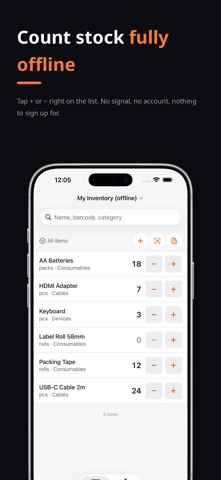
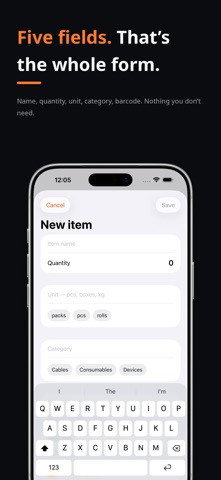
Countpad is a small, fast inventory tracker for people who just need the numbers to be right. Open it, add your items, and count. Tap + or − straight from the list, or tap the number to type it in when there are 143 of something. That is the whole idea. WHAT IT DOES • Count from the list — increase or decrease without opening a detail screen • Type a quantity directly when tapping would be slower • Scan a barcode to jump to an item, or to create one with the barcode attached • Search instantly across name, barcode, category and unit • Filter by category, or by what is in stock and what has run out • Create a report in one tap — a clean PDF and a CSV, ready to share or print • Back up everything to one portable file, and restore it later • Add a photo when two items look alike, and a unit cost when you want the report to total it COUNT TOGETHER (OPTIONAL) Shared inventory lets several people count one stock list at the same time, each on their own phone, with every change appearing on everyone else's screen. Two people counting the same shelf add up — the app never lets one person's count overwrite another's. A shared inventory is always live, so it needs a connection — your own inventory keeps working offline. WORKS WITHOUT A CONNECTION Counting, search, filters, reports, export and backup all work in airplane mode, in a stockroom with no signal, in a basement. Your inventory stays on your device unless you choose to share it — and if you do, it goes to your shared inventory and nowhere else. NO ACCOUNT NEEDED No sign-up, no email, no password. Open the app and start counting. An account is only ever created if you switch on the shared inventory, and you can delete it from inside the app. Terms of Use: https://www.apple.com/legal/internet-services/itunes/dev/stdeula/ Privacy Policy: https://gist.github.com/hjatupon/21ebe78638c416a5373e3b1a766eb433
What's new · 3.1.1
Fixed a bug where photos were not copied when setting up a shared inventory from your existing items.
Details