

FileMend: Convert & Compress
冲 洪 · Utilities
Independent analytics for this App Store listing. AppTracker is not affiliated with 冲 洪.
Chart standing · US
What changed · US
Listing changes AppTracker has observed for this app in this storefront — new versions, price moves, rating shifts, and store copy.
In-app purchases · US
What this app sells inside itself, grouped by kind and priced for this storefront.
Screenshots



About
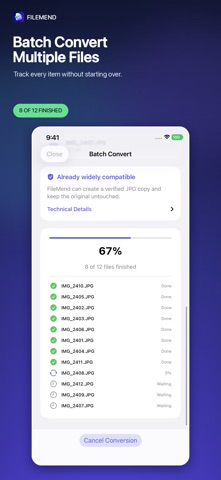
Files should work where you need them. FileMend converts, compresses, and prepares photos, videos, audio, and PDFs on your iPhone or iPad. Choose what you need—fix compatibility, fit an upload limit, prepare for email or websites, or batch process multiple files—and FileMend handles the technical settings. MAKE FILES FIT • Compress photos and videos below 1 MB, 2 MB, 5 MB, 10 MB, 25 MB, or a custom limit. • Verify the output is under your selected size before marking it complete. • Get a clear warning when a target would make the result unusable. CONVERT COMMON FORMATS • Convert HEIC, JPEG, PNG, WebP, and AVIF images to JPEG when supported by your device. • Convert iPhone HEVC/H.265 MOV video to widely compatible H.264/AAC MP4. • Extract audio from video as M4A. • Combine images into PDF, export PDF pages to JPEG, and optimize scanned PDFs. PRIVATE ON YOUR DEVICE • Supported conversion work stays on your device. • No account and no file uploads to a FileMend server. • Remove photo location metadata and keep the capture date when you choose. • Your original files are never changed or automatically deleted. BUILT FOR REAL WORKFLOWS • Import from Files, Photos, Camera, or the Share menu. • Batch process multiple files with per-item progress and failure isolation. • Share results, save to Photos or Files, and revisit verified outputs in History. • Use destination presets for email, website uploads, and maximum compatibility. FileMend validates each result by reopening it and checking required size and format conditions. A failed or cancelled job does not count as a successful conversion. Some formats are available only when supported by your device. Large video conversions may require FileMend to remain open.
Details