

Financial Literacy for Kids
Mark Berger · Education
Independent analytics for this App Store listing. AppTracker is not affiliated with Mark Berger.
Chart standing · US
What changed · US
Listing changes AppTracker has observed for this app in this storefront — new versions, price moves, rating shifts, and store copy.
New in version 1.17: • Your avatar sits in the circle the way it does on the setup screen. The square inside the ring is gone. • The bottom bar no longer cuts words off. "Settings" used to run into the edge of the screen. • Nothing flickers after a page change, and the progress bar no longer restarts from zero. • The pointer to the certificate is gone from Tools. You still find it under Results.
In-app purchases · US
No in-app purchases.
Screenshots




Keywords this app targets
Search terms AppTracker associates with this app — estimates, not search volume. ❝ = in the app's title; a highlighted number is its current position for that term.
Similar apps
Competitors and close alternatives, as estimated by AppTracker.
 Zero: Financial Knowledge
Daron Pritchard
Zero: Financial Knowledge
Daron Pritchard
 YNAB
You Need A Budget LLC
YNAB
You Need A Budget LLC
 KidCash: Allowance & Savings
Perry Hampton
KidCash: Allowance & Savings
Perry Hampton
 Parent Pay - School Finance AI
Hayk Martirosyan
Parent Pay - School Finance AI
Hayk Martirosyan
 Invest Fast: Learn Stocks
Matthew Avery
Invest Fast: Learn Stocks
Matthew Avery
 Financial Numbers
Kyosuke Tabata
Financial Numbers
Kyosuke Tabata
 Money Up! - Build Life Skills
Peter Easdown
Money Up! - Build Life Skills
Peter Easdown
 Montessori Preschool, Kids 3-7
EDOKI ACADEMY
Montessori Preschool, Kids 3-7
EDOKI ACADEMY
About
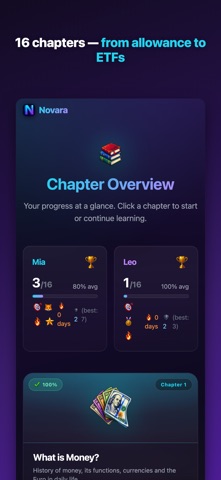
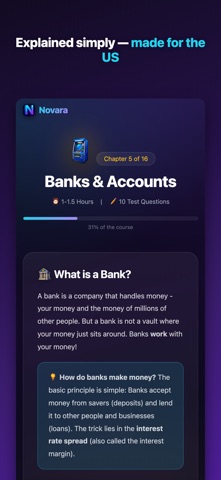
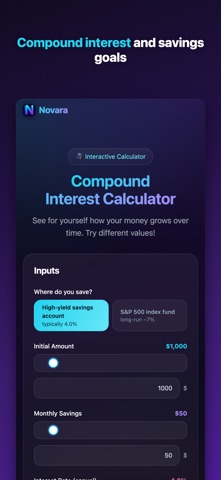
Kids will use money every day of their lives, but nobody teaches them how it works. Novara does: 16 short chapters, a quiz after every one, made for the United States. Start free with the first 3 chapters. Then one small one-time purchase unlocks all 16 chapters for your whole family. No subscription, no monthly fee, no debit card, no ads. WHY PARENTS CHOOSE NOVARA Most "money apps for kids" are debit cards with a monthly subscription. Novara is a course. It teaches how money actually works, from allowance to paycheck to credit score, so your child understands the system before they're in it. 16 CHAPTERS, FROM ALLOWANCE TO FIRST HOME • Money basics · Income and spending · Your first paycheck • Saving and goals · Banks and accounts · Interest and compounding • Subscription traps · Scams and social media · Debt and credit • Taxes · Insurance · Investing and the stock market • Risk and diversification · Understanding crypto risks · Your financial plan · Your first home Every chapter ends with a 10-question quiz, graded and explained on the spot. TOOLS THEY'LL ACTUALLY USE • Compound interest, inflation and savings goal calculators, a budget planner and a family finance challenge • Streaks and badges that keep the momentum going • Cel-shaded avatars that cheer your child on in every quiz (pick a preset, or parents can turn a photo into one) BUILT FOR PARENTS • One parent account, a profile for each child • A parent dashboard with every child's results, chapter by chapter • Child mode with a parent PIN, so kids can't change settings or switch profiles • Kids never enter an email address, phone number or personal details • One purchase covers the whole family with Family Sharing MADE FOR THE U.S. Not a generic course with the flags swapped. The U.S. edition teaches the terms your child will actually meet: FDIC deposit insurance, the IRS, FICA payroll tax, the standard deduction, 401(k)s and Roth IRAs, the S&P 500, FICO credit scores and the credit bureaus, 529 plans and FAFSA. In dollars. SAFE BY DESIGN • No ads, no tracking, no data sold. Ever. • Built with COPPA in mind: kids share no personal details, and parents control the account • Learning data is stored on servers in the EU under strict European privacy law • Delete the account and all data any time, right inside the app • Age rating 9+ WHO MADE THIS Novara is built by a father of three in Germany who wanted his own kids to understand money before their first paycheck. It's the course he wished existed, and now it exists for your family too. Download Novara, try the first 3 chapters free, and give your kids the one subject school still skips. Novara provides financial education, not financial, investment or tax advice. All content is for educational purposes only.
What's new · 1.17
New in version 1.17: • Your avatar sits in the circle the way it does on the setup screen. The square inside the ring is gone. • The bottom bar no longer cuts words off. "Settings" used to run into the edge of the screen. • Nothing flickers after a page change, and the progress bar no longer restarts from zero. • The pointer to the certificate is gone from Tools. You still find it under Results.
Details