

カギカケ - 写真と動画を隠す金庫
Daisuke Yamaguchi · Utilities
Independent analytics for this App Store listing. AppTracker is not affiliated with Daisuke Yamaguchi.
Chart standing · US
What changed · US
Listing changes AppTracker has observed for this app in this storefront — new versions, price moves, rating shifts, and store copy.
Minor improvements.
Screenshots


Keywords this app targets
Search terms AppTracker associates with this app — estimates, not search volume. ❝ = in the app's title; a highlighted number is its current position for that term.
Similar apps
Competitors and close alternatives, as estimated by AppTracker.
 LockMyPic Private Photo Vault
Viktor Varadi
2 shared topics
LockMyPic Private Photo Vault
Viktor Varadi
2 shared topics
 Secret Vault - Hide Photos
嘉露 姚
2 shared topics
Secret Vault - Hide Photos
嘉露 姚
2 shared topics
 Photo Enclave
庆昀 贺
2 shared topics
Photo Enclave
庆昀 贺
2 shared topics
 Secret Album Pro - Still Box
Tomohiko Saitoh
2 shared topics
Secret Album Pro - Still Box
Tomohiko Saitoh
2 shared topics
 Private View
Ewgeniy Isurov
3 shared topics
Private View
Ewgeniy Isurov
3 shared topics
 Safety Photo+Video Pro
Sixbytes PLT
3 shared topics
Safety Photo+Video Pro
Sixbytes PLT
3 shared topics
 Photo Vault-Hide Secret Photos
Shenzhen Ziyun Technology Co.,Ltd
3 shared topics
Photo Vault-Hide Secret Photos
Shenzhen Ziyun Technology Co.,Ltd
3 shared topics
 Locked Folder Pro - Code Acces
Danilo Oliveira
3 shared topics
Locked Folder Pro - Code Acces
Danilo Oliveira
3 shared topics
About
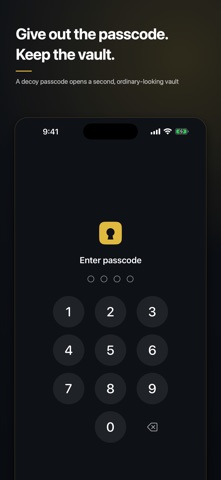
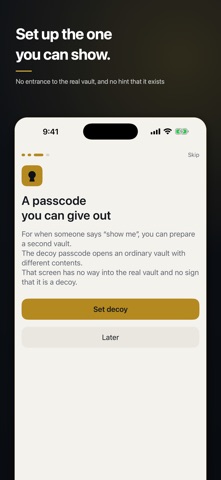
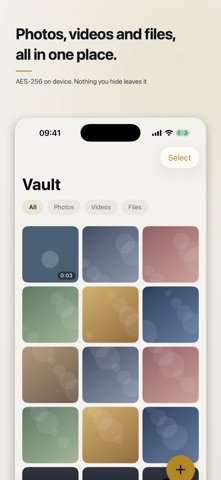
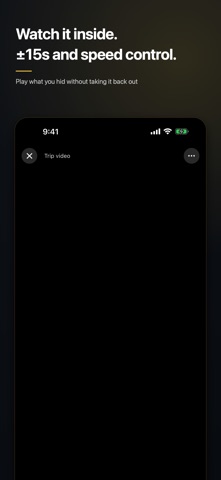
The moment someone says “show me your passcode”, hiding is over. Kagikake is built so that giving out a passcode does not give away the vault. No ads. No subscriptions. Your photos and passcode never leave your iPhone. DECOY PASSCODE Set a second passcode alongside your real one. Typing it opens a different vault, with different contents. The decoy side shows no sign that it is a decoy, and has no way into the real vault. You can add and view items there too, so it never looks suspiciously empty. INTRUDER PHOTO Turn on “Photograph wrong-code attempts” and, each time the passcode is entered wrong three times in a row, the front camera takes one photo (up to five until you next unlock – no burst shooting). The photos are encrypted into the “Intruders” album of the real vault only. Nothing about them appears in the decoy vault. When you next open the real vault, Kagikake tells you how many wrong attempts there were and how many photos were taken. It is off by default, and camera access is only requested when you turn it on. ENCRYPTED, ON THIS DEVICE ONLY Everything you hide is sealed with AES-256-GCM. The key lives in the device Keychain, so the files alone cannot be read. The photos, videos and files you hide, your passcode and intruder photos never leave your iPhone. To improve the app, only anonymous usage data (such as which screens are opened) is counted with Google Analytics — you can turn this off in Settings. Which vault, real or decoy, was opened is never reported. NO ADS, NO IN-APP PURCHASES There is no ad framework inside, so ads can never appear later. No in-app purchases. Every feature works from day one. DON’T LOSE IT WHEN YOU SWITCH PHONES Export the whole vault into a single file protected by a passphrase. Keep it in Files, send it by AirDrop or store it on a computer, then restore it on your new iPhone exactly as it was. WATCH IT WITHOUT TAKING IT OUT Pinch to zoom photos, swipe for the next one. Videos play inside the app with ±15 second skip and 0.5x–2.0x speed. Large files are encrypted in small chunks, so long videos don’t run out of memory. SMALL THINGS THAT KEEP IT HIDDEN · The app switcher never shows your contents – the app covers itself as you leave · Auto-lock: immediately, after 1 minute or after 5 minutes · Choose the Home Screen icon colour (gold, silver or ivory) · A log of when a wrong passcode was entered · Contents are not exposed to the Files app THREE STEPS TO START 1. Choose a passcode (4 or 6 digits; Face ID works too) 2. Choose a decoy passcode (you can do this later) 3. Pick photos to hide – and decide whether to delete the originals The first-run tutorial walks you through all three, and can be replayed from Settings. PLEASE NOTE If you forget your passcode, the contents cannot be opened – not even by the developer. Deleting the app deletes its contents. Export a backup of anything important. From Sauna Inc.
What's new · 1.4
Minor improvements.
Details