

Cauldron: Token Printer
Joseph Liechty · Utilities
Independent analytics for this App Store listing. AppTracker is not affiliated with Joseph Liechty.
Chart standing · US
What changed · US
Listing changes AppTracker has observed for this app in this storefront — new versions, price moves, rating shifts, and store copy.
New printers - Rollo Wireless (X1040). The fastest printer Cauldron drives: playtest an edh deck, printed in 45 seconds, over Wi-Fi, with no overheating. Cauldron checks whether it is set for shipping labels before every print, and settings has one button to switch it to receipt paper and back. 3⅛-inch rolls only. - Rongta RPP300. A full-size card on a battery, on 80mm paper. No cutter: tear it off. Faster Queue Print Jobs for Legacy printers Each small printer was run until it overheated, repeatedly, and is now paced by what it measured. - Phomemo M110: prints at its lightest burn, which was readable and far cooler. A deck went from about 50 minutes to about 12. - Munbyn FM226: set to its lightest density; a deck in about 15 minutes. - Rongta RPP300: found to overheat at about 34 full-size cards. It is now paced, and an overheat is detected, waited out and the card reprinted. New ways to play and print - Horde Magic: everyone against a deck that plays itself, with the original Zombie list. More Horde decks will be added later, as well as custom decks. - Any card by voice: say "card" and then its name. *not guaranteed to work - as tens of thousands of cards is a lot* - Markers: say "marker" and then any phrase for a label with your own words. - Turn timer: whose turn it is, how long it has taken, pass and pause (long-press pass to pause). - Deck lists from a file: IMPORT reads a .txt or .csv as well as the clipboard. Booster packs - Every kind of booster a set was sold in (draft, play, set, collector, Jumpstart), each with its own named button on one row under the set. - The button fills as the pack prints and can't be tapped twice. - Every card in a pack is sleeve-size and lies the same way, in all three print modes. - Packs and chaos drafts print on the Rollo as well as the NETUM. Chaos draft - Cards print with rules in clear type by default; full card is a choice. - A draft can be kept to Standard, Pioneer, Modern or Legacy. - Leaving a draft in progress asks first. Card printing - Reminder text can be left off. - Tap and untap symbols are drawn as arrows. Settings - The product shelf can be filtered (draft packs, full, and lists the Rongta and Rollo with their paper. Fixes - M110 cards that came out starting twice after an interrupted print. - A crash when the board turned back over with commander damage showing. - Momir Vig lagging; its prints now go through the print queue. - Spoken labels printing nothing after switching printers. - Settings changes not applying when you left by tapping outside the panel. - A new pairing attempt now takes over from one in progress. - A long note printing as a meter of text on the NETUM. - One haptic for a bulk print, not one per card; "Stopped" clears itself. - Crashes are now included in the next feedback report.
Price & rating history · US
Reconstructed from the listing changes AppTracker has observed in this storefront. A field is charted once it has changed more than once, and each line starts at the value it moved from.
Average rating · ★ 4.98 now · 3 changes on record
Ratings breakdown · US
The star breakdown behind this app's rating in this storefront.
In-app purchases · US
No in-app purchases.
Screenshots


About
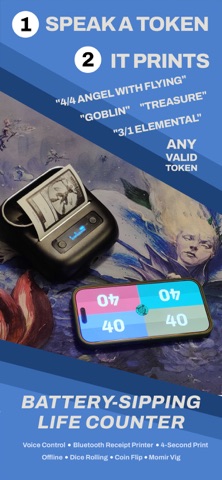
Say the name of a card. It comes out of your printer. Cauldron is the life counter that prints tokens. Hold the microphone, say "goblin" or "4/4 angel with flying" or "treasure," and the card is found, dithered and printed on receipt paper in about a second. LIFE COUNTER • Drag from one seat to another to deal commander damage. Partner commanders are counted apart. • Draw a glyph on a seat to give it the monarch, poison, energy, experience, rads or the city's blessing. • Three fingers across the board starts a new game. Two fingers opens the settings. • Circle the dial to undo and redo. • Supports up to 8 players in a pod (7+ on iPad / tablet only) • Say "2/4/6/8 players" to change the game size. • Archenemy and Treachery, dealt and printed by the app. • This is a full-fledged life counter, without menus. THE PRINTER • Cauldron drives the Phomemo M110, MUNBYN FM226 and NETUM NT-861 over Bluetooth, and the Brother QL-710W and QL-810W over Wi-Fi. • The NT-861 cuts each card off the roll, at real card size or sized to fit a sleeve. • The printers use no ink - merely fast heat transfer to receipt paper, they will not smear. • A print queue lines up as many cards as you like, shows what is left, and can be stopped and carried on. DICE AND COINS AND MORE • Say "roll a d20" or "flip a coin." • Four, six, eight, ten, twelve, twenty and a hundred sides... • all announced out loud by a voice synthesizer that sounds like it was built in 1982. • "Momir {number}" to get a random creature. Say "Calling Mr. Vig" for a standalone Momir Vig faux-payphone interface. • Say "copy camera" to photograph a card and print it as a copy. THE TOKEN INDEX Say "token index" or hold four fingers on the board to open it. • Browse and search every printable token, by name or by artist, with filters for each kind of token. • Swipe through each token's artwork and print the one you like. • Tap an artwork to keep it out of random picks, or long-press to always print that one. • SHUFFLE, RANDOM and SEQUENTIAL control how artwork is dealt when you ask by voice. • A UB switch keeps Universes Beyond artwork out of random picks. • Create your own tokens, and add your own artwork to or photo library. • Favorites: drag the heart onto artwork you love, then print one, print them all, or share them as an Instagram story. • See any card full screen, with the artist credited u • Tap (i) for a guide to everything. THE CARD INDEX Say "card index" to open it. • Every real Magic card, held on your phone, to search, sort and print. • Browse by set, and print a booster pack. • Print a whole card, or just its art or its words. GAME MODES • Archenemy, Treachery, Planechase • Chaos draft Every token is indexed on your phone, so lookup is quick. Speech is recognised on the device. Nothing about your game is uploaded anywhere. No Accounts. No Signups. WHAT YOU NEED A supported thermal printer and a roll of paper. Cauldron will show you which paper and printer to purchase. Card data and images from Scryfall. Cauldron is unofficial Fan Content permitted under the Fan Content Policy. Not approved/endorsed by Wizards. Portions of the materials used are property of Wizards of the Coast. ©Wizards of Apple's Standard Terms of Use apply: https://www.apple.com/legal/internet-services/itunes/dev/stdeula/
What's new · 1.1.3
New printers - Rollo Wireless (X1040). The fastest printer Cauldron drives: playtest an edh deck, printed in 45 seconds, over Wi-Fi, with no overheating. Cauldron checks whether it is set for shipping labels before every print, and settings has one button to switch it to receipt paper and back. 3⅛-inch rolls only. - Rongta RPP300. A full-size card on a battery, on 80mm paper. No cutter: tear it off. Faster Queue Print Jobs for Legacy printers Each small printer was run until it overheated, repeatedly, and is now paced by what it measured. - Phomemo M110: prints at its lightest burn, which was readable and far cooler. A deck went from about 50 minutes to about 12. - Munbyn FM226: set to its lightest density; a deck in about 15 minutes. - Rongta RPP300: found to overheat at about 34 full-size cards. It is now paced, and an overheat is detected, waited out and the card reprinted. New ways to play and print - Horde Magic: everyone against a deck that plays itself, with the original Zombie list. More Horde decks will be added later, as well as custom decks. - Any card by voice: say "card" and then its name. *not guaranteed to work - as tens of thousands of cards is a lot* - Markers: say "marker" and then any phrase for a label with your own words. - Turn timer: whose turn it is, how long it has taken, pass and pause (long-press pass to pause). - Deck lists from a file: IMPORT reads a .txt or .csv as well as the clipboard. Booster packs - Every kind of booster a set was sold in (draft, play, set, collector, Jumpstart), each with its own named button on one row under the set. - The button fills as the pack prints and can't be tapped twice. - Every card in a pack is sleeve-size and lies the same way, in all three print modes. - Packs and chaos drafts print on the Rollo as well as the NETUM. Chaos draft - Cards print with rules in clear type by default; full card is a choice. - A draft can be kept to Standard, Pioneer, Modern or Legacy. - Leaving a draft in progress asks first. Card printing - Reminder text can be left off. - Tap and untap symbols are drawn as arrows. Settings - The product shelf can be filtered (draft packs, full, and lists the Rongta and Rollo with their paper. Fixes - M110 cards that came out starting twice after an interrupted print. - A crash when the board turned back over with commander damage showing. - Momir Vig lagging; its prints now go through the print queue. - Spoken labels printing nothing after switching printers. - Settings changes not applying when you left by tapping outside the panel. - A new pairing attempt now takes over from one in progress. - A long note printing as a meter of text on the NETUM. - One haptic for a bulk print, not one per card; "Stopped" clears itself. - Crashes are now included in the next feedback report.
Details