

AI Architecture Render
OANA RINALDI · Graphics & Design
Independent analytics for this App Store listing. AppTracker is not affiliated with OANA RINALDI.
Chart standing · US
What changed · US
Listing changes AppTracker has observed for this app in this storefront — new versions, price moves, rating shifts, and store copy.
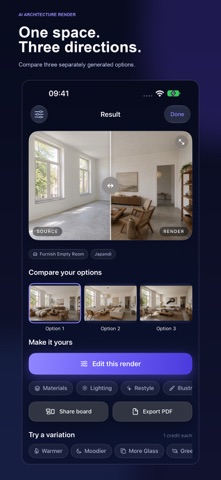
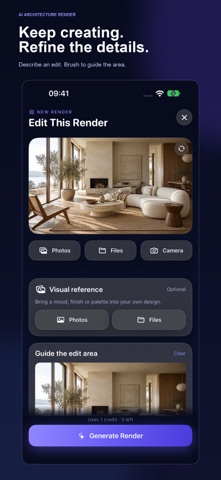
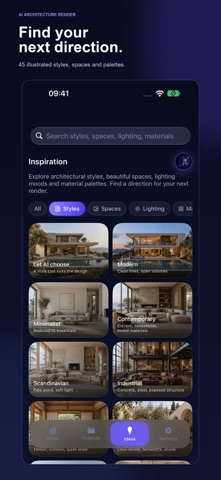
Your architectural design studio just got bigger. • Furnish empty rooms, redesign facades and explore gardens and landscapes. • Change materials, restyle renders, relight scenes and create watercolor, pencil, marker or collage presentations. • Edit a render you like, with optional brush marks to guide the area to change. • Add a visual reference for materials and design mood. • Generate and compare three design options, with the total credit cost shown upfront. • Share presentation boards as images or PDFs. • Explore an Ideas library illustrated with 45 architectural images. • Continue saved projects with their images and settings, and start directly from an inspiration page. The original six tools, saved projects and credit plans remain available.
In-app purchases · US
What this app sells inside itself, grouped by kind and priced for this storefront.
Screenshots



About
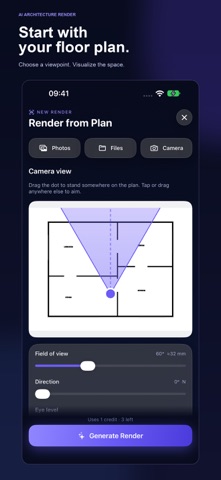
Turn sketches, model views, photos and floor plans into architectural concepts — then refine a result you love. YOUR DESIGN STUDIO Sketch / Design to Render Bring a sketch, line drawing or untextured 3D model screenshot to life. Render Interior & Exterior Explore finishes, furnishing, lighting and architectural atmosphere from your own source image. Furnish Empty Room Visualize an empty room with furniture, textiles and decor in a coherent design style. Redesign Facade Explore cladding, colors, finishes and entrance details for an existing building. Garden & Landscape Visualize planting, patios, paths and outdoor seating for gardens, courtyards and terraces. Change Materials Explore a new floor, wall finish or facade palette. Add your own instructions and brush marks to guide the area to change. Restyle My Render Explore another design language using a photo or existing render. Change Lighting Explore bright daylight, soft overcast light, golden hour or a night-time atmosphere. Presentation Styles Transform architecture into watercolor, pencil, marker or collage illustrations. Sketch to Plan, Color & Furnish Plan, Render from Plan Create drafted-looking plans, colored presentation plans, or an inferred interior view from a viewpoint placed on a floor plan. REFINE, COMPARE, PRESENT Edit a selected render instead of starting again. Describe a change, replace furniture, add planting or mark an object to remove. Brush marks guide the AI; precise edit boundaries may vary. Add an optional reference image for a material palette or design mood. Your source image remains the subject. Generate one render or three design options. Each option is generated separately; the total credit cost is shown before you start. Compare the results and export a presentation board as an image or PDF. Continue saved projects with their source images and settings. Browse 45 illustrated inspiration pages and start a render with a selected style, space, lighting mood or material palette. PLANS OR YOUR OWN KEY Render with credits: Monthly includes 30 credits per month; Pro includes 100. One-time packs of 15 or 50 credits do not expire. A Standard render uses 1 credit; High uses 3. Three options use three times the per-render credits. No OpenAI account is needed when using credits. Alternatively, bring your own OpenAI API key. It is stored in your device's Keychain, and each image generation is billed directly to your OpenAI account. Projects and images are saved on your device. Optional Sign in with Apple lets you recover your credit account on another device. Our render server temporarily holds completed results so interrupted requests can be recovered. SUBSCRIPTIONS Monthly and Pro renew automatically until cancelled. Payment is charged to your Apple ID at confirmation and renewal unless cancelled at least 24 hours before the period ends. Manage subscriptions in your App Store account settings. Monthly credits reset at renewal and do not roll over. AI CONCEPT VISUALIZATIONS AI interprets your images; it does not reconstruct a measured 3D model. Faithful controls instruct it to preserve the design, but details and proportions can change. Check results against your drawings. Plans are raster images, not CAD files; dimensions are illustrative. Views inferred from plans are approximate. Selected source and reference images, edit marks and descriptions are sent to OpenAI for processing, after your consent. Terms of Use: https://www.apple.com/legal/internet-services/itunes/dev/stdeula/ Privacy Policy: https://aiarch-render.oanaunciuleanu.workers.dev/privacy
What's new · 1.2
Your architectural design studio just got bigger. • Furnish empty rooms, redesign facades and explore gardens and landscapes. • Change materials, restyle renders, relight scenes and create watercolor, pencil, marker or collage presentations. • Edit a render you like, with optional brush marks to guide the area to change. • Add a visual reference for materials and design mood. • Generate and compare three design options, with the total credit cost shown upfront. • Share presentation boards as images or PDFs. • Explore an Ideas library illustrated with 45 architectural images. • Continue saved projects with their images and settings, and start directly from an inspiration page. The original six tools, saved projects and credit plans remain available.
Details