

Voces: Ear Training & Pitch
Alexey Ovod · Education
Independent analytics for this App Store listing. AppTracker is not affiliated with Alexey Ovod.
Chart standing · US
Screenshots



About
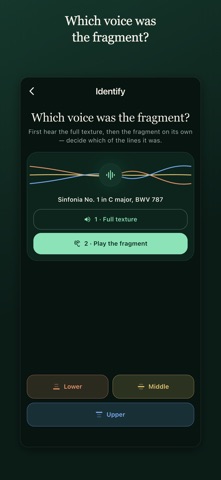
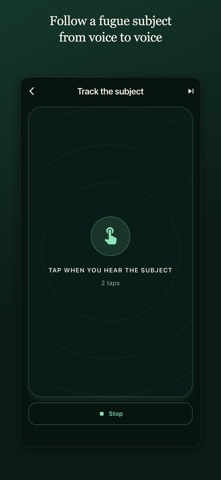
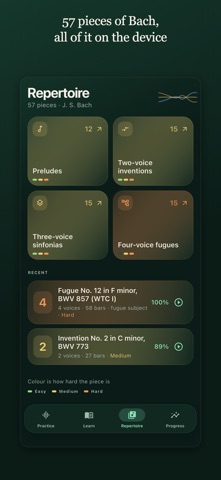
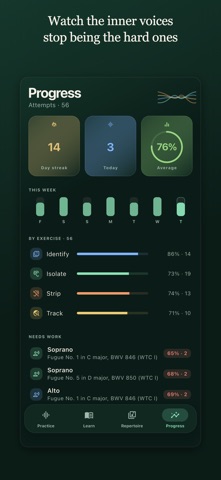
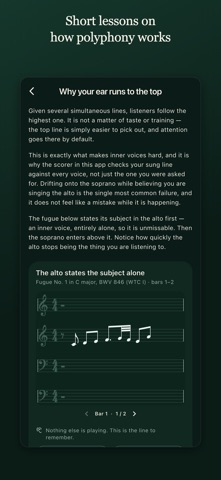
Every ear trainer teaches you to hear chords. None of them teaches you to hear a line. Voces trains horizontal listening — locking onto one voice inside a polyphonic texture and holding it while three others move around it. It is the skill a choir singer needs to keep the alto part, and the one that turns a Bach fugue from a wash of notes into four separate arguments. FOUR WAYS TO PRACTISE Identify — hear the full texture, then one voice alone. Name which line it was. Isolate — all voices play. Sing the highlighted one, with the staff and note names to help. Strip — all voices play. Reproduce the named voice from memory. No staff, no note names, no guidance. Track — a whole fugue plays. Tap every time you hear the subject enter, in any voice. IT KNOWS WHEN YOU DRIFT Sing into the microphone and Voces scores your line note by note against the voice you were asked for. It also matches you against every other voice — so when you slide onto the soprano without noticing, it says so. That drift is the exact habit this app exists to break. 57 PIECES BY BACH 15 two-voice inventions, 15 three-voice sinfonias, 15 fugues from The Well-Tempered Clavier and 12 preludes. 23 pieces in two voices, 18 in three, 16 in four — the texture thickens as your ear does. A PATH, NOT A PILE OF EXERCISES An eight-week course — forty lessons, from two outer voices to a subject in stretto. It answers "where will I be in two months?", which a shuffled drill never can. Or learn one work. Any piece divides into sections and you walk it end to end, voice by voice, at a tempo you climb rather than one you are handed. And any stretch of it can be put on a loop with your own line taken out: the other voices keep going, a bar of clicks counts you in each time round, and nothing is scored. ALSO • Mute or solo any voice — study a line on its own, then put it back into the texture • Live pitch indicator: on pitch, too high, too low • Sing it, play it into the microphone, or connect a MIDI keyboard • Octave-tolerant scoring — take the line where your voice actually sits • Daily sessions that adjust difficulty as you improve, or free practice • Progress broken down by voice, so you can see which line you keep losing • A Learn section covering the theory behind what you are hearing • Twelve languages: English, German, Russian, French, Spanish, Italian, Swedish, Portuguese, Japanese, Korean, Simplified Chinese, Traditional Chinese FREE AND PREMIUM Free: five pieces, all four exercises on them, the whole scorer including the drift warning, every study aid, and week one of the course. No time limit, no daily cap. Premium opens the other fifty-two pieces, the remaining seven weeks, and the section-by-section path through any work. Monthly, yearly with a seven-day free trial, or a one-time lifetime purchase. Prices are shown in the app before anything is bought. Voces needs the microphone for the singing exercises. Pitch detection runs on your device — nothing you sing is recorded or uploaded. The whole corpus is bundled, so practice works offline and needs no account; the App Store is contacted only to check a purchase. Terms of Use (EULA): https://hearvoices.app/terms
What's new · 1.1.0
REHEARSE — A PASSAGE ON A LOOP, WITH YOUR LINE TAKEN OUT Until now every exercise was an exam: sing it once, get a score. This is the other half of learning a piece. Pick a section, or a run of them, and it plays round and round with every voice sounding except the one you are learning. A bar of clicks counts you in before each pass, so there is always somewhere to come in from. Take it slower than your rung whenever you want. Drop your own line back in for the first few passes, before you know it — switching it off again is the moment the rehearsal really starts. Nothing is scored here and the microphone stays shut. Play along until the line is yours. It opens from any section on a piece's map, already set up: your voice, at your tempo, taken out. Or open it from the map itself to loop a longer stretch — the join between two sections is exactly what a metronome on its own cannot give you. ALSO • Time spent rehearsing keeps a daily streak alive. It is never scored: a loop can say that a day happened, not how it went. • The session summary now says something beyond the percentage — your first session, a clean run, or the days you have strung together. • Settings has a way to reach a person: something not working, a piece you want added, or a score that looks wrong.
Details