

Lux & Flicker Meter
小燕 陈 · Utilities
Independent analytics for this App Store listing. AppTracker is not affiliated with 小燕 陈.
Chart standing · US
In-app purchases · US
No in-app purchases.
Screenshots

About
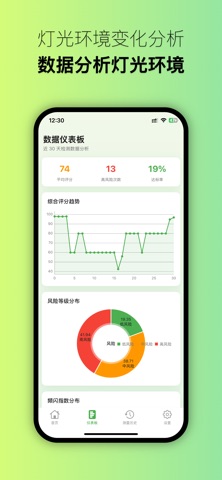
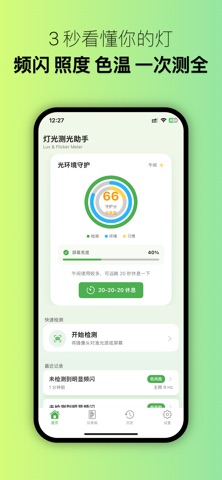
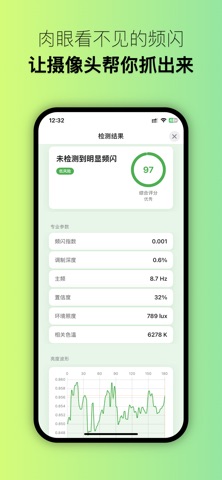
Light Meter Assistant is a utility app that turns your phone into a light environment tester. Whether you're choosing a desk lamp for your child, evaluating workstation lighting, or checking whether your screen or bedside lamp is emitting proper light, just open the app, point it at the light source, and get a readable light environment report in seconds. 【Core Detection Capabilities】 Flicker Detection: Captures brightness variations at high speed via the camera, performs spectrum analysis, and outputs flicker index, modulation depth, dominant frequency, and light environment risk level, revealing invisible light fluctuations to the naked eye. Illuminance Estimation: Estimates the ambient illuminance range based on scene brightness, telling you whether the current light is suitable for reading, working, or nighttime relaxation. Color Temperature Estimation: Identifies warm, neutral, or cool light tendencies to help you choose fixtures that better fit the scene. Comprehensive Light Environment Score: Combines flicker, illuminance, and color temperature metrics to give a holistic score from 0 to 100 along with actionable suggestions. 【Data Management & Tracking】 History records are automatically grouped by date, with support for tagging different light sources (desk lamp, living room ceiling light, bedroom night light, etc.) for easy categorization. Data dashboard aggregates the last 30 days of test data, presenting score trend curves, risk level distribution, and flicker index distribution for an intuitive view of light environment changes. Light source environment profiles build individual trend charts for each tag, enabling long-term tracking of the same lamp's performance. One‑tap export of PDF reports and CSV data for archiving, sharing, or discussion with family and friends. 【Thoughtful Details】 Smart eye care reminders: Customize rest intervals and daily reminder times to help you build healthy resting habits. Multi‑language support: Simplified Chinese, Traditional Chinese, English. Theme modes: Day, Night, and Follow System – freely switch among three appearances. Adjustable camera parameters: Preferred frame rate, measurement duration, and auto‑save can all be set as needed. All detection is performed locally, and data stays on your device – no upload to servers. 【Use Cases】 Quick on‑site screening before selecting desk lamps, floor lamps, or ceiling lights Evaluating whether lighting in studies, classrooms, or offices meets standards Families concerned about children's study environments and elderly living area lighting Users who care about screen flicker and the effect of nighttime light on sleep Advanced users who need to record and compare long‑term performance across multiple light sources 【How to Use】 Open the app and tap "Start Test" on the home page. Point the camera at the light source or screen you want to test. Keep it steady for a few seconds while the capture completes. Review the conclusion card, professional parameters, waveform chart, and spectrum graph. Add notes and light source tags to the record, or export a PDF report. Target Users: Parents concerned about their children's study light environment Office workers and students who spend long hours at desks, working or reading Consumers looking to buy desk lamps or screen bars Professionals such as interior designers and lighting consultants Photographers and video creators who demand high light quality Disclaimer: This app is a consumer‑grade light environment screening tool. Results are for reference only and cannot replace professional testing instruments. Illuminance estimation accuracy is approximately ±15‑20%, color temperature estimation accuracy is about ±5%, and it can detect periodic flicker with a modulation depth above 3%. Camera parameters vary by phone model, so results may differ. Take control of your light environment – make every lamp more trustworthy.
Details