

Speed Overlay Camera
Lenny Shtab · Photo & Video
Independent analytics for this App Store listing. AppTracker is not affiliated with Lenny Shtab.
Chart standing · US
What changed · US
Listing changes AppTracker has observed for this app in this storefront — new versions, price moves, rating shifts, and store copy.
• Improved background export stability. • Fixed issues when deleting layers and resetting overlays. • Fixed display issues with recording duration, altitude, heart rate and pace. • Improved Live Activity reminders.
Ratings breakdown · US
The star breakdown behind this app's rating in this storefront.
Screenshots



About
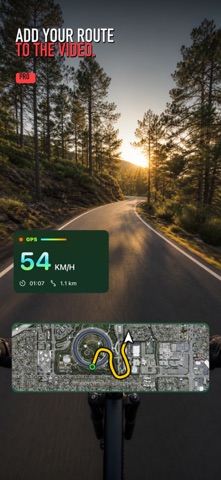
Record rides and walks with speed, distance, and a route map on your videos. Show where you went and how you moved. Speed Overlay Camera helps you customize your videos, record routes without filming, and revisit your favorite moments on a 3D map. SPEED AND ROUTE ON VIDEO • Record portrait and landscape video on iPhone. • Add GPS speed, elapsed time, distance, and a route map. • Choose a style and adjust the size and position of your overlays before saving. • Save your finished video to Photos and share it. RECORD A ROUTE WITHOUT VIDEO Record your route, speed, distance, and duration without filming. While recording a route, you can lock your iPhone or use another app. APPLE WATCH WORKOUTS Start a walking, running, cycling, hiking, skiing, or snowboarding workout in the Apple Watch app. Record your route and workout stats, including heart rate with your permission. The completed workout transfers to your paired iPhone when the devices can connect. YOUR ROUTE IN 3D Zoom and rotate the map to change your viewpoint. Play back your route, jump to a moment, and view speed or pace, elevation, and available heart-rate data. Select a section for playback and poster creation. Your original recording stays unchanged. A ROUTE POSTER WORTH SHARING Create an image with your route and activity stats. Choose satellite imagery or a stylized design, save your poster as a PNG, and share it with friends. You can hide the start and end of your route before creating a poster, provided the route is long enough. FREE FEATURES AND PRO Clean and Sport HUD styles, plus a compact route map, are available for free. Route recording, Apple Watch workouts, and 3D route viewing do not require Pro. Free video and poster exports include the app's watermark. Pro Forever is a one-time purchase with no subscription. It unlocks: • Performance HUD; • Wide Route Map for videos; • the Snow poster style and Story format; • video and poster exports without a watermark. You can preview Performance HUD and Wide Route Map on your video before purchasing. Exporting a video with these features requires Pro, or you can replace them with free alternatives. NO SIGN-UP. NO ADS. Videos, routes, and projects are stored locally on your devices. Health access is used for workouts recorded by the Apple Watch app and to recover those workouts. Maps are provided through Apple services. 3D detail depends on the location, device, and internet connection. GPS accuracy and heart-rate availability depend on your device, permissions, and recording conditions.
What's new · 2.1.5
• Improved background export stability. • Fixed issues when deleting layers and resetting overlays. • Fixed display issues with recording duration, altitude, heart rate and pace. • Improved Live Activity reminders.
Details