

PUB File Viewer & Converter
Eutopix Labs P S A · Productivity
Independent analytics for this App Store listing. AppTracker is not affiliated with Eutopix Labs P S A.
Chart standing · US
What changed · US
Listing changes AppTracker has observed for this app in this storefront — new versions, price moves, rating shifts, and store copy.
• Before you upgrade to convert a file to PDF, the upgrade screen now shows a watermarked preview of your own first page. • The Pro button names what you asked for, and purchase or restore problems appear on the upgrade screen itself. • New Shortcuts: Open in PubHarbor, and Convert to PDF (Pro). • If a file won’t open or opens with serious problems, you can send it to support. You choose whether to attach it.
Screenshots


About
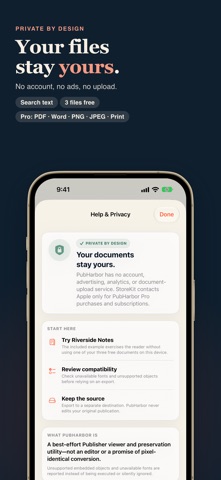
Open PUB files and preview Publisher documents before exporting them to PDF, Word or images. PubHarbor keeps your .pub files readable without Publisher or Windows. PubHarbor turns compatible .pub publications into a clear, browsable archive while keeping document contents on your device. Best results with Publisher 2002 and later; Publisher 97, 98 and 2000 files open with simpler formatting. OPEN AND INSPECT • Preview multipage Publisher documents with thumbnails • Zoom from 25% to 400% and search recognized text • Review missing fonts, unsupported objects, and compatibility warnings • Try the included two-page example before importing a file • Also open Visio (.vsd, .vsdx, .vdx), CorelDRAW (.cdr) and WordPerfect (.wpd) files PRESERVE AND SHARE • Export searchable multipage PDF • Export an editable Word document (.docx) from Publisher and WordPerfect files • Export pages as PNG or JPEG at 144 DPI • Export embedded raster assets as a ZIP archive • Generate detailed compatibility reports • Export the recognized text as a plain .txt file • Print from iPhone, iPad and Mac BUILT FOR APPLE DEVICES • Security-scoped recent-document library • Separate document windows on iPad and Mac • Convert whole folders to PDF on Mac, for every supported format • Quick Look previews on Mac • Native, offline conversion—no account, analytics SDK, or document upload The free preview opens up to three distinct imported documents. Export and print need PubHarbor Pro, which also unlocks unlimited opening, asset archiving, and Mac batch conversion. Get Pro with an optional monthly or yearly subscription or a one-time lifetime purchase. Microsoft Publisher is a trademark of Microsoft Corporation. PubHarbor is an independent product and is not affiliated with Microsoft. Visio is a trademark of Microsoft Corporation. CorelDRAW and WordPerfect are trademarks of Corel Corporation; PubHarbor is not affiliated with Corel. Terms of Use: https://www.apple.com/legal/internet-services/itunes/dev/stdeula/ Privacy Policy: https://pubharbor.app/privacy/
What's new · 1.0.9
• Before you upgrade to convert a file to PDF, the upgrade screen now shows a watermarked preview of your own first page. • The Pro button names what you asked for, and purchase or restore problems appear on the upgrade screen itself. • New Shortcuts: Open in PubHarbor, and Convert to PDF (Pro). • If a file won’t open or opens with serious problems, you can send it to support. You choose whether to attach it.
Details