
Chart standing · US
Screenshots


About
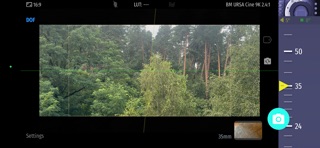
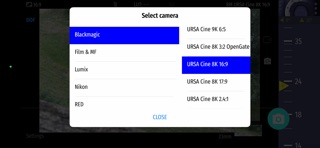
Magic Universal ViewFinder presents you a precise framing preview for a number of cameras you'll be shooting with, right where you stand with your iPhone / iPad. It simulates the field of view of any camera or lens and can help thousands of professionals in filmmaking at the preproduction. BEFORE BUYING: feel free to first try out the free variants of this app designed for a specific make, eg Magic Cinema ViewFinder. If you find the app helpful then proceed with the purchase. Thank you! PLEASE READ: this app does not turn your Apple device into an external monitor, but operates as a stand-alone director's viewfinder. The app is a digital directors viewfinder -- it helps you see the exact field of view for your future shot. Select the camera from the menu and rotate the wheel to select the focal length of the lens. Supported camera makes: - ARRI - Blackmagic Design - Canon - Lumix - Nikon - Sony - RED - Phase One - a number of film formats Magic ViewFinder simulates using tele adapters or anamorphic optics on your camera (see menu). From the menu you can also select the aspect ratio of the frame guide overlaying your image. Magic ViewFinder also lets you apply some commonly used color presets (also known as LUTs) to the live picture, which brings you even closer to the final shot. When you have found the right view, you may save it for future reference, with additional data like the focal length, date and time and camera / lens information. While taking a photo, you may lock exposure and turn on and off the auto focus to better control the captured picture. You can set camera to work in constant auto-focus mode, or lock the focus temporarily. You can also tap the live screen to focus on particular objects (which turns on the focus-locked mode). White balance may work in Auto, Locked or Manual mode. If the field of view of your real camera is wider than your in-device camera, the app adds 'padding' around the image, since the device cannot 'see' what is beyond. It is the best solution that we developed first amongst other viewfinder apps. Please note that position of your iPhone/iPad should correspond to the 'nodal point' of your real lens, which is somewhere in the middle of the lens. Additional info about the app may be read at: https://dev.kadru.net If you have any issues please email us for a quick support: dev@kadru.net Terms of Use: http://dev.kadru.net/tos.html Privacy Policy: http://dev.kadru.net/privacy_policy/Privacy_Policy_Magic_Cinema_ViewFinder.html
Details