

FlashSCORE
Lemm · Education
Independent analytics for this App Store listing. AppTracker is not affiliated with Lemm.
Chart standing · US
What changed · US
Listing changes AppTracker has observed for this app in this storefront — new versions, price moves, rating shifts, and store copy.
* Added a new guide accessible from the top-right corner of the home screen, covering the basic knowledge needed to use FlashSCORE. * Split Interval Mode into two sub-modes: * **Interval Recognition:** The original Interval Mode. * **Interval Specification:** A random reference note and a specified interval are shown during the question phase. During the answer phase, the note at that interval from the reference note is displayed. * Added a global transposition setting for playback sounds, key names, and note names throughout the app. This can be changed from the Global Settings on the home screen. * Fixed UI layout issues that caused elements such as home screen icons and the Next button to display incorrectly on certain devices. * Added **Training Display Settings** to the Global Settings on the home screen, allowing you to adjust the proportions of the display areas for different elements on the training screen. The existing **Next Button Position** setting has also been integrated into this section. * Added additional settings to each of the six modes, allowing further fine-tuning of the display area proportions for individual elements. * Fixed missing candidates in the Chord Reverse Lookup Dictionary, such as Cb major not appearing when Eb is selected as the top note. * Fixed several translation errors.
In-app purchases · US
No in-app purchases.
Screenshots



Similar apps
Competitors and close alternatives, as estimated by AppTracker.






About
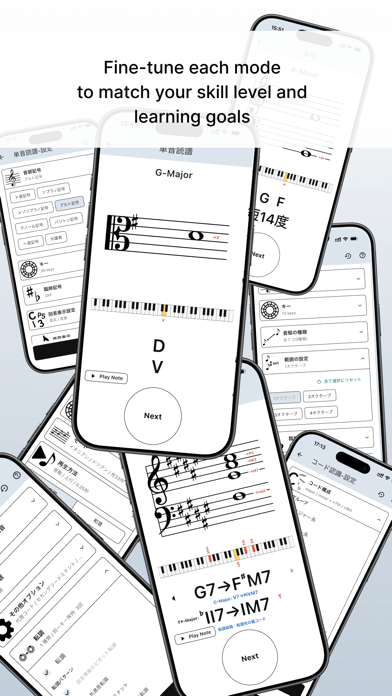
FlashSCORE is a focused training app for building practical music fundamentals through short, repeatable drills. Instead of simply reading explanations, you answer one question after another in a flashcard-style format. The goal is to turn knowledge you understand into knowledge you can recall and use instantly. TRAIN ACROSS A WIDE RANGE OF TOPICS • Sight reading • Intervals • Modes • Chord recognition • Reverse chord lookup • Chord progressions • Keys and scale degrees • Borrowed chords • Modulation From fundamental reading skills to practical music theory, FlashSCORE gives you a simple way to practice repeatedly at your own pace. DESIGNED FOR QUICK PRACTICE FlashSCORE is built around short, focused exercises. You can practice whenever you have a few minutes, concentrate on areas you find difficult, or use it as a regular warm-up for your musical skills. The simple flashcard-style workflow keeps you moving from one question to the next without unnecessary distractions. FOR MUSICIANS AT EVERY STAGE FlashSCORE is designed for students, instrumentalists, composers, arrangers, producers, and anyone who wants to strengthen their understanding of music. Improve the fundamentals that support reading, analysis, composition, arrangement, and performance. Build fluency through repetition. Make music theory something you can use — not just something you know.
What's new · 1.0.2
* Added a new guide accessible from the top-right corner of the home screen, covering the basic knowledge needed to use FlashSCORE. * Split Interval Mode into two sub-modes: * **Interval Recognition:** The original Interval Mode. * **Interval Specification:** A random reference note and a specified interval are shown during the question phase. During the answer phase, the note at that interval from the reference note is displayed. * Added a global transposition setting for playback sounds, key names, and note names throughout the app. This can be changed from the Global Settings on the home screen. * Fixed UI layout issues that caused elements such as home screen icons and the Next button to display incorrectly on certain devices. * Added **Training Display Settings** to the Global Settings on the home screen, allowing you to adjust the proportions of the display areas for different elements on the training screen. The existing **Next Button Position** setting has also been integrated into this section. * Added additional settings to each of the six modes, allowing further fine-tuning of the display area proportions for individual elements. * Fixed missing candidates in the Chord Reverse Lookup Dictionary, such as Cb major not appearing when Eb is selected as the top note. * Fixed several translation errors.
Details