

(A)ss(I)stantCoach
Matt Powers · Sports
Independent analytics for this App Store listing. AppTracker is not affiliated with Matt Powers.
Chart standing · US
What changed · US
Listing changes AppTracker has observed for this app in this storefront — new versions, price moves, rating shifts, and store copy.
New in 1.2 Start Game (live scoring): score a game from the bench: Big buttons for goals, shots and penalties on either side, plus a period tracker. Goals record the scorer, up to two assists, the strength (even, power play, shorthanded, empty net), and who was on the ice for plus/minus. After a penalty, your PP or PK units pop up on screen. End Game builds a shareable box score and adds goals, assists, plus/minus, penalty minutes and games played to each player's season stats. Vision Board: your whole organization side by side by tier (EHL, EHLP, Tier 1, 2, 3 or custom). Drag a player to move him between tiers, and each lineup can draw from one tier. Drag to swap: press and drag a player onto another spot in the lineup and the two trade places. Bigger lineups: add or remove forward lines (up to 8), D pairs (up to 6) and goalies (up to 4). More units: PP2, PK2 and beyond, plus 3-on-3 OT, 6-on-5 and protect-the-lead groups. Each is graded by the assistant and printed on the chart and Coach's Card. Player Out: pick an injured or ejected player and see the best reshuffle, with the grade change, before you apply it. Pairings: how many games each line, pair and duo has played together. Last game vs. this opponent: pull up your lineup from the last game against tonight's team. Backup and staff sharing: export one team file to Files or iCloud Drive, or AirDrop it to an assistant. Faster lineup board: fixed a slowdown that made the board lag with large rosters.
In-app purchases · US
No in-app purchases.
Screenshots





Keywords this app targets
Search terms AppTracker associates with this app — estimates, not search volume. ❝ = in the app's title; a highlighted number is its current position for that term.
Similar apps
Competitors and close alternatives, as estimated by AppTracker.






About
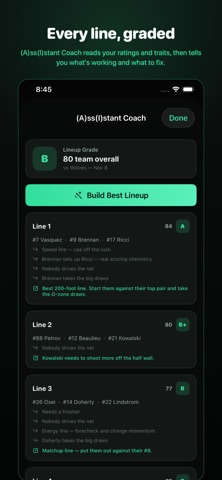
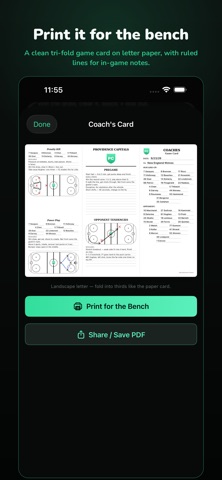
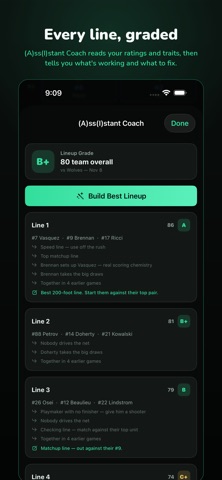
Your lineup and your assistant coach. Nothing else. (A)ss(I)stant Coach is a deliberately small tool for hockey coaches and general managers. Upload your roster, build your lines, and get an honest read on them before puck drop — without wading through a practice planner, a video library and a team feed to get there. BUILD YOUR LINES • Four forward lines, three defense pairs, starter and backup, PP1, PK1 and scratches — all on one screen • Tap any slot to see your whole bench, with jersey numbers and overall ratings right in the list • Private notes on every line and pair: chemistry, matchups, what to fix. Only you ever see them • Save as many lineups as you want, duplicate one, or pull last game's lines forward in a single tap (A)ss(I)STANT COACH It grades every unit from A+ to D and explains itself in plain hockey language: • "Playmaker with no finisher — give him a shooter" • "Both wingers on their off-wing" • "Nobody at the net front — the goalie sees everything" • "No faceoff specialist for the shorthanded draw" • "#21 Kowalski rates above #19 Fitzgerald — consider dressing him" Then tap Build Best Lineup and it assembles your strongest group: natural positions first, handedness second, your own ratings as the tiebreaker — faceoff men at center, wingers chosen to complement their center, a puck-mover paired with a defender, and your power-play quarterback where he belongs. It runs entirely on your device using your own ratings and trait tags. It is a rules-based assistant, not a chatbot, and your roster never leaves your phone. RATE AND TAG YOUR PLAYERS • Grade skaters on Skating, Shooting, Playmaking, Defense and Compete — goalies on Reflexes, Positioning, Rebound Control and Compete • Tag them from 80+ scouting traits: Sniper, Playmaker, Net-Front Presence, Shutdown, Faceoff Specialist, Power-Play Quarterback, Penalty Killer, Burner, Grinder and more • Broadcast-style player cards rank each player by percentile against your own roster at his position — not against some league average • Archive a season and every player keeps a permanent history, so the cards grow season-over-season trend graphs as your team develops UPLOAD YOUR ROSTER IN SECONDS • Import a CSV from a league site or a spreadsheet, or paste a list straight from a text or an email • Column headers are detected and matched for you • Or add players one at a time — whatever's faster PUBLISH THE CHART • A clean, print-style line chart with your team crest, lines, pairs, goalies, special teams and scratches • Share it as an image, copy the lines as text for the group chat, or AirPrint it for the room • Your private line notes never appear on the published chart YOUR TEAM, YOUR LOGO Upload your own logo once and it shows up everywhere — the line chart you publish, your player cards and your roster. NO ACCOUNT. NO SUBSCRIPTION. NO INTERNET. There is no sign-up, no cloud and nothing to sync. Everything lives on your device, which means it works on the bench, in the barn and on the bus. Built for junior, college, high school, AAA, youth and men's league coaches who just want the lineup part done right.
What's new · 2.0
New in 1.2 Start Game (live scoring): score a game from the bench: Big buttons for goals, shots and penalties on either side, plus a period tracker. Goals record the scorer, up to two assists, the strength (even, power play, shorthanded, empty net), and who was on the ice for plus/minus. After a penalty, your PP or PK units pop up on screen. End Game builds a shareable box score and adds goals, assists, plus/minus, penalty minutes and games played to each player's season stats. Vision Board: your whole organization side by side by tier (EHL, EHLP, Tier 1, 2, 3 or custom). Drag a player to move him between tiers, and each lineup can draw from one tier. Drag to swap: press and drag a player onto another spot in the lineup and the two trade places. Bigger lineups: add or remove forward lines (up to 8), D pairs (up to 6) and goalies (up to 4). More units: PP2, PK2 and beyond, plus 3-on-3 OT, 6-on-5 and protect-the-lead groups. Each is graded by the assistant and printed on the chart and Coach's Card. Player Out: pick an injured or ejected player and see the best reshuffle, with the grade change, before you apply it. Pairings: how many games each line, pair and duo has played together. Last game vs. this opponent: pull up your lineup from the last game against tonight's team. Backup and staff sharing: export one team file to Files or iCloud Drive, or AirDrop it to an assistant. Faster lineup board: fixed a slowdown that made the board lag with large rosters.
Details