

Recipe Tin: Family Recipes
Zossoz inc · Food & Drink
Independent analytics for this App Store listing. AppTracker is not affiliated with Zossoz inc.
Chart standing · US
What changed · US
Listing changes AppTracker has observed for this app in this storefront — new versions, price moves, rating shifts, and store copy.
Share a shopping list with family. Invite your spouse, your kids, or whoever does the shopping to one list, and everyone sees items and check-offs as they happen — while every other list you keep stays yours. Sharing uses Apple's own share sheet and your own iCloud; there's still no account. Your tin on every device. Turn on iCloud sync in Settings and your recipes, card photos, voice notes, meals, planner, and shopping lists stay the same on your iPhone and iPad. It's off until you turn it on, it lives in your own private iCloud, and you can turn it off any time without losing anything. Both are free. Share a recipe with anyone from the recipe's menu.
Screenshots



About
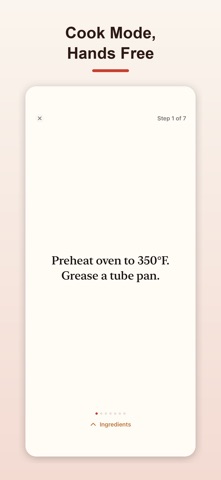
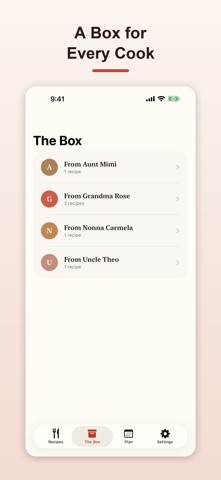
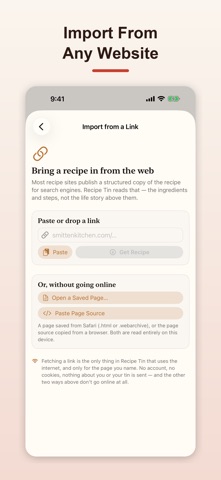
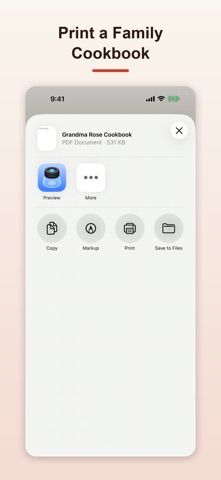
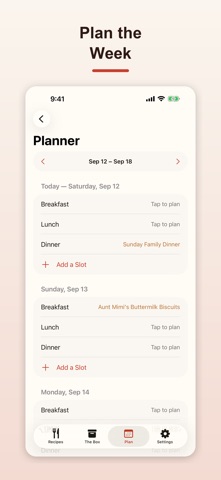
Some recipes are written in cursive on a card that's been splattered with fifty Thanksgivings. Recipe Tin keeps them — handwriting and all — free, with everything you need to actually use the tin every day. FREE, NO LIMITS • Save as many recipes as you want, each with its own photographed card kept forever, zoomable, right next to a typed version • Multiple photos per card — front and back, or a few scanned pages • Cook Mode: a full-screen, one-step-at-a-time view that keeps the screen awake while you cook • Search everything — title, person, ingredients, steps, the story — and scale any recipe with a tap; quantities recalculate in real fractions (1½, ¾), the way recipes are actually written • Print a single recipe as a beautiful typeset PDF card, or send it straight to someone else's tin • Back up the whole tin, or restore one, any time • Find a recipe or start Cook Mode with Siri, and search your tin from Spotlight — no need to open the app first • Meals: build a menu for an occasion out of your own recipes — courses, guest count, and per-course serving overrides — with a "Cook" button straight into Cook Mode for each recipe • Planning: a week-at-a-glance planner for Breakfast/Lunch/Dinner (or your own custom slots), with a "Today" card on the Recipes tab so you can see the day's plan at a glance • Shopping lists: build a checklist from one recipe, a whole meal, or your planned week — quantities are scaled and combined automatically — then check items off, or send it to Reminders. Keep as many lists as you like • Share a list with family: invite your spouse or kids to one shopping list and everyone sees items and check-offs as they happen, while your other lists stay yours • iCloud sync: turn it on and your recipes, card photos, voice notes, meals, planner, and lists show up on your iPhone and iPad alike THE BOX Recipes live under the person they came from — "From Grandma Rosa, 6 recipes" — and open like a drawer of index cards, not a database. UNLOCK RECIPE TIN COOKBOOK — ONE PURCHASE, EVERYTHING BELOW, FOREVER • Import from a Link — paste any recipe website's URL and Recipe Tin reads the recipe straight off the page • Bring in your whole Paprika library in one pass — titles, categories, ingredients, steps, and photos, all matched so a re-import never duplicates what's already in your tin • Export a per-person cookbook — every recipe from one cook bundled into a single gift-ready PDF, card photo included • On iPhones with Apple Intelligence: retype a photographed card into a structured recipe in one tap, reconstruct a lost dish from a photo and a description, get an ingredient substitution, or troubleshoot a recipe that didn't turn out right — all processed entirely on your device YOURS, PRIVATELY No account, ever, and no server of ours. Your tin lives on your device. If you want it on your iPad too, turn on iCloud sync and it's kept in your own private iCloud — off by default, and yours to turn off. Share a single shopping list with family and everyone sees check-offs live. Otherwise Recipe Tin only goes online to read the page you paste for Import from a Link. Everything else, including Apple Intelligence, runs entirely on your device. Recipe Tin Cookbook is one small one-time purchase — no subscription, ever — and it covers your whole family through Family Sharing. The food is how they loved you. Keep the instructions.
What's new · 1.4
Share a shopping list with family. Invite your spouse, your kids, or whoever does the shopping to one list, and everyone sees items and check-offs as they happen — while every other list you keep stays yours. Sharing uses Apple's own share sheet and your own iCloud; there's still no account. Your tin on every device. Turn on iCloud sync in Settings and your recipes, card photos, voice notes, meals, planner, and shopping lists stay the same on your iPhone and iPad. It's off until you turn it on, it lives in your own private iCloud, and you can turn it off any time without losing anything. Both are free. Share a recipe with anyone from the recipe's menu.
Details