

OnePage PPT: AI Slide Maker
Guan Feng Lai · Productivity
Independent analytics for this App Store listing. AppTracker is not affiliated with Guan Feng Lai.
Chart standing · US
What changed · US
Listing changes AppTracker has observed for this app in this storefront — new versions, price moves, rating shifts, and store copy.
This update refreshes our App Store information. Everything in the app works the same as before.
In-app purchases · US
What this app sells inside itself, grouped by kind and priced for this storefront.
Screenshots



About
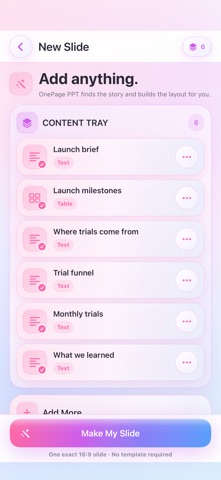
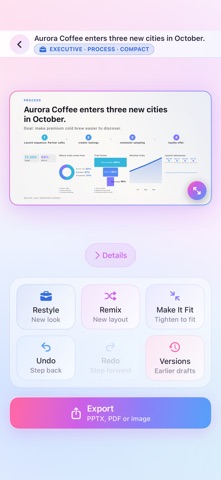
Turn a wall of text into ONE slide people actually read. OnePage PPT reads whatever you give it — typed notes, pasted text, screenshots, photos, PDFs, CSV tables — finds the key points, and lays them out as a single, presentation-ready 16:9 slide. No template picking. No dragging boxes around. HOW IT WORKS 1. Add anything: type, paste, snap a photo, or import a PDF or spreadsheet. 2. Tap Make My Slide. Your content is summarised into headlines and turned into the right visual. 3. Present it, or export it. IT CHOOSES THE RIGHT VISUAL Numbers become column, bar, line, donut or funnel charts. Steps become a process flow. Dates become a timeline. Two options become a comparison. Findings become a matrix or a hierarchy. It only draws a chart the data can honestly support — it never invents figures. REDESIGN UNTIL IT'S RIGHT Six one-tap redesigns — Cleaner, More Visual, More Professional, More Bold, More Compact, More Editorial — each genuinely rebuilds the slide with different chart forms, typography and layout. Lock any element you like and redesign around it. EXPORT ANYWHERE • Editable .pptx for PowerPoint, Keynote and Google Slides • PDF for sharing and printing • High-resolution PNG for docs, email and chat EDIT EVERY DETAIL Tap any element to rewrite it, swap an image, reorder blocks, or change the style. Full version history lets you go back to any earlier draft. PRIVATE BY DESIGN Everything runs on your device. Your projects and images stay on your iPhone or iPad; exported files leave it only when you share them yourself. No account, no sign-in, no tracking — and it works with no network at all. BUILT FOR Consultants, founders, students, teachers, project managers and anyone who has to make one clear page out of a lot of information. ONE-TIME PURCHASE Try it free. Lifetime Pro is a single purchase — no subscription, no recurring fee.
What's new · 1.0.7
This update refreshes our App Store information. Everything in the app works the same as before.
Details