

Video Compressor – Shrink MP4
EMRE KOTUN · Photo & Video
Independent analytics for this App Store listing. AppTracker is not affiliated with EMRE KOTUN.
Chart standing · US
What changed · US
Listing changes AppTracker has observed for this app in this storefront — new versions, price moves, rating shifts, and store copy.
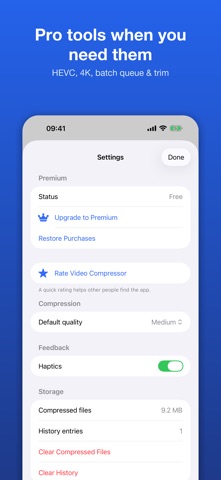
• Now in 12 languages • New Premium plans: weekly, yearly with free trial, or lifetime • Smarter paywall timing and a new "Rate" option in Settings • Performance and stability improvements
In-app purchases · US
What this app sells inside itself, grouped by kind and priced for this storefront.
Screenshots


About
Video Compressor makes big videos small enough to send, upload or keep — right on your iPhone. Pick a video, pick a quality, tap Compress. You see the estimated file size before you start, and nothing ever leaves your device. WHY PEOPLE USE IT • Video too large for email, messaging apps, chat servers or a web upload form • iPhone storage full of 4K clips • Need an MP4/MOV under a size limit (e.g. 25 MB) fast HOW IT WORKS • Medium — 720p, great for sharing (free) • Small Size — 480p, smallest file (free) • High Quality — same resolution, lighter bitrate (Premium) • Custom — choose bitrate, resolution, frame rate, codec and audio (Premium) Typical results: 50–90% smaller files with quality that still looks sharp on a phone. PREMIUM • HEVC (H.265) for much smaller files, or H.264 for maximum compatibility • 4K and 1440p output • Batch compression: queue many videos, keeps running in the background • Editor: trim, rotate and flip before compressing • Save your own presets Premium is available weekly, yearly (with a free trial) or as a one-time lifetime purchase. PRIVATE BY DESIGN Compression runs 100% on device with Apple's video engine. No upload, no account, no ads, no watermark, no tracking. BUILT FOR iOS • Share Sheet: compress straight from Photos or Files • Shortcuts & Siri actions, Home Screen widget • History with before/after sizes and total space saved • Save to Photos or Files, optionally delete the original • Available in 12 languages Subscriptions renew automatically unless cancelled at least 24 hours before the end of the period. Manage or cancel anytime in your Apple ID settings. Terms of Use: https://www.apple.com/legal/internet-services/itunes/dev/stdeula/ Privacy Policy: https://www.termsfeed.com/live/1b7f299e-8207-4a3a-bcd3-ad59603dbcbc
What's new · 1.2
• Now in 12 languages • New Premium plans: weekly, yearly with free trial, or lifetime • Smarter paywall timing and a new "Rate" option in Settings • Performance and stability improvements
Details