

Paper Scan: Scan to PDF
Meng-Yi Hsu · Productivity
Independent analytics for this App Store listing. AppTracker is not affiliated with Meng-Yi Hsu.
Chart standing · US
What changed · US
Listing changes AppTracker has observed for this app in this storefront — new versions, price moves, rating shifts, and store copy.
Small update. Nothing changes in the app.
Price & rating history · US
Reconstructed from the listing changes AppTracker has observed in this storefront. A field is charted once it has changed more than once, and each line starts at the value it moved from.
Average rating · ★ 1.00 now · 3 changes on record
In-app purchases · US
What this app sells inside itself, grouped by kind and priced for this storefront.
Screenshots



About
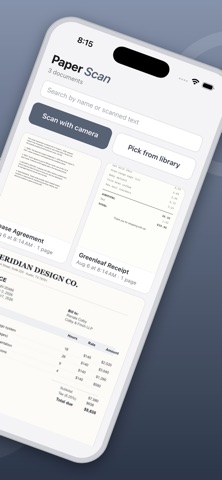
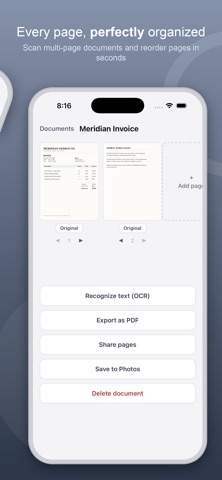
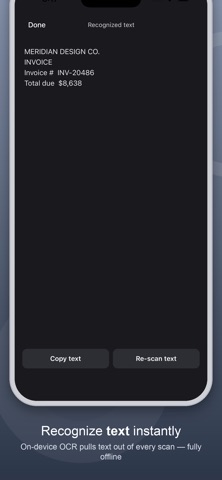
Paper Scan turns your iPhone into a fast, private document scanner. Every scan, every recognized word and every PDF you export stays on your device — none of it is ever uploaded or sold, and scanning and OCR both work with the phone in airplane mode. No account. No sign-up. No email. No ads. Open it, point it at a page, and scan. Point the camera at any document and Paper Scan automatically detects its edges and corrects the perspective — no manual cropping needed. Capture multi-page documents in one pass, then reorder, rename, or add more pages any time. Enhance any scan with a tap: choose Original, Grayscale, Black & White, or Enhance for a clean, readable page. Recognize text right on your device with on-device OCR, then copy it or search your documents by what they say. When you're ready to share, export any document straight to PDF, share individual pages, or save them to your Photos library. FEATURES • Automatic edge detection & perspective correction • Multi-page documents with reordering • On-device text recognition (OCR) • Enhance, Grayscale, and Black & White filters • Export to PDF • Share pages or save to Photos • Search documents by title or recognized text • Scanning and OCR run entirely offline — your documents never leave your iPhone • No tracking of you across other companies' apps or websites BUILT BY ONE PERSON I built Paper Scan for myself, in a year when AI finally made something like this achievable alone — then kept building whatever people asked for. No team, no investors, and no roadmap written by anyone but the people using it. And no subscription: scanning your own paperwork shouldn't cost a monthly fee. TELL ME WHAT TO BUILD See something in another scanner app that you wish this one had? Email mark@vibecode.review. I read every message and I build what people actually ask for — that is how most of this app got here.
What's new · 2.37
Small update. Nothing changes in the app.
Details