

Auto Face Blur: Video Mosaic
YUYA SATO · Photo & Video
Independent analytics for this App Store listing. AppTracker is not affiliated with YUYA SATO.
Chart standing · US
What changed · US
Listing changes AppTracker has observed for this app in this storefront — new versions, price moves, rating shifts, and store copy.
The Review Faces screen is easier to read. - Each face now has a "Blur" / "Keep" choice instead of an on/off switch, so you can always read which one is selected. - The screen now tells you that every face starts out blurred. Switch only the faces you want to show to "Keep." - New "Blur All" and "Keep All" buttons set every face at once.
Screenshots




About
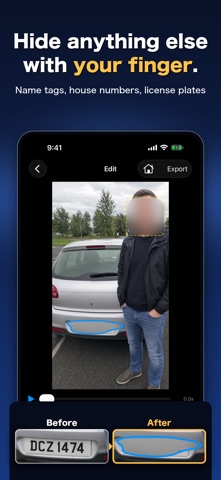
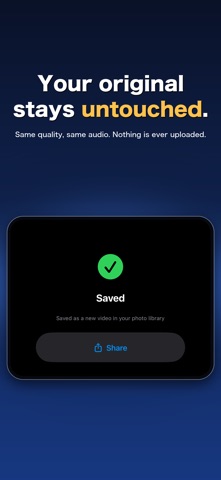
There's a stranger's face in your video. That alone is enough to stop you from sending it to family or posting it anywhere. Auto Face Blur does one thing: it hides faces in videos. Pick a video and every face is found for you, blurred to start. Set the ones you want to show to "Keep" - everyone else stays hidden. The app is free to download, so you can check that faces are actually found in your own video before you decide to pay. ■ Your video never leaves your iPhone Nothing is uploaded. Finding the faces, blurring them, and saving all happen on your device. No account, no sign-up, no data collected. (The app goes online only for a purchase, for restoring a purchase, and if you tap the Terms or Privacy Policy link.) ■ Three steps 1. Pick a video - faces are found automatically 2. Set each face to "Blur" or "Keep" 3. Save There is nothing to learn. If you have never used a video editor, you can still finish in a minute. ■ What you can do - Automatic face detection The whole video is scanned, and moving faces are tracked and blurred. - "Blur" or "Keep", face by face Every face found is listed as a thumbnail. They all start on "Blur," so setting your kid to "Keep" leaves only the people around them hidden. - Hide anything else Trace with your finger or drag a box over name tags, house signs, license plates, or documents. - Decide where a blur ends A blur you add by hand starts where you drew it and runs to the end of the video. To stop it sooner, play up to that point and tap "End here." - Blur or mosaic Two looks to choose from, with a strength slider. - Check it before you save Play the video with the blur already applied, so you can see the result before saving. - Nudge and resize Drag a face frame to move it, pinch to resize. - Undo and redo Step back through your edits one at a time, and forward again if you go too far. ■ Your original video stays untouched The result is added to your photo library as a new video. Your original is never changed or deleted. Resolution stays the same, audio is passed through without re-encoding, and no watermark is added. ■ Free to download, one-time purchase to save The app is free. Automatic face detection, blur and mosaic, the strength slider, tracing extra areas by finger, and previewing the result are all free, with no time or count limits. The only thing you pay for is saving the finished video to your photo library. It is a single one-time purchase - not a subscription. Buy it once and it stays unlocked. If you switch devices, use "Restore Purchase." No ads. No watermarks. Ever. ■ Before you start - iPhone only. - Faces in profile, or faces that are very small in the frame, may not be found automatically. Check the preview before saving and trace over anything that was missed. - If someone leaves the frame and comes back, they may be listed as a separate face. Set each one to "Blur" or "Keep" as you like. - Long videos and 4K videos can take a few minutes to save. - Available in English and Japanese. Terms of Use: https://yuyasato1986.github.io/auto-face-blur/terms.html Privacy Policy: https://yuyasato1986.github.io/auto-face-blur/privacy.html
What's new · 1.1
The Review Faces screen is easier to read. - Each face now has a "Blur" / "Keep" choice instead of an on/off switch, so you can always read which one is selected. - The screen now tells you that every face starts out blurred. Switch only the faces you want to show to "Keep." - New "Blur All" and "Keep All" buttons set every face at once.
Details