

PrepPad
Kevin Ting · Food & Drink
Independent analytics for this App Store listing. AppTracker is not affiliated with Kevin Ting.
Chart standing · US
What changed · US
Listing changes AppTracker has observed for this app in this storefront — new versions, price moves, rating shifts, and store copy.
A new keyboard button. Tap the glass key that sits just above the keyboard to put it away, so the keyboard never gets stuck covering what you are working on.
Screenshots




About
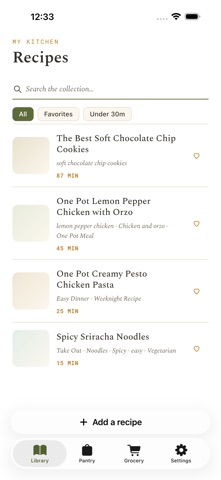
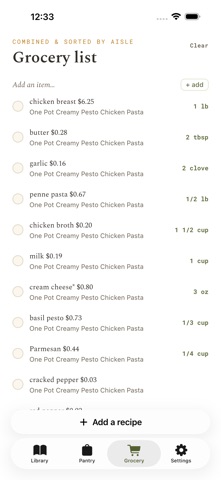
Your recipes are scattered: screenshots you'll never find again, links buried in chats, a card in a drawer. PrepPad turns all of them into one clean, cookable library. CAPTURE FROM ANYWHERE • Screenshots: share or pick them and PrepPad reads the recipe out, ingredients split from steps, ads and comments left behind. On supported devices, on-device AI tidies amounts, groups ingredient sections, and pulls prep times automatically. • Links: paste a recipe URL and get the recipe, not the life story. Bundled steps get split; ingredient sections keep their headings. • Typed: quick manual entry when it's grandma's card. COOK FROM IT • Clean recipe view with scalable servings, grouped ingredients, and optional items badged. • Text size controls and a screen that stays awake while you cook. SHOP FROM IT • One tap sends a recipe to your grocery list. Quantities merge across recipes; pantry staples and optional ingredients stay off it. • A simple pantry that knows what you can already make. PRIVATE BY DESIGN Your recipes, photos, grocery lists, and on-device AI stay private. Ads help support the app and include privacy choices where required. Sign in only if you want your recipe box backed up and synced across devices. Your recipes, finally in one place, and nobody else's business.
What's new · 0.2.5
A new keyboard button. Tap the glass key that sits just above the keyboard to put it away, so the keyboard never gets stuck covering what you are working on.
Details